When QuickBooks won’t let me sign in, the first thing I check is whether the problem comes from my login details, browser settings, account security, or the QuickBooks app itself. Most sign in problems can be fixed with a few simple steps.
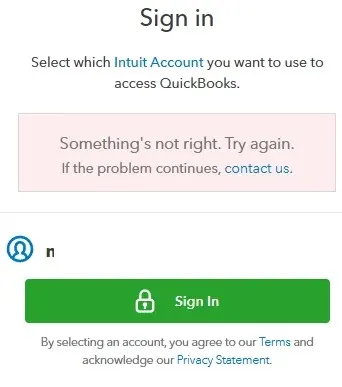
QuickBooks is an important tool for many businesses because it stores financial records, invoices, expenses, and other important accounting information. When I cannot access my account, even a small login issue can interrupt my daily work and delay important tasks.
In my experience helping businesses manage accounting systems, I have seen that QuickBooks sign-in problems are usually caused by common issues such as an incorrect password, outdated browser information, missing verification codes, or account security checks.
This guide explains the most common reasons why QuickBooks won’t let me sign in and the steps I can take to regain access quickly.
If you need help managing your QuickBooks records, bookkeeping tasks, or accounting workflow, our team at Accounts Confidant can also help you keep your financial processes organized and running smoothly.
Quick Fixes When QuickBooks Won’t Let Me Sign In
If QuickBooks won’t let me sign in, I start with a few basic checks before trying advanced solutions. Simple problems with my browser, internet connection, or saved login information are often the reason behind login failures. Here are the first steps I recommend:
Solution 1. Check My Internet Connection
A stable internet connection is required for QuickBooks Online to complete the sign in process. If my connection is slow or keeps dropping, QuickBooks may fail to load the login page properly.
I first check whether other websites are working correctly. If they are also loading slowly, the issue may be with my internet connection instead of QuickBooks.
Solution 2. Try Signing In Through a Private Browser Window
Using a private or incognito browser window helps me check if saved cookies or browser data are causing the problem.
Old login information stored in my browser can sometimes create conflicts when QuickBooks tries to verify my account.
I open a private browser window, visit the QuickBooks login page, and try signing in again.
Solution 3. Clear Browser Cookies and Cache
Clearing browser data can solve many QuickBooks sign in problems.
My browser stores temporary files to help websites load faster, but outdated files can sometimes prevent QuickBooks from working correctly.
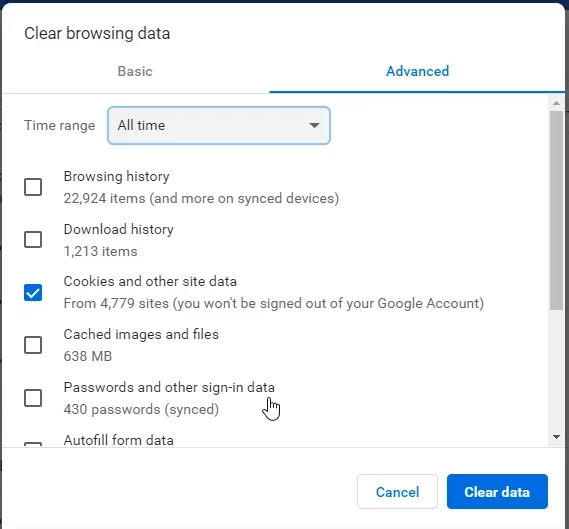
I clear my browser cache, restart the browser, and try logging in again.
Solution 4. Check QuickBooks Service Status
Sometimes the problem is not with my account or device. QuickBooks services can experience temporary interruptions that affect login access.
Before changing settings on my computer, I check the official QuickBooks status page to confirm whether there is an active service issue.
Why Won’t QuickBooks Let Me Sign In?
QuickBooks usually will not let me sign in because of incorrect login information, account security checks, browser problems, or issues with the QuickBooks application.
Finding the exact cause helps me choose the right solution instead of trying random fixes.
The most common causes include:
QuickBooks Says Incorrect Username or Password
If QuickBooks says my username or password is incorrect, the first step is to confirm that I am using the correct Intuit account details.
Many users have more than one email address or Intuit account, especially if they have worked with different businesses or subscriptions.
I check the following:
- I am using the correct email address linked to my QuickBooks account
- My keyboard is entering the password correctly
- Caps Lock is turned off
- My browser is not filling an old saved password automatically
If I am still unable to access my account, I reset my password through the Intuit account recovery process.
QuickBooks Won’t Accept My Password
QuickBooks may reject my password even when I believe I entered it correctly. This usually happens because my password has changed, my browser saved outdated information, or my account requires additional verification.
I follow these steps:
- Type my password manually instead of using autofill
- Confirm that I am using the latest password
- Reset my password if QuickBooks continues rejecting it
- Sign in again after updating my account login details
Keeping my login information updated helps prevent repeated access problems in the future.
QuickBooks Sign In Verification Code Not Received
If the QuickBooks sign-in verification code is not received, I check my email address, phone number, and message filters before requesting another code.
Verification codes are an important security step that protects my accounting information from unauthorized access.
Common reasons I may not receive the code include:
- The code was sent to an old phone number
- The email went into my spam folder
- My internet connection delayed the message
- I requested too many codes within a short time
I avoid requesting multiple codes repeatedly because this can create additional delays. Instead, I wait a few minutes, check my contact details, and request a new verification code once.
For additional account security guidance, I can also review the official QuickBooks support resources from Intuit.
QuickBooks Account Locked and I Can’t Sign In
If my QuickBooks account is locked and I cannot sign in, the problem is usually related to too many failed login attempts, security checks, or unusual account activity. The best solution is to recover my account instead of repeatedly trying different passwords.
QuickBooks protects financial information with security measures that can temporarily block access when it detects possible risks.
Why Does QuickBooks Lock My Account?
QuickBooks may lock my account for several reasons, including:
- Entering the wrong password many times
- Trying to sign in from an unfamiliar device or location
- Multiple failed verification attempts
- Security activity that requires additional confirmation
Although this can be frustrating, the account lock is designed to protect my business information.
How Do I Unlock My QuickBooks Account?
If I cannot access my QuickBooks account because it is locked, I follow these steps:
Reset My QuickBooks Password
Resetting my password is one of the fastest ways to regain access.
I use the password recovery option, verify my identity, and create a new password.
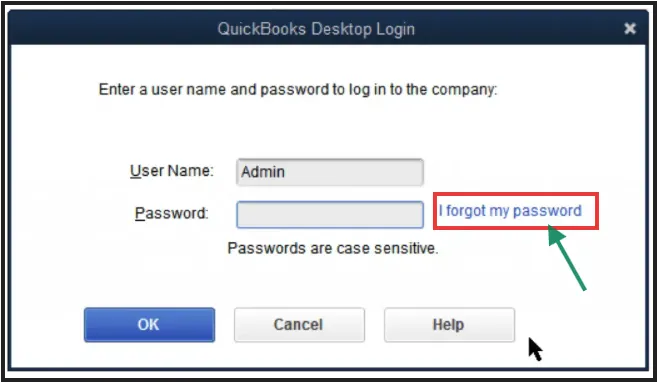
After updating my password, I try signing in again with the new details.
Wait Before Trying Again
If I have entered incorrect information many times, QuickBooks may need some time before allowing another login attempt.
Instead of continuing to enter passwords, I wait and try again later.
Confirm My Account Recovery Information
I check that my recovery email address and phone number are correct.
Having updated recovery details makes future login problems much easier to solve.
If I manage QuickBooks for a business with multiple users, I also make sure other team members have their own login access instead of sharing one account.
QuickBooks Won’t Let Me Log In on Mobile App
If QuickBooks won’t let me log in on the mobile app, the issue is often caused by an outdated app version, saved app data, or connection problems.
The QuickBooks mobile app needs a stable connection and updated software to communicate correctly with my account.
Update the QuickBooks Mobile App
An outdated app version may stop working properly after QuickBooks releases updates.
I check my phone’s app store and install any available QuickBooks updates.
Keeping the app updated helps prevent:
- Login failures
- App crashes
- Loading problems
- Security issues
Restart My Phone and Try Again
A simple restart can fix temporary problems with my mobile device.
I close the QuickBooks app completely, restart my phone, and attempt to sign in again.
This clears temporary system problems that may affect the app.
Clear QuickBooks App Data
If the app keeps rejecting my login, stored app information may be causing the problem.
On Android devices, I can clear the app cache from my phone settings.
On iPhone devices, reinstalling the app can remove old stored data.
Before removing the app, I make sure I know my correct QuickBooks login details.
Check My Mobile Internet Connection
QuickBooks mobile login problems can happen when my connection is unstable.
I switch between WiFi and mobile data to check whether the connection is causing the issue.
QuickBooks Sign In Not Working on Browser
If QuickBooks sign in is not working in my browser, the problem is often caused by cookies, extensions, browser settings, or saved login information.
QuickBooks Online depends on browser settings to complete the authentication process.
Disable Browser Extensions
Some browser extensions can block parts of the QuickBooks login process.
Security extensions, ad blockers, and privacy tools may prevent required scripts from loading.
I temporarily disable extensions and try signing in again.
If QuickBooks works after disabling extensions, I know one of those tools was causing the problem.
Try a Different Browser
Sometimes the issue is specific to my current browser.
I try another updated browser to check whether the problem continues.
For example, if QuickBooks does not work in Chrome, I test another supported browser.
This helps me identify whether the issue is with QuickBooks or my browser settings.
Turn Off VPN Temporarily
A VPN can sometimes affect login security checks because it changes my location and network details.
If I use a VPN, I temporarily disable it and try signing in again.
After confirming the issue, I can adjust my VPN settings if needed.
QuickBooks Login Keeps Loading or Shows a Blank Screen
If QuickBooks keeps loading after I enter my login details, the problem is usually related to browser data, extensions, or connection issues.
Common signs include:
- A spinning loading icon that never finishes
- A blank white screen
- The login page returning again and again
Fix QuickBooks Login Loop Problems
When QuickBooks sends me back to the login page repeatedly, I try these solutions:
- Open QuickBooks in a private browser window
- Clear cookies and cache
- Update my browser
- Disable browser extensions
- Restart my device
A login loop often happens because the browser cannot properly save or verify my login session.
QuickBooks Desktop Won’t Let Me Sign In
If QuickBooks Desktop won’t let me sign in, the problem may be different from QuickBooks Online issues.
Desktop users may experience problems related to the application, updates, company files, or Intuit account connections.
Update QuickBooks Desktop
Using an older version of QuickBooks Desktop can create login and connection problems.
I check for available updates and install the latest version.
Updates often include security improvements and fixes for connection issues.
Repair QuickBooks Desktop Installation
If QuickBooks Desktop freezes during login or will not open correctly, the installation files may be damaged.
Repairing the QuickBooks installation can help restore normal operation.
Check Intuit Account Connection
QuickBooks Desktop may require my Intuit account to verify access.
If the account connection fails, I sign out and reconnect my Intuit account inside QuickBooks Desktop.
How QuickBooks Login Problems Affect My Business
When I cannot access QuickBooks, the problem is not only technical. It can affect my daily business operations.
A blocked QuickBooks account can delay:
- Invoice creation
- Expense tracking
- Financial reports
- Payroll preparation
- Tax preparation tasks
For small businesses, even a short login problem can create unnecessary stress.
This is why I recommend keeping my accounting system organized, maintaining updated login information, and having professional bookkeeping support when needed.
At Accounts Confidant, we help businesses manage their bookkeeping processes, maintain accurate financial records, and reduce the stress of handling accounting tasks alone.
Case Study: Helping a Business Recover From a QuickBooks Login Problem
A small business owner contacted our team after being unable to access their QuickBooks account before an important reporting deadline.
The owner had tried multiple passwords but QuickBooks continued showing an incorrect login message. The problem became more complicated because the verification code was being sent to an old phone number.
We first reviewed the account access issue and identified that the login details were correct. The main problem was outdated recovery information.
After updating the account recovery details and completing the verification process, the owner regained access to QuickBooks.
The experience showed that many login problems are not caused by serious technical failures. Often, the issue comes from outdated account information or security settings that need attention.
When Should I Get Professional QuickBooks Help?
I can usually fix simple QuickBooks login problems myself. However, professional help may be useful when the issue affects my accounting work or business operations.
I consider getting support when:
- I cannot recover my account
- Multiple users cannot access QuickBooks
- Important financial records are unavailable
- Login problems keep happening repeatedly
- I need help managing my bookkeeping system
Working with an experienced accounting support team can help me spend less time troubleshooting and more time focusing on my business.
How to Prevent QuickBooks Sign In Problems in the Future
The best way to avoid QuickBooks login problems is to keep my account information updated, use secure login practices, and maintain my devices properly. Small steps can prevent many common access issues.
QuickBooks stores important financial information, so keeping my account secure should always be a priority.
Keep My QuickBooks Account Information Updated
I regularly check that my recovery email address and phone number are correct.
If I change my phone number or lose access to my email account, I update my Intuit account information immediately.
Having the correct recovery details helps me regain access faster if I ever forget my password or do not receive a verification code.
Use a Strong and Secure Password
A strong password reduces the risk of unauthorized access and helps protect my business financial information.
I avoid:
- Using simple passwords
- Reusing the same password across multiple websites
- Sharing my login details with other people
For businesses with multiple employees, I create separate user accounts instead of allowing everyone to use the same QuickBooks login.
This improves security and makes it easier to control access.
Keep My Browser and QuickBooks App Updated
Outdated software can create compatibility problems.
I regularly update:
- My internet browser
- QuickBooks mobile app
- QuickBooks Desktop software
Updates often include important security improvements and fixes that help prevent login problems.
Avoid Too Many Failed Login Attempts
Repeatedly entering incorrect login details can trigger account security restrictions.
If I cannot remember my password, I use the password recovery option instead of guessing multiple times.
This helps prevent temporary account locks.
Final Thoughts
When QuickBooks won’t let me sign in, the problem is usually caused by something simple such as incorrect login details, outdated browser data, missing verification codes, or account security settings.
I start with basic solutions like checking my password, clearing browser data, updating my app, and confirming my account recovery information.
If the problem continues, I look deeper into account access settings, application issues, or professional support options.
QuickBooks is an important part of many business operations. Having reliable access to my accounting system helps me keep track of expenses, manage reports, and make better financial decisions.
At Accounts Confidant, we understand that accounting software problems can interrupt important business tasks. Our team helps businesses maintain organized bookkeeping systems, manage financial records, and get better control over their accounting processes.
FAQ’s
Why Won’t QuickBooks Let Me Sign In?
QuickBooks usually will not let me sign in because of incorrect login details, browser problems, verification issues, account security checks, or problems with the QuickBooks application.
Why Does QuickBooks Say Incorrect Username or Password?
QuickBooks says incorrect username or password when the login details entered do not match the Intuit account information.
What Should I Do If QuickBooks Won’t Accept My Password?
If QuickBooks will not accept my password, I first confirm that I am using the correct account email and typing the password correctly.
If the problem continues, I reset my password through Intuit account recovery and try signing in again.
Why Did I Not Receive My QuickBooks Verification Code?
I may not receive my QuickBooks verification code because of delayed messages, incorrect recovery information, spam filters, or too many verification requests.
How Do I Fix a QuickBooks Account That Is Locked?
If my QuickBooks account is locked, I reset my password and complete the account verification process.
Why Won’t QuickBooks Let Me Log In on My Mobile App?
QuickBooks mobile login problems are usually caused by outdated apps, stored app data, weak internet connections, or incorrect login information.
Can Browser Problems Stop QuickBooks From Working?
Yes, browser problems can prevent QuickBooks Online from completing the login process.