
If the primary administrator has left your company, cannot sign in, or is no longer available, you can request to be the primary admin or contact in QuickBooks through Intuit’s Business Change Request process.
The request applies to QuickBooks Online and QuickBooks Desktop. You must provide proof of identity and documents that establish your ownership of the business or authority to manage its account. Intuit reviews this information before assigning the role.
However, you don’t need a Business Change Request if the current primary admin can sign in and transfer the role directly.
The steps below explain how to choose the correct process, prepare the required documents, submit your request, and handle a rejected or pending application.
When should you request primary admin access in QuickBooks?
You should request primary admin access when the current administrator or primary contact cannot complete the transfer, and you have the authority to take over the role.
This often happens after a business sale, an employee’s departure, or a change in accounting firms. For example, a former bookkeeper may have created the QuickBooks account using their email address. Even if you can access the company, you may not have permission to change its primary administrator.
First, identify which type of access you need.
| Your situation | Correct action |
| Current primary admin can sign in | Ask them to transfer the role |
| Former admin has left and cannot be contacted | Submit a Business Change Request |
| You forgot your own Intuit password | Recover your Intuit account |
| You can open a QuickBooks Desktop company file but cannot manage Intuit Account users | Check the Intuit Account primary admin role |
| QuickBooks Online Simple Start does not offer the transfer option | Contact Intuit for the supported process |
| Intuit rejected your previous request | Review and correct the rejection reason |
If you cannot sign in to your own account, try Intuit Account Recovery first. Password recovery restores your sign-in access; it does not give you another person’s primary admin role.
Which QuickBooks Desktop administrator role do you need?
QuickBooks Desktop has several administrator roles that are easy to confuse.
| Role | What it controls |
| Company-file Admin | Access and permissions inside the local QuickBooks company file |
| Company primary admin/contact | Account administration, contacts, and applicable billing settings through CAMPs |
| Intuit Account primary admin | Intuit Account users and permissions for supported connected services, including payroll and payments |
For example, you might know the Admin password for a QuickBooks Desktop company file but still be unable to change users associated with the Intuit Account. Resetting the company-file password will not assign you the Intuit Account primary admin role.
Intuit treats these as separate administrative responsibilities. The company primary admin and Intuit Account primary admin can be different people.
According to Intuit’s QuickBooks Desktop admin guide, there can be only one primary admin per company or Intuit Account.
What documents are required to request primary admin access?
Intuit requires government-issued identification and supporting business documents. The paperwork must establish your identity and help Intuit confirm who owns or is authorized to manage the business.
Before opening the form, prepare:
- A driver’s license, passport, or another government-issued ID.
- Business documents showing the relevant owner names and titles.
- Contact information for other owners or authorized parties, if Intuit requires their verification.
- Additional authorization documents for special circumstances, such as a deceased owner.
The business documents depend on your company structure.
| Business type | Documents listed by Intuit |
| Sole proprietorship | Business license |
| Corporation or S corporation | Articles of organization, corporate bylaws, or shareholders’ agreement |
| Limited liability company (LLC) | Articles of organization or operating agreement |
| Limited partnership | Certificate of limited partnership or limited liability partnership |
| Nonprofit organization | Board of trustees’ meeting minutes naming the new primary admin; if unavailable, articles of incorporation or nonprofit bylaws |
| Other business structures | Articles of organization, articles of incorporation, corporate bylaws, or shareholders’ agreement, as applicable |
These are the document types listed in Intuit’s primary admin request instructions. Depending on your circumstances, Intuit may require additional verification.
A document showing only the registered company name may not establish who can authorize the change. Check that the relevant owner names and titles are included.
What if the previous business owner has died?
Intuit requires a notarized document identifying the executor of the deceased owner’s estate. The document must also state that you are authorized to become the primary admin.
Prepare this authorization before submitting the request. Do not assume that a death certificate alone will meet Intuit’s requirements.
What if the company is a nonprofit?
For nonprofits, Intuit lists board of trustees’ meeting minutes that identify the intended new primary admin.
If those minutes are unavailable, articles of incorporation or nonprofit corporate bylaws may be submitted under Intuit’s guidance.
For example, if a former treasurer still holds the primary admin role, the organization should provide applicable records that support the new administrator’s authority. Being the current bookkeeper does not automatically establish that authority.
How to submit a QuickBooks Business Change Request
You can request primary admin or contact access through Intuit’s official Business Change Request portal.
Before starting, make sure you have an Intuit account and the documents required for your business.
Step 1: Open the Business Change Request form
- Visit the Intuit Business Change Request form.
- Sign in with your Intuit account.
- Follow the prompts to start the request.
- If you do not have an Intuit account, create one through Intuit’s official sign-in service.
The form may redirect you to the Intuit sign-in page before you can continue. You should use your own account rather than the former administrator’s credentials.
Step 2: Select the correct QuickBooks company
After opening the request form:
- Select the company for which you want the primary admin or contact role.
- Answer the questions in the available dropdown menus.
- Select Continue.
- Review the business details.
- Select Continue again if the information is correct.
If the company is wrong, select This is not the right business and return to the company-selection step.
This matters when your Intuit login is linked to more than one company. The request must identify the business you are authorized to manage.
Step 3: Review your personal details
Check the personal information displayed in the form, then select Continue.
On the summary page, review the request before proceeding.
Make sure the company and requester details are correct. The exact questions may vary depending on the information Intuit needs for your request.
Step 4: Submit the request
Select Submit request after reviewing the summary.
If other owners or authorized parties must verify the change, Intuit sends them a separate email notification.
Your request is now submitted for review. The primary admin role will not change until Intuit approves it.
Step 5: Complete any required owner verification
If your request requires approval or documentation from other owners, Intuit sends an email from no_response@intuit.com.
The recipients must follow the verification link to:
- Verify their identity.
- Upload the required supporting documents.
Intuit gives other owners or authorized parties 14 business days to complete the required verification.
If they do not complete it within that period, the system automatically declines the request, and you must submit a new one.
The 14-business-day deadline is for owner verification. It does not mean Intuit guarantees approval within 14 business days.
How can you check the status of a QuickBooks primary admin request?
Intuit sends request updates to the email address provided during submission. You can also check the status online.
To do this, open the official primary admin request guide and select Check the status of your request under Step 4.
This link directs you to Intuit’s sign-in process for the Business Change Request service.
After signing in, you can check whether other owners or authorized parties still need to complete their verification.
If your request is approved
Intuit will notify you that the primary admin or contact role has been assigned.
Sign in with the email address associated with the approved request. Open the correct QuickBooks company and verify that you can access the account-management functions relevant to your role. 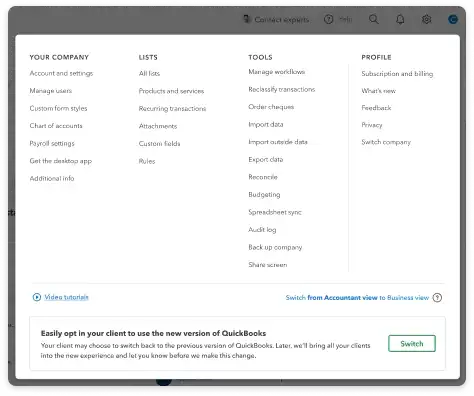
For QuickBooks Online, check your role under Settings → Manage users. For QuickBooks Desktop, check the applicable administration settings in CAMPs or Intuit Account User Management.
If your request is rejected
Intuit sends a notification explaining why it did not approve the request and what you may need to correct.
The reason might involve a missing document, an unreadable upload, or paperwork that does not meet the approval requirements.
Read the rejection message before starting another request. If Intuit asks for a new submission, correct the identified problem first.
Why was your QuickBooks primary admin request denied or delayed?
A request may be delayed when Intuit needs more documentation or another authorized person has not completed verification. A rejection requires you to review the reason given by Intuit rather than repeat the same submission.
The business documents do not prove your authority
Check whether the document identifies the relevant business owners and their titles.
For example, an LLC’s registration details may confirm its legal name without showing whether the requester is authorized to manage the QuickBooks account.
If Intuit requires an operating agreement or other ownership evidence, submit the relevant document according to the portal’s instructions.
Do not modify official records to make them appear to authorize a transfer.
Another owner has not completed verification
Check whether the request status shows pending owner verification.
Ask the relevant person to check their inbox and spam folder for Intuit’s email. They must complete the required steps within the 14-business-day verification period.
If the request has already been automatically declined because the deadline passed, submit a new request.
Your uploaded ID is unclear
If Intuit identifies a problem with your ID, check that the entire document is visible and readable.
Avoid cropped images, glare, and blurred information. Submit an accepted ID type according to Intuit’s instructions.
A clearer image may resolve a document-quality problem, but it will not resolve an ownership or authorization issue.
The request is pending without an explanation
Open the official request status page and look for outstanding verification.
If the status does not explain the delay, contact Intuit through its official support channels. Include the affected QuickBooks product, company details needed to identify the account, and any request reference number provided.
Do not send copies of identity documents through an unverified support channel.
How to change the primary admin when the current administrator is available
When the existing primary admin can sign in, you can usually transfer the role without submitting a Business Change Request.
The steps differ between QuickBooks Online and QuickBooks Desktop.
Change primary admin in QuickBooks Online
The current primary admin must initiate the transfer. The incoming person must already be added as a user with the Admin role.
Follow these steps:
- Sign in to QuickBooks Online as the current primary admin.
- Select the Settings gear icon.
- Open Manage users.
- Find the person who will become the new primary admin.
- Check the Role column. If the person is not an Admin, select Edit and change their role.
- Select Actions → Make primary admin.
- Select Change primary admin to confirm.
- Sign out of QuickBooks.
Under Intuit’s current QuickBooks Online instructions, the new primary admin does not need to accept another transfer invitation after this standard change.
QuickBooks Online Simple Start: Intuit directs subscribers to contact support to transfer the primary admin role. The normal self-service transfer option may not be available.
You can review the procedure in Intuit’s QuickBooks Online primary admin transfer guide.
What if Make primary admin is missing?
First, confirm that you are signed in as the current primary admin. A company admin cannot simply assign themselves the primary role through the standard transfer procedure.
Then check whether the intended replacement has the Admin role.
If those conditions are met but Make primary admin is still missing, check whether you use Simple Start or another account configuration requiring Intuit’s help.
If the current primary admin is unavailable, you must follow the Business Change Request process instead.
Change the primary company contact in QuickBooks Desktop
For QuickBooks Desktop, the current authorized primary admin can change the company primary contact through the Customer Account Management Portal (CAMPs).
- Open Intuit CAMPs.
- Sign in using the registered Intuit account.
- Locate Primary Contact.
- Select Change.
- Choose the new primary contact from the available contacts.
- Select Save and Close.
If the new contact is not listed, the current admin must add or invite that person first. The invited user may need to accept the invitation before being eligible for selection.
You can also reach the account portal from supported QuickBooks Desktop installations through Company → My Company → Manage Your Account.
Transfer the Intuit Account primary admin in QuickBooks Desktop
If you need to change the administrator responsible for Intuit Account users and supported connected services, use Intuit Account User Management.
The incoming person must already have the secondary admin role.
- Open QuickBooks Desktop.
- Select Company → Users → Intuit Account User Management.
- Find the secondary admin who will receive the primary role.
- Select Edit → Change Primary admin.
- Enter the verification code sent to the current primary admin’s phone.
- Complete the transfer process.
Intuit sends a transfer email to the current primary admin and the secondary admin.
The secondary admin must accept the transfer. Once accepted, the incoming person becomes the primary admin, and the former primary admin becomes a secondary admin.
These steps are documented in Intuit’s QuickBooks Desktop transfer instructions.
If you cannot access the local company file because of a forgotten password, that is a separate issue. See our guide on QuickBooks administrator password reset problems.
Resetting the company-file password does not transfer the Intuit Account primary admin role.
Does changing the primary admin affect QuickBooks Payroll or other Intuit services?
Changing the main administrator does not necessarily change the person recorded as the principal officer or account contact for every connected service.
QuickBooks Payroll and Payments
The QuickBooks primary admin and payroll principal officer have different responsibilities.
If you need to change the payroll principal officer, use the process for your payroll service. Intuit provides separate procedures for QuickBooks Desktop Payroll Assisted, Basic, and Enhanced, as well as applicable online payroll services.
QuickBooks Payments may also require a separate principal-information update through the Merchant Service Center.
Refer to Intuit’s payroll principal and contact instructions before changing information tied to payroll or payment processing.
If QuickBooks Payroll also displays an inactive subscription warning, check that issue separately using our guide to fixing a QuickBooks Payroll subscription that shows inactive.
QuickBooks Time
QuickBooks Time has its own primary admin role.
When the existing primary admin is available, the role can be transferred to an eligible team member. If the new administrator is not already a team member, they must first be added.
If the existing administrator is unavailable, Intuit directs users to its primary admin request process.
For accounts connected to QuickBooks Online or Online Payroll, follow the applicable QuickBooks Online instructions. See Intuit’s QuickBooks Time admin guide.
QuickBooks Online Accountant and Intuit Accountant Suite
An accounting firm may hold the primary admin role for a client’s QuickBooks Online company.
If the firm is available and has the required permissions, it can transfer the role back to the client.
Under Intuit’s documented client-handoff process, the authorized firm administrator opens the client’s QuickBooks Online company through Intuit Accountant Suite, goes to Settings → Manage users, selects the client, and chooses Change primary admin.
The client receives an email and must accept the role.
This email-acceptance requirement is specific to that accountant-to-client process. It should not be confused with the standard QuickBooks Online admin transfer described earlier.
See Intuit’s instructions for transferring primary admin access back to a client.
What should you do once primary admin access is restored?
After approval, confirm that you have access to the correct company and account settings. Check the existing administrators, authorized users, and contact details before making changes.
If your business has also changed payroll principals or payment-account owners, complete any required separate updates.
When the previous primary admin is unavailable, the next step is to submit the official Business Change Request with valid documents. Avoid changing company-file credentials or account settings that do not address the ownership request.
Frequently asked questions
Can two people be primary admins in the same QuickBooks company?
No, Intuit allows one primary admin per company or Intuit Account. Other eligible users can have administrative permissions, but only one person holds the primary admin role in that account.
Can I request primary admin access without the previous admin’s email?
Yes, you can use Intuit’s Business Change Request process when the previous primary admin is unavailable. Intuit must verify your identity and business authority, and it may require verification from other owners or authorized parties. Approval is not automatic.
How long does Intuit take to approve a primary admin request?
Intuit does not publish a universal approval turnaround in its primary admin request instructions. The 14-business-day period applies to required verification by other owners or authorized parties, not to the entire review. Check your request status for updates.
Do I need the QuickBooks company-file Admin password to request the Intuit Account primary admin role?
Not as a stated prerequisite for Intuit’s formal Business Change Request. The company-file Admin password and Intuit Account primary admin permissions are separate. You must provide the identity and business-authorization evidence requested by Intuit.
Can one Business Change Request cover multiple QuickBooks companies?
Intuit’s documented process asks you to select the company for which you need access. The published guide does not confirm that one request can transfer primary admin rights across several companies. Check each company’s current administrator and follow the portal’s instructions.
What if the former accountant refuses to transfer primary admin access?
If the accountant cannot complete the transfer, an authorized business owner or representative can use Intuit’s formal request process. Be prepared to prove your authority over the business and complete any additional verification required by Intuit.
