If QuickBooks displays “Unable to reset QuickBooks administrator password at this time,” you may be locked out of your company file even after selecting the password recovery option. Some users also see a message asking them to check their internet connection and try again.
The error can occur when QuickBooks cannot verify your registered information, send a recovery token, or start the password reset process. An unsupported recovery tool or an unresponsive password field can also prevent you from signing in.
The right solution depends on where the reset fails. This guide explains how to troubleshoot the error, fix a QuickBooks password reset tool that is not working, and identify the available recovery options when Intuit’s standard methods fail.
Why Does QuickBooks Say “Unable to Reset the QuickBooks Administrator Password at This Time”?
The message “Unable to reset the QuickBooks administrator password at this time” means QuickBooks could not complete the recovery process. However, the error alone does not tell you what caused the failure.
Possible reasons include:
- Incorrect registration details: The license number, registered email, phone number, or ZIP code doesn’t match Intuit’s records.
- Email verification problems: The recovery email is inaccessible, the token is missing, or the entered code isn’t accepted.
- Connection problems: QuickBooks cannot complete the online verification request.
- Unsupported password reset utility: The Automated Password Reset Tool is incompatible with the company file’s QuickBooks version.
- Application errors: QuickBooks freezes, the password field becomes grayed out, or the reset window doesn’t open.
- Discontinued software: An older QuickBooks release may have limited access to connected recovery services.
For example, someone using QuickBooks Desktop 2019 may receive a registration mismatch error after entering the wrong business phone number. Another user running QuickBooks Desktop 2020 may be unable to open the password recovery screen at all.
These problems require different solutions.
Identify Where the Password Reset Fails
Before changing any settings, use the following table to narrow down the problem.
| What happens? | What to check first |
| QuickBooks asks you to check your internet connection | Internet connectivity and recovery service availability |
| Registration details are rejected | Product information in CAMPS |
| Password reset email or token is not received | Registered recovery email and spam folder |
| “QuickBooks can’t start password reset” appears | QuickBooks version and recovery feature availability |
| “I forgot my password” opens a Help window | Whether you’re using an administrator account and whether the recovery screen works |
| Automated Password Reset Tool fails or closes | Version compatibility and token verification |
| Password field is grayed out | QuickBooks application responsiveness |
| Password is rejected after restoring a backup | Selected company file and administrator credentials |
How to Fix Unable to Reset QuickBooks Administrator Password
Start with the fix that matches your error. You don’t need to reinstall QuickBooks, repair the company file, or run every Tool Hub utility to troubleshoot a failed password reset.
Solution 1: Check Your Internet Connection and Retry the Reset
Some users report an error similar to:
QuickBooks is unable to reset the Administrator password at this time. Please check your internet connection and try again.
Although the message mentions internet connectivity, it doesn’t always mean your computer is offline.
To check:
- Close the QuickBooks password recovery window.
- Open a browser and visit a trusted website.
- Try accessing the Intuit Customer Account Management Portal.
- Confirm that the website loads and your connection works.
- Close and reopen QuickBooks Desktop.
- Open your company file and select I forgot my password again.
If websites load normally but QuickBooks continues displaying the connection warning, the recovery request may be failing for another reason.
Check your QuickBooks version and whether it is supported. Some older releases can have problems accessing online recovery features.
Do not disable your firewall or antivirus software merely because QuickBooks displays a connection error. First, establish whether a particular security setting is blocking the recovery request.
Solution 2: Use the Correct Administrator Password Reset Method
QuickBooks Desktop administrator password recovery differs by version. Before using a reset tool, identify your installed product.
If QuickBooks is accessible, press F2 to open the Product Information window. In some versions, you can also use F2 from the company file login screen to view the license number.
Alternatively, check your registered product in CAMPS.
| QuickBooks Desktop version | Recovery method |
| QuickBooks Desktop 2020 and newer | Built-in I forgot my password feature |
| QuickBooks Desktop 2019 and earlier | Built-in recovery using registered product information |
| Compatible older Windows versions | Automated Password Reset Tool, where supported |
| QuickBooks Desktop for Mac | Recovery through the lock icon and registered email |
Reset the Admin Password in QuickBooks Desktop 2020 or Newer
Intuit directs QuickBooks Desktop 2020 and newer users to the password recovery feature inside QuickBooks.
Follow these steps:
- Open QuickBooks Desktop and select your company file.
- On the sign-in screen, click I forgot my password.
- Select an available registered email address.
- Click Next to request a verification token.
- Open the email from Intuit.
- Enter the token in QuickBooks.
- Follow the prompts to create a new administrator password.
If your email isn’t shown, select Don’t see your email in the list above? and follow the available recovery instructions.
If the recovery window doesn’t open or QuickBooks rejects the token, continue with the relevant solutions below.
Reset the Admin Password in QuickBooks Desktop 2019 or Earlier
Older QuickBooks Desktop versions use a recovery form that asks for product registration details.
- Open QuickBooks Desktop.
- On the company file login screen, select I forgot my password.
- Enter your QuickBooks license number.
- Provide the name, email address, phone number, and ZIP code associated with the product registration.
- Click OK.
- If Intuit verifies the information, retrieve the code sent to the primary email registered in CAMPS.
- Enter the code and follow the instructions to create a new password.
You can find these procedures in Intuit’s official QuickBooks Desktop password reset guide.
If the form rejects your information, check the registration details rather than repeating the same entries.
Solution 3: Verify Your CAMPS Details Before Using the Reset Tool
QuickBooks may refuse to reset the administrator password if the information entered during verification doesn’t match Intuit’s records.
The Customer Account Management Portal (CAMPS) stores details associated with your registered QuickBooks products.
To verify them:
- Visit CAMPS.
- Sign in to the Intuit account associated with the QuickBooks license.
- Open Products and Services.
- Check the product license number.
- Verify the authorized contact’s name and email address.
- Review the primary mailing ZIP code and business phone number under the account details.
- Compare this information with the fields requested during password recovery.
For the Automated Password Reset Tool, Intuit specifically requires the entered information to match its registration records.
For example, suppose a company originally purchased QuickBooks using its accountant’s email address and office phone number. The business owner later attempts recovery using a different email and phone number.
Even if the owner is authorized to access the accounting records, those details may not match the product registration.
Use the registered information associated with the license rather than assuming the contact details inside the company file are the same.
If you cannot sign in to the registered Intuit account, follow the appropriate Intuit Account Recovery process.
Recovering an Intuit account password is different from resetting the administrator password protecting a QuickBooks Desktop company file.
Solution 4: Fix QuickBooks Password Reset Email or Token Not Received
If your QuickBooks password reset email is not received, first confirm which email address the recovery process uses.
The password recovery message may have been sent to the product’s registered primary contact rather than your current business email.
What to Do When the Password Reset Email/Token Is Not Received
- Check the inbox of the email address selected during recovery.
- Look in the spam and junk folders.
- Search for recent messages from Intuit.
- Confirm that the recovery email is associated with the registered product.
- If a resend option appears, request another token.
- Enter the code from the current recovery attempt.
Intuit’s account recovery documentation identifies do_not_reply@intuit.com as an address users can add to their approved sender list when Intuit verification emails are being filtered.
However, the sender and delivery process may differ between account verification and Desktop company-file recovery. Always verify the message before opening links or entering credentials.
What If the Password Reset Token Is Rejected?
For Intuit account sign-in verification, Intuit states that only the most recently issued code works.
The separate Automated Password Reset Tool is designed for one-time use. Starting another tool-based recovery attempt requires new verification and a new token.
If a Desktop recovery token is rejected:
- Confirm that you’re entering the code in the correct recovery window.
- Check whether you requested another token after receiving the first.
- Use the code associated with the current attempt.
- Verify that the selected product and account information are correct.
- Don’t assume the same token rules apply to every QuickBooks version or recovery screen.
If the registered email is inaccessible, use Intuit’s official account recovery options. Requesting more tokens won’t help if you cannot access the mailbox receiving them.
Solution 5: Fix “QuickBooks Can’t Start Password Reset”
Some users encounter the message:
QuickBooks can’t start password reset. Try again in some time.
This error occurs before the normal password recovery process can begin.
A user running QuickBooks Desktop Pro 2020 reported this issue in an Intuit Community discussion. An Intuit representative explained that unsupported versions may have trouble communicating with recovery services.
That explanation may apply to some older versions, but it doesn’t establish the cause of every password-reset startup error.
Try these checks:
- Close QuickBooks Desktop.
- Confirm that your computer has a working internet connection.
- Restart QuickBooks.
- Identify the installed QuickBooks version.
- Select I forgot my password again.
- Check whether the recovery screen opens or the error appears immediately.
If the error continues, determine whether your Desktop release still receives Intuit support.
For an unsupported version, contact Intuit to ask which recovery options remain available.
Avoid repairing or rebuilding the company file solely because the password reset window fails. The error doesn’t prove that your accounting data is damaged.
Solution 6: Fix “I Forgot My Password” Opening a Help Window
In some QuickBooks Desktop cases, selecting I forgot my password opens a Help window instead of the expected recovery screen.
This behavior has been described in Intuit Community discussions, including a QuickBooks Desktop 2020 case where a user couldn’t complete administrator recovery.
A similar report involved a regular company-file user rather than an administrator. Intuit explained that the company-file administrator must reset ordinary users’ passwords.
If the Help window opens:
- Check the username displayed on the QuickBooks login screen.
- Determine whether you’re signing in as the company-file administrator or another user.
- If you’re a regular user, ask the administrator to reset your password through QuickBooks user-management settings.
- If you’re the administrator, confirm your QuickBooks Desktop version.
- Close the Help window and retry the supported administrator recovery option.
For regular users, the administrator can sign in and navigate to:
Company → Set Up Users and Passwords → Set Up Users
The administrator can then select the user, choose Edit User, and change the password.
If you’re the company-file administrator and the recovery link repeatedly opens Help without offering verification, the normal recovery process isn’t working.
Record the behavior and contact Intuit about the available recovery options. Don’t assume that reinstalling the program will correct it.
Solution 7: Fix a Grayed-Out or Unresponsive QuickBooks Password Field
Sometimes the administrator password cannot be entered because the login field is grayed out or QuickBooks stops responding.
This is different from QuickBooks rejecting a password.
An Intuit Community user reported that the password field in QuickBooks Desktop Contractor 2023 became unresponsive after unlocking Windows. Intuit suggested Quick Fix my Program as a troubleshooting step.
If your QuickBooks password field is grayed out:
- Close QuickBooks Desktop.
- Open QuickBooks Tool Hub.
- Select Program Problems.
- Click Quick Fix my Program.

- Allow the utility to finish.
- Reopen QuickBooks and check whether the password field responds.
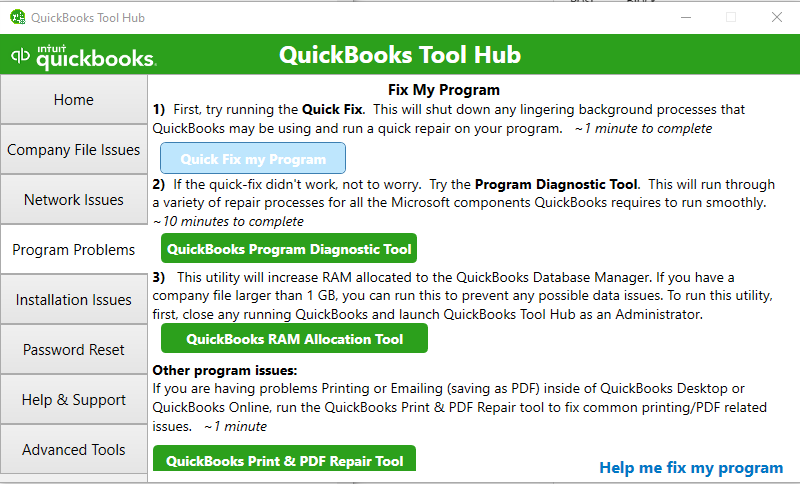
Quick Fix my Program is intended to troubleshoot certain application problems. It doesn’t reset administrator credentials.
For recurring application freezes, use the relevant steps in the QuickBooks Not Responding guide.
If QuickBooks accepts typed input but rejects the password, return to administrator recovery instead of running unrelated program repair tools.
Why Is the QuickBooks Automated Password Reset Tool Not Working?
The Automated Password Reset Tool is a separate Intuit utility intended to recover administrator access to eligible QuickBooks Desktop for Windows company files.
It is mainly relevant to older Desktop versions.
Automated Password Reset Tool Failure or Incompatibility
Intuit states that the Automated Password Reset Tool does not support QuickBooks Desktop 2020 or newer.
This means the utility isn’t a supported recovery method for company files associated with QuickBooks Desktop 2020, 2021, 2022, 2023, or 2024.
Even if you can download the utility, it may direct you back to the built-in recovery procedure for a newer version.
If you use a compatible older version, obtain the utility through Intuit’s Automated Password Reset Tool instructions.
How to Fix QuickBooks Admin Password Reset Tool Not Working
If the tool is compatible with your version but fails during recovery, check the following:
| Problem | What to verify |
| Tool rejects registration details | License number and primary contact details in CAMPS |
| Verification token isn’t received | Registered primary contact’s email address |
| Token isn’t accepted | Token issued for the current tool session |
| Wrong product selected | QuickBooks Desktop version associated with the company file |
| Company file isn’t found | Correct file location and .QBW file |
| Tool reports an incorrect administrator username | Actual company-file administrator username |
| Tool crashes or stops responding | System compatibility and the stage where the failure occurs |
For compatible versions, Intuit’s procedure requires you to select the company file, enter the administrator username if it differs from Admin, and create a temporary password.
QuickBooks may then ask you to change that password when you open the file.
The tool is designed for one-time use. To reset another company file, you must complete the applicable recovery process again.
If the tool repeatedly crashes despite using the correct details, contact Intuit about the recovery options available for your version.
Do not download an unofficial copy of the Automated Password Reset Tool from an unfamiliar website.
What Can You Do When Official Intuit Password Reset Tools Fail?
If the built-in recovery method and applicable Intuit utilities don’t work, the next step depends on whether the issue involves account verification, unsupported software, or the company file itself.
Before trying anything else:
- Confirm that you used the correct recovery method for your version.
- Check that the company-file administrator account is the account you need to recover.
- Verify your registered product and primary contact information.
- Record the exact error message and where recovery stops.
- Preserve the original company file and available backups.
- Contact Intuit through its official QuickBooks support channel.
For discontinued QuickBooks versions, Intuit may have limited support options.
Can Third-Party Password Recovery Help When Official Tools Fail?
Independent companies offer third-party QuickBooks password recovery services and utilities. Some users also discuss these services in Intuit Community forums when official recovery options are unsuccessful.
However, a suggestion posted by a community member is not an Intuit endorsement, and the compatibility or success of a particular service cannot be assumed.
Third-party password recovery carries additional risks because a QuickBooks company file may contain sensitive customer, employee, banking, and payroll information.
Before considering a third-party provider, check:
- Authorization: Confirm that you own the company file or have permission from the business to recover access.
- Version compatibility: Ask whether the service supports the exact QuickBooks Desktop version and company-file format.
- Data handling: Find out whether the provider needs a copy of the company file and how it protects, stores, and deletes that copy.
- Confidentiality: Review the provider’s written privacy and confidentiality terms.
- Recovery limitations: Ask what happens if the service cannot recover access.
- File protection: Preserve the original company file and work only with a separate copy when appropriate.
Don’t send your only copy of a company file to an unknown provider or install a password-removal program from an untrusted source.
I could not verify that Intuit officially endorses a particular independent password-recovery utility or that any one tool reliably works across all QuickBooks Desktop versions.
Can a Third-Party Tool Recover a QuickBooks Desktop 2020 or Newer Company File?
Some independent providers advertise recovery for newer QuickBooks versions, but that does not establish that their tools work with every 2020-or-newer company file.
The compatibility of a specific third-party tool must be verified with its provider. Intuit’s restriction on the Automated Password Reset Tool does not establish whether an independent product will work.
Use official recovery methods first, and evaluate outside services carefully before granting access to financial data.
Why Is My Administrator Password Rejected After Restoring a QuickBooks Backup?
A restored QuickBooks backup can still require administrator credentials.
For example, you might restore a .QBB backup on another computer and find that the password you normally use is rejected.
Before starting another reset:
- Confirm that the correct company backup was restored.
- Check the restored company file’s name and location.
- Verify the administrator username.
- Check Caps Lock and enter the password carefully.
- If the credentials remain rejected, use the applicable administrator recovery method.
Don’t restore older backups over your current file merely to test different passwords.
If you need to verify the restore process, see the QuickBooks Backup Restoration guide.
Restoring a backup is not a supported way to bypass company-file password protection.
Can an Unsupported QuickBooks Desktop Version Affect Password Recovery?
An older, discontinued QuickBooks Desktop release may have difficulty using online recovery features or accessing live technical support.
Intuit discontinued support and connected services for QuickBooks Desktop 2023 after May 31, 2026. The affected editions include Pro Plus 2023, Premier Plus 2023, Enterprise 23.0, and Mac Plus 2023.
QuickBooks Desktop 2024 follows a different support model. Intuit has confirmed continued support and updates for covered version 24.0 products rather than the previously expected May 2027 discontinuation.
See Intuit’s QuickBooks Desktop release process for current product support information.
Discontinuation doesn’t automatically make a company file inaccessible. It also doesn’t prove that a failed password reset was caused by an unavailable Intuit service.
If you use an older version, identify the installed release and ask Intuit about the recovery options available before making software or company-file changes.
What If You Cannot Reset the Administrator Password in QuickBooks Desktop for Mac?
QuickBooks Desktop for Mac has a separate recovery process from Windows.
If you’re the company-file administrator:
- Open QuickBooks Desktop for Mac.
- Select the lock icon in the password field.
- Choose a recovery email address you can access.
- Click OK.
- Check your email for the recovery message.
- Follow the instructions to create a new administrator password.
The Windows Automated Password Reset Tool doesn’t apply to QuickBooks Desktop for Mac.
If you cannot access the offered email address, follow Intuit’s QuickBooks Desktop for Mac password recovery instructions or contact Intuit about the available options.
What Should You Do If the Administrator Password Still Won’t Reset?
If the correct recovery process fails, gather the details needed to identify the issue before contacting official support.
Prepare:
- QuickBooks Desktop product and version.
- Exact error message.
- The stage where password recovery fails.
- Whether the registered email is accessible.
- Whether the problem affects the original company file or a restored backup.
- Product license and registration details for secure identity verification.
For example, reporting that “QuickBooks Desktop 2020 opens a Help window instead of the password reset screen” is more specific than saying the administrator password doesn’t work.
Don’t share your password, recovery token, or sensitive company information publicly in a support forum.
After regaining access, make sure the business maintains control of the registered recovery email and authorized contact information.
Conclusion
If QuickBooks cannot reset the administrator password, identify where the recovery process fails before trying another fix.
A verification error calls for checking CAMPS details. A missing email requires checking the registered recovery address. If the password reset won’t start, confirm your Desktop version and available recovery options. Use Tool Hub only when an application problem prevents you from accessing the login screen.
If Intuit’s standard recovery tools fail, preserve your company files and seek authorized recovery assistance before considering independent utilities.
Frequently Asked Questions
Why Is the QuickBooks Password Reset Tool Not Working?
The tool may be incompatible with your QuickBooks version, unable to verify your registration details, or failing during token verification. Intuit’s Automated Password Reset Tool doesn’t support QuickBooks Desktop 2020 or newer. Check compatibility before troubleshooting other errors.
Why Am I Not Receiving the QuickBooks Password Reset Email or Token?
The email may be going to your registered primary contact, spam folder, or an address you no longer use. Check the selected recovery email and verify the contact details in CAMPS. Use the available resend option if necessary.
What Can I Do When the Official Intuit Password Reset Tools Fail?
Confirm your version, registration details, and the point where recovery fails. Preserve the company file and contact Intuit about available support options. Avoid reinstalling QuickBooks or running unrelated file repairs solely to remove a forgotten password.
Is There a Third-Party Tool to Recover a QuickBooks Password When Official Tools Fail?
Independent recovery utilities and services exist, but their compatibility, security, and success rates vary. I could not verify a universally reliable or Intuit-endorsed third-party solution. Check the provider’s credentials, data-handling practices, and support for your exact version before proceeding.
Why Does “I Forgot My Password” Open a Help Window Instead of the Reset Screen?
This behavior has been reported in QuickBooks Desktop Community discussions. It can occur when a regular user attempts self-service recovery or when the administrator recovery interface doesn’t open correctly. Verify the account type and QuickBooks version before contacting Intuit.
Can I Reset the Admin Password for Multiple QuickBooks Company Files at Once?
The documented recovery process works with an individual company file. The Automated Password Reset Tool requires you to select a company file and uses a one-time verification process. It doesn’t provide a documented bulk password-reset feature for multiple files.
What Does “QuickBooks Can’t Start Password Reset. Try Again in Some Time” Mean?
QuickBooks couldn’t launch the password recovery process. Possible causes include a temporary application problem or unavailable recovery functionality in an older release. Check your connection and version, then contact Intuit if the error continues.
Is My Company File Damaged If the Reset Tool Fails?
Not necessarily. A password reset can fail because of incorrect verification information, recovery service problems, or tool incompatibility. The failure alone doesn’t establish company-file damage. Don’t run data repair or rebuild tools without another reason to suspect corruption.
What Is the Automated Password Reset Tool, and Who Should Use It?
It is an Intuit utility for recovering administrator access to compatible older QuickBooks Desktop for Windows company files. It uses registered product information and a verification token. Intuit states that it doesn’t support QuickBooks Desktop 2020 or newer.
How Do I Verify My CAMPS Details Before Using the Reset Tool?
Sign in to CAMPS, open the registered QuickBooks product, and compare the license number, authorized contact’s name, email, business phone, and mailing ZIP code with the information requested during recovery.
What Should I Do If I No Longer Have Access to the Registered Email?
Use Intuit’s official account recovery process to verify your identity or regain access to the registered account. If you cannot access the primary contact’s mailbox, repeatedly requesting password-reset tokens won’t resolve the delivery problem.
Can I Use a Third-Party Password Recovery Tool on a QuickBooks Desktop 2020 or Newer Company File?
Only if the provider can establish compatibility with your exact product and company-file format. Intuit doesn’t support its own Automated Password Reset Tool for these newer versions. Don’t assume a third-party utility is safe or compatible simply because it advertises QuickBooks password recovery.
How Do I Reset the Admin Password in QuickBooks Desktop 2020 or Newer?
Open the company file, select I forgot my password, choose an available recovery email, and request a token. Enter the token and follow the prompts to create a new password. If the reset interface doesn’t open, troubleshoot the specific failure rather than using the older Automated Password Reset Tool.
How Do I Reset the Admin Password in QuickBooks Desktop 2019 or Earlier?
From the login screen, select I forgot my password and provide the license number and registered business details. After successful verification, enter the code sent to the primary email in CAMPS and follow the reset instructions.
Why Is the QuickBooks Password Field Grayed Out or Unresponsive?
The login window may be affected by an application responsiveness problem. Close QuickBooks and try Quick Fix my Program through Tool Hub. This can address certain program issues but won’t reset administrator credentials or bypass verification.