QuickBooks Assisted Payroll is a payroll service for QuickBooks Desktop that lets businesses prepare employee paychecks while Intuit handles covered federal and state payroll tax payments and filings. It also supports direct deposit and keeps payroll transactions connected to the company’s accounting records.
However, new standalone QuickBooks Assisted Payroll subscriptions are no longer available. Intuit stopped selling them on June 1, 2022. New customers can get the service through QuickBooks Desktop Enterprise Diamond, while eligible existing subscribers may continue using it with supported software.
Another important change took effect on May 31, 2026, when QuickBooks Desktop 2023 payroll services were discontinued.
If you currently use Assisted Payroll or are considering Enterprise Diamond, this guide explains how the service works, its costs, what Intuit handles, and what you must manage yourself.
What Is QuickBooks Assisted Payroll?
QuickBooks Assisted Payroll is a full-service payroll option integrated with QuickBooks Desktop. Employers prepare payroll and submit the information to Intuit, which processes payments and manages covered payroll tax deposits and filings.
Unlike a basic payroll tool that leaves employers responsible for filing taxes, Assisted Payroll provides additional tax administration through Intuit.
Its main features include:
- Paycheck processing: Calculate employee wages, applicable payroll taxes, and deductions.
- Direct deposit: Pay employees electronically through an eligible payroll account.
- Payroll tax administration: Have Intuit pay covered federal and state payroll taxes.
- Tax form filing: Intuit prepares and files supported forms, including Forms 941, 940, W-2, and W-3.
- Payroll setup assistance: Get guidance when configuring payroll information.
- Payroll records: Record employee wages, tax liabilities, and related expenses within QuickBooks Desktop.
- Tax notice assistance: Request help with eligible federal or state payroll tax notices.
These features do not eliminate the employer’s role in payroll. The business must still maintain employee records, enter accurate hours and wages, approve paychecks, and keep enough money available for payroll and taxes.
Is QuickBooks Assisted Payroll Still Available in 2026?
Yes, QuickBooks Assisted Payroll remains available through QuickBooks Desktop Enterprise Diamond and to eligible existing subscribers. It is no longer sold as a standalone payroll subscription to new customers.
According to Intuit’s June 2022 product announcement, the sales restriction does not automatically cancel existing subscriptions.
However, continued access depends on the Desktop version and payroll account status.
| Customer situation | Availability in 2026 |
| New Enterprise Diamond customer | Assisted Payroll is included, subject to eligibility and employee fees |
| New customer seeking standalone Assisted Payroll | No longer available |
| Existing Assisted Payroll subscriber | May continue with an eligible subscription and supported Desktop version |
| QuickBooks Desktop 2023 user | Payroll service discontinued after May 31, 2026 |
| Enterprise Gold or Platinum customer | Enhanced Payroll is included instead of Assisted Payroll |
An important distinction is that discontinuing new sales is different from discontinuing an existing payroll service.
For example, a business that purchased standalone Assisted Payroll before June 2022 may still have an active subscription. A different business using QuickBooks Desktop 2023 would have lost the associated payroll service after May 31, 2026, even if it previously subscribed to Assisted Payroll.
The first business must verify its current account eligibility. The second needs a supported payroll solution.
What changed after May 31, 2026?
QuickBooks Desktop 2023, including Enterprise Solutions 23.0, reached its service discontinuation date on May 31, 2026.
For affected Assisted Payroll users, Intuit states that:
- Payroll information can no longer be sent for processing.
- Direct deposit processing through the discontinued service is unavailable.
- Paycheck tax calculations will be incorrect.
- Intuit will no longer be responsible for the affected 2026 payroll tax returns and W-2 filings.
- The Assisted Payroll service will be canceled.
Intuit’s Desktop Payroll discontinuation policy also states that Intuit will handle second-quarter tax payments and filings under that policy.
Affected employers should confirm exactly which taxes and forms Intuit completed. Do not assume the remaining 2026 obligations were transferred automatically to another provider.
How Does QuickBooks Assisted Payroll Work?
QuickBooks Assisted Payroll follows the regular payroll process, but it adds a submission step so Intuit can process the payroll and manage covered tax obligations.
The employer remains responsible for preparing accurate payroll information.
Step 1: Set up company and employee information
Before processing payroll, the company needs to configure its payroll account.
Required information may include:
- Employer Identification Number (EIN) and business details.
- Federal and state payroll tax account numbers.
- Payroll bank account information.
- Employee names, addresses, and withholding information.
- Pay rates, pay schedules, and deductions.
- Direct deposit details for participating employees.
- Previous payroll information if employees were paid earlier in the year.
For example, a business hiring its first employee must set up the employee’s compensation and withholding details before QuickBooks can calculate the paycheck correctly.
If the company has already paid employees during the year, it may also need to enter historical wages and tax payments. Those amounts affect future payroll calculations and year-end reporting.
Step 2: Prepare and review paychecks
Once payroll is configured, the employer creates paychecks in QuickBooks Desktop.
For a regular payroll:
- Open QuickBooks Desktop and select Employees > Payroll Center.

- Choose the relevant payroll schedule.
- Select the employees to pay.
- Review the pay period and paycheck date.
- Enter hours, salaries, bonuses, and other earnings.
- Check payroll taxes, deductions, and net pay.
- Create the paychecks after confirming the information.
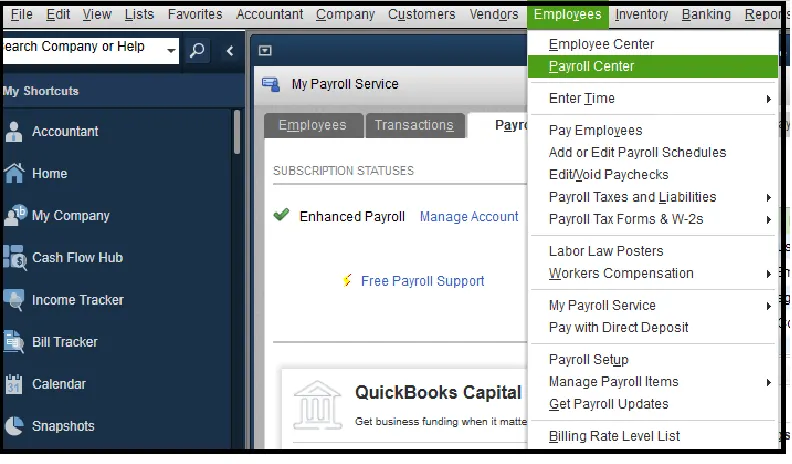
Consider an hourly employee who worked 42 hours during a workweek. The employer must ensure the recorded hours and applicable overtime treatment are correct before approving the paycheck.
QuickBooks calculates pay based on its configuration and the information entered. Assisted Payroll does not independently verify whether the employee’s hours or compensation details are accurate.
Step 3: Send payroll information to Intuit
After preparing payroll, Assisted Payroll users transmit the payroll information for processing.
In supported Desktop configurations, this is done through:
Employees > Send Payroll Data
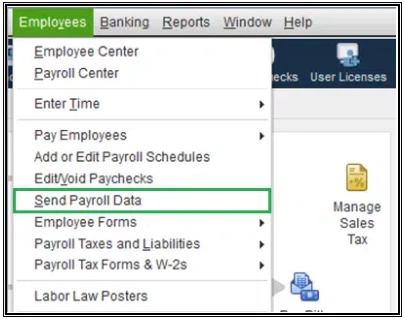
Before submitting, review the payroll totals and confirm that the correct paychecks are included.
Once sent, check the transmission result. Do not resend a payroll batch simply because a confirmation is missing.
If you restore an older company-file backup, some payroll transactions may already exist on Intuit’s servers but not in the restored file. Resending those transactions could create duplicates. Intuit advises contacting payroll support when the Send Payroll Data window contains transactions whose status is uncertain.
Step 4: Verify payroll processing
After submitting payroll, review the confirmation report and bank activity.
According to Intuit’s payroll confirmation instructions, you can view a confirmation report through:
- Select Employees > Send Payroll Data.
- Under Items Received, select the applicable report.
- Choose View to review it.
- Select Print if you need a copy.
The report can show employee names, direct deposit amounts, and the total amount scheduled to be withdrawn from the payroll bank account.
Compare those amounts with your approved payroll. You should also review the bank debits and covered tax payments when they are processed.
This gives the business a record of what was submitted and helps identify missing or duplicate transactions.
Which Payroll Taxes Does QuickBooks Assisted Payroll Handle?
QuickBooks Assisted Payroll handles covered federal payroll taxes and most supported state payroll taxes. However, some local taxes, tax forms, and reporting duties remain the employer’s responsibility.
Intuit’s payroll tax coverage guide, updated October 21, 2026, identifies the following coverage.
| Payroll tax or form | Assisted Payroll coverage |
| Federal income tax withholding | Yes |
| Social Security and Medicare taxes | Yes |
| Federal unemployment tax (FUTA) | Yes |
| State income tax withholding | Yes, where supported |
| State unemployment insurance (SUI) | Yes, where supported |
| Form 941 or Form 944 | Yes, as applicable |
| Form 940 | Yes |
| Forms W-2 and W-3 | Yes |
| Form 943 | No |
| Local payroll tax payments | Generally not covered; limited exceptions |
| Local payroll tax forms | Generally not covered |
| State new-hire reporting | No |
Intuit also excludes certain state-specific insurance obligations, including New York State Disability Insurance (NY SDI) and Hawaii Temporary Disability Insurance (HI TDI).
Understanding these exclusions matters because a business may have local or special payroll tax obligations even when Intuit handles its federal and state payroll filings.
Does Assisted Payroll handle local payroll taxes?
QuickBooks Assisted Payroll generally requires employers to pay and file local payroll taxes separately. However, Intuit identifies a few local tax exceptions.
Its Desktop local tax setup guide lists Assisted Payroll pay-and-file support for:
- Maryland local withholding handled through the state withholding setup.
- New York City resident withholding and Yonkers resident and nonresident local taxes.
- Oregon Lane Transit District and TriMet transit taxes.
Other local taxes may need to be set up in QuickBooks and paid or filed outside the software.
For example, a Pennsylvania employer may need to account for local earned income taxes and local services taxes. The employer should identify the applicable municipality, school district, and tax collector instead of assuming Assisted Payroll handles every local obligation.
Intuit’s general payroll coverage chart excludes local taxes, while its local tax instructions document these specific exceptions. The employer should confirm which rules apply to the active payroll account.
Does Intuit take responsibility for payroll tax penalties?
Intuit offers a conditional payroll tax penalty guarantee for covered federal and state tax payments and filings.
Under its published terms, Intuit may pay resulting penalties when it makes an error involving a covered tax obligation, provided the employer supplied accurate information on time and maintained sufficient funds.
The guarantee does not cover every payroll error or remove the employer’s legal obligations.
The IRS guidance on outsourcing payroll duties states that employers generally remain responsible for federal employment tax deposits even when they use a third-party payroll provider.
Employers should monitor deposits through the Electronic Federal Tax Payment System (EFTPS), review tax notices, and keep copies of payroll tax returns.
For example, if a payroll provider fails to deposit federal withholding taxes, the IRS may still pursue the employer for unpaid amounts and related penalties. Any contractual protection offered by the payroll provider is a separate matter.
QuickBooks Enhanced vs. Assisted Payroll: What’s the Difference?
The main difference between QuickBooks Enhanced and Assisted Payroll is responsibility for payroll taxes.
Enhanced Payroll provides tools to calculate wages, prepare paychecks, and manage payroll tax payments and filings. Assisted Payroll adds Intuit’s administration of covered tax payments and forms.
| Feature | Enhanced Payroll | Assisted Payroll |
| Calculate employee wages and deductions | Yes | Yes |
| Create employee paychecks | Yes | Yes |
| Direct deposit | Yes | Yes |
| Federal payroll tax payments | Employer manages | Intuit handles covered payments |
| State payroll tax payments | Employer manages | Intuit handles covered payments |
| Payroll tax form filing | Employer manages | Intuit files covered forms |
| Assisted tax penalty guarantee | No | Conditional guarantee |
| Included with Enterprise | Gold and Platinum | Diamond |
| Main responsibility | Employer manages payroll and tax administration | Employer prepares payroll; Intuit manages covered tax administration |
The comparison is based on Intuit’s QuickBooks Desktop Enterprise Payroll offerings.
Enhanced Payroll can suit a business with an employee or accountant who knows how to manage tax deposits and filing deadlines.
Assisted Payroll is more appropriate when the business wants to keep its Desktop payroll process but have Intuit handle covered tax administration.
However, moving to Diamond solely for Assisted Payroll may not be cost-effective for every company. The decision should account for the full Enterprise subscription, employee processing charges, and the other Diamond features the business will actually use.
How Much Does QuickBooks Assisted Payroll Cost in 2026?
QuickBooks Assisted Payroll is included with an eligible Enterprise Diamond subscription, but it is not free of all payroll processing charges.
Intuit publishes the following charges for Enterprise Diamond Assisted Payroll:
| Pricing component | Published charge |
| Assisted Payroll base service | Included with Enterprise Diamond |
| Employee processing | $2.50 per employee per pay period |
| Contractor direct deposit | $1.75 per transaction |
| Enterprise Diamond subscription | Depends on the applicable subscription and quote |
These figures come from Intuit’s Enterprise pricing page. Existing standalone Assisted Payroll subscriptions may have different contract terms.
Example: Payroll processing costs for 10 employees
Suppose a business has 10 employees and pays them every two weeks.
At $2.50 per employee per pay period:
- Each payroll costs $25 in employee processing charges.
- A year with 26 biweekly payrolls costs $650 in employee processing charges.
The $650 does not include the Enterprise Diamond software subscription, additional payroll services, contractor transactions, or exceptional charges.
Payroll frequency also affects processing costs. Paying the same 10 employees weekly would produce 52 payroll runs in a typical year, increasing the employee processing charges to $1,300.
This is why comparing payroll prices requires more than looking at a monthly software subscription.
What additional fees can Assisted Payroll charge?
Intuit’s Assisted Payroll fee schedule, updated August 5, 2026, lists charges for certain additional services.
| Additional service | Published fee |
| Late or backdated payroll | $100 |
| Payroll debit returned for insufficient funds | $100 |
| Monthly service fee returned for insufficient funds | $25 |
| Direct deposit reversal request | $75 per payroll |
| Data recovery | $150 |
| Additional current-year tax return copy | $25 per form |
| Cancellation with requested year-end filings | $150 |
| Wage and tax amendment | $375 per case |
| Employee-only amendment | $250 per case |
The fee schedule also identifies some services, such as tax notice assistance, legal entity changes, and certain corrections, as included without an additional charge.
Not every request automatically results in a fee. Intuit’s terms include exceptions when additional work is required because of an Assisted Payroll service error and the employer supplied accurate information on time.
Businesses should review the current agreement before requesting special processing or tax return amendments.
How Do You Set Up or Verify QuickBooks Assisted Payroll?
QuickBooks Assisted Payroll setup begins with confirming that the business has an eligible subscription and supported Desktop software. After that, the employer must complete payroll setup, verify employee and tax information, and confirm that Intuit has activated the applicable services.
Step 1: Check your payroll subscription
If you already use QuickBooks Desktop, confirm your payroll service before making any changes.
According to Intuit’s instructions for finding a payroll subscription:
- Open QuickBooks Desktop.
- Sign in to the company file as the Primary Admin or Payroll Admin.
- Select Employees > Payroll Center.
- Open the Payroll tab.
- Review the service under Subscription Statuses.
You can also sign in to the Customer Account Maintenance Portal (CAMPs) to review registered products and subscription information.
If the service is inactive, do not assume that renewing a Desktop license automatically restores Assisted Payroll.
Intuit instructs former Assisted Payroll customers who want to reactivate their service to contact payroll support. Eligibility depends on the customer’s current account and available products.
Step 2: Confirm your software and service eligibility
Before activating or continuing Assisted Payroll, verify that:
- Your Desktop version is supported.
- Your payroll subscription is active.
- Your business and payroll tax accounts are eligible.
- Your payroll bank account has been verified.
- The company file contains accurate payroll information.
- The appropriate administrator has access to the account.
Intuit states that QuickBooks Desktop Assisted Payroll is unavailable in Indiana and Wyoming. Businesses with employees or payroll obligations in these states should confirm their specific eligibility before relying on the service.
Step 3: Complete employee and payroll tax setup
In supported QuickBooks Desktop versions, payroll setup is available through Employees > Payroll Setup.
The setup process covers employee details, compensation, payroll items, tax accounts, and pay schedules.
For an employee who receives both regular wages and a retirement plan deduction, the employer must configure the appropriate earnings and deduction items before processing payroll.
The employee’s withholding details must also be accurate.
Businesses adding direct deposit should collect and verify the employee’s banking information and required authorization. For those details, see the QuickBooks Direct Deposit Form guide.
Step 4: Enter prior payroll history when switching midyear
If employees have already been paid during the current year, their previous wages and tax payments need to be accounted for.
For example, suppose a company moves to Assisted Payroll in October 2026 after processing payroll through another provider from January through September.
The company should gather:
- Year-to-date gross wages and taxable wages for every employee.
- Federal and state taxes already withheld.
- Employer payroll taxes already paid.
- Quarterly payroll tax returns, including applicable Form 941.
- Previous tax deposit confirmations.
- Employee deductions and benefit contributions.
- Payroll details for employees who left during the year.
Intuit’s historical payroll setup guide explains how prior paychecks, tax payments, and other payroll-related payments are entered into QuickBooks Desktop.
The Payroll Setup workflow includes a Payroll History section for entering prior payroll information. Current-quarter paychecks may need to be entered individually, while earlier quarters may allow consolidated entries.
For Assisted Payroll, coordinate the transfer with Intuit so previously filed taxes and reported wages are not duplicated.
Step 5: Confirm the first payroll was processed
Before the first live payroll:
- Review the payroll schedule and employee payment details.
- Confirm year-to-date wages and deductions.
- Check the payroll bank account and available funds.
- Verify that the required tax services are active.
- Submit payroll within the applicable deadline.
- Review the payroll confirmation and processing status.
Keep the confirmation report and compare it with the payroll register and related bank debits.
What Are the Limitations of QuickBooks Assisted Payroll?
QuickBooks Assisted Payroll does not manage every employer obligation. It also has software, geographic, and processing restrictions that can affect payroll.
Direct deposit deadlines
Intuit advertises next-day direct deposit for eligible Enterprise Diamond Assisted Payroll accounts when payroll is submitted by 5:00 p.m. Pacific Time on the day before payday, subject to applicable business-day and bank verification requirements.
However, the Assisted Payroll ancillary fee schedule separately describes a $100 late or backdated payroll charge for payroll not received by 5:00 p.m. Pacific Time at least two banking days before the pay date.
These are separate published conditions. Employers should confirm which submission deadlines and fees apply to their specific payroll account.
Do not assume that eligibility for next-day direct deposit removes every late-processing charge.
New-hire reporting
Desktop Assisted Payroll does not include state new-hire reporting under Intuit’s current coverage chart.
Employers must submit required new-hire reports through their state agency or an authorized service.
Employees working in multiple states
A business with employees in multiple states must configure applicable tax accounts and withholding details correctly.
For example, an employee may live in New Jersey and work in New York. The employer needs to determine the appropriate withholding treatment, tax registrations, and reporting requirements based on the employee’s actual work arrangement and applicable state rules.
Before adding an employee in another state, verify the work location, state unemployment insurance requirements, and any local taxes.
Payroll tax notices
If the company receives a payroll tax notice for a period covered by Assisted Payroll, determine which tax, filing period, and agency are involved.
Intuit provides a process for reviewing eligible federal and state notices. The employer should retain the original notice, provide the requested information, and track the case until the matter is resolved.
Do not ignore a notice because Intuit handles payroll taxes. Some notices concern information or obligations outside the Assisted Payroll service.
What Should You Do if Assisted Payroll Stops Working or Is Discontinued?
The first step is to identify whether the issue involves an unsupported QuickBooks version, an inactive subscription, or a payroll transmission problem. These situations require different actions.
If you were using QuickBooks Desktop 2023
Payroll service discontinuation cannot be fixed by downloading another payroll tax table or repairing the program.
If your business was affected by the May 31, 2026 discontinuation, start by protecting and reconciling the payroll records.
Before processing payroll through another service:
- Save a backup of the company file and export payroll reports.
- Identify the last payroll successfully processed by Intuit.
- Confirm which federal and state taxes were deposited.
- Obtain copies of completed payroll tax returns.
- Determine which 2026 tax periods and year-end filings remain outstanding.
- Reconcile employee year-to-date wages and withholding.
- Arrange a supported payroll service and confirm its start date.
For example, if Intuit completed the second-quarter payroll tax filings, the replacement provider may need those records to establish the correct opening balances for the next period.
The employer should confirm actual deposits and filings rather than assume that a form was filed based solely on an accounting entry.
If you cannot send payroll from a supported Desktop version
Check whether the Assisted Payroll subscription is active and whether the payroll transmission produced an error.
A problem with unsent paychecks is different from a discontinued payroll service.
For example, QuickBooks Error PS038 involves paychecks stuck with an Online to Send status. Assisted Payroll users should contact Intuit before rebuilding the company file or modifying affected paychecks because these actions can interfere with payroll records already submitted.
The QuickBooks Error PS038 guide explains the issue in more detail.
If the problem involves a payroll update, damaged installation component, or connection error, see the QuickBooks Payroll Errors guide for error-specific troubleshooting.
If your Assisted Payroll subscription has expired
Review its status through CAMPs and contact Intuit to check whether reactivation is available.
Because standalone Assisted Payroll is no longer sold to new customers, a previous subscription does not guarantee that the same service can be restored.
Intuit may require a different supported payroll product.
How Do You Cancel or Move Away From Assisted Payroll?
Canceling QuickBooks Assisted Payroll requires confirming the final payroll and arranging responsibility for any outstanding tax payments and filings.
Intuit’s payroll cancellation instructions recommend completing payroll and saving the necessary records before cancellation.
For eligible Assisted Payroll accounts, the cancellation process begins in CAMPs. Enterprise Diamond customers with one or more EINs must contact Intuit for assistance.
Before canceling, verify:
- The final paychecks and direct deposits have been processed.
- Federal and state payroll tax liabilities are accounted for.
- Any remaining quarterly or year-end filing duties are assigned.
- The replacement provider has accurate year-to-date payroll information.
- Payroll reports and tax return copies have been saved.
Intuit states that Assisted Payroll customers can access copies of previously filed payroll tax returns through the Canceled Client Payroll Tax Center for 12 months after cancellation. It also lists a $150 charge if the customer requests year-end filings or W-2 preparation during cancellation.
Save required records before that access period ends.
What Are the Alternatives to QuickBooks Assisted Payroll?
The available alternatives depend on whether the business needs to retain QuickBooks Desktop or is willing to change its accounting and payroll workflow.
QuickBooks Desktop Enterprise Diamond may suit businesses that want to keep their Desktop accounting system and have Intuit manage covered payroll taxes. It requires an eligible subscription and the associated employee charges.
QuickBooks Desktop Enhanced Payroll may be suitable for existing eligible customers with the resources to manage their own payroll tax payments and filings. Availability should be checked before making a subscription change.
QuickBooks Online with a compatible payroll service is an option for businesses moving away from Desktop. Before switching, confirm which employee records, payroll history, and accounting transactions can be transferred.
Third-party payroll providers may be appropriate when the business needs a different combination of payroll processing, tax administration, reporting, benefits, or human resources support.
For example, a company operating in several states may want a payroll provider that can handle its specific state and local filing requirements. Another business may prefer to keep payroll preparation in-house while outsourcing only selected administrative tasks.
The Outsourced Payroll Services guide explains how managed payroll arrangements differ from handling payroll internally.
Before choosing a replacement, compare the total recurring cost, covered tax jurisdictions, filing responsibilities, record access, and payroll data transfer requirements.
Is QuickBooks Assisted Payroll Worth It?
QuickBooks Assisted Payroll can be useful for businesses that already rely on supported QuickBooks Desktop software and want Intuit to manage covered federal and state payroll taxes.
For an existing subscriber, the priority is to confirm software support, subscription eligibility, tax coverage, and processing status.
For a new customer, the decision is broader: Enterprise Diamond must make sense as an accounting software subscription, not merely as a way to obtain payroll tax filing services.
If your business needs tax filing support that Assisted Payroll does not cover, compare other providers before committing to a subscription.
Frequently Asked Questions
Can I still buy QuickBooks Assisted Payroll in 2026?
QuickBooks Assisted Payroll is available to new customers through QuickBooks Desktop Enterprise Diamond, subject to eligibility. Standalone Assisted Payroll subscriptions have not been available for new purchases since June 1, 2022.
Can I use Assisted Payroll without Enterprise Diamond?
Eligible customers who already had standalone Assisted Payroll subscriptions may continue using the service with supported Desktop software. New customers cannot purchase the standalone service separately.
Does QuickBooks Enterprise Diamond include Assisted Payroll?
Yes, Enterprise Diamond includes Assisted Payroll without a separate base payroll subscription fee, but Intuit charges $2.50 per employee per pay period and may apply other service fees.
Does QuickBooks Assisted Payroll file Form 941 and W-2?
Yes, Intuit’s coverage chart includes Forms 941 or 944, 940, W-2, and W-3. The forms required depend on the employer’s tax filing obligations and the service period.
Does Assisted Payroll file Form 943?
No, Intuit’s October 2026 payroll coverage chart marks Form 943 as unsupported for QuickBooks Desktop Assisted Payroll. Agricultural employers should confirm how that filing will be handled.
Does QuickBooks Assisted Payroll pay local payroll taxes?
Most local taxes are not included. Intuit documents limited exceptions for Maryland, certain New York City and Yonkers taxes, and Oregon’s Lane Transit District and TriMet taxes.
Does QuickBooks Assisted Payroll support next-day direct deposit?
Yes, for eligible accounts that meet Intuit’s bank verification and submission requirements. The published next-day cutoff is 5:00 p.m. Pacific Time on the day before payday, but customers should separately verify applicable late-payroll fee rules.
Is Assisted Payroll available in all 50 states?
No, Intuit states that QuickBooks Desktop Assisted Payroll is not available in Indiana or Wyoming.
Does Assisted Payroll handle state new-hire reporting?
No, QuickBooks Desktop Assisted Payroll excludes new-hire reporting. Employers must arrange for required reports to be submitted to the applicable state agencies.
Can QuickBooks Assisted Payroll pay contractors?
Enterprise Diamond Assisted Payroll supports contractor direct deposit, with a published charge of $1.75 per transaction. Employers must separately confirm their contractor tax reporting obligations.
Can I use QuickBooks Assisted Payroll on a Mac?
The Desktop Assisted Payroll offering is associated with supported Windows-based QuickBooks Desktop products, not the native QuickBooks Desktop for Mac product. Businesses using remote Windows environments should confirm software and hosting compatibility.
Can I reactivate QuickBooks Assisted Payroll after cancellation?
Reactivation may be possible for an eligible account, but it is not guaranteed. Intuit instructs former Assisted Payroll subscribers to contact payroll support rather than using the standard Enhanced Payroll reactivation process.
Will upgrading QuickBooks Desktop restore Assisted Payroll?
Upgrading to a supported Desktop version may address software eligibility, but it does not automatically reactivate a canceled Assisted Payroll subscription. Intuit must confirm the account’s service eligibility.
Who is responsible if Intuit fails to pay payroll taxes?
Intuit offers a conditional guarantee for covered payroll tax errors. However, the IRS generally holds employers responsible for federal payroll tax deposits even when a third-party provider handles payments, so employers should monitor their tax accounts and resolve any missing deposits promptly.
Accounts Confidant is an independent accounting and bookkeeping service provider and is not affiliated with Intuit.