QuickBooks Desktop 2024 is still supported, but Intuit has changed how the software is sold and updated. New U.S. customers can no longer purchase Pro Plus, Premier Plus, or Mac Plus subscriptions, while QuickBooks Desktop Enterprise remains available.
If you already use QuickBooks Desktop 2024, you can continue receiving security patches, product improvements, and support with an eligible subscription. Intuit has also confirmed that QuickBooks Desktop 2024 will not be discontinued in May 2027.
The software now follows a continuous-update model instead of the older three-year support cycle.
This guide explains what QuickBooks Desktop 2024 includes, which editions are available, its latest release, system requirements, and where to download the software.
What Is QuickBooks Desktop 2024?
QuickBooks Desktop 2024 is accounting software developed by Intuit for businesses that manage their financial records through a desktop application.
It supports everyday accounting tasks such as creating invoices, recording expenses, managing vendor bills, reconciling bank accounts, and preparing financial reports.
Depending on the edition, businesses can also use industry-specific reports, inventory management, job costing, payroll services, and multi-user access.
QuickBooks Desktop 2024 is identified as version 24.0. Intuit has confirmed that QuickBooks Desktop Plus 2024 and Enterprise 24.0 were its final annual platform releases.
Instead of releasing a new product version every year, Intuit now adds features and fixes through periodic updates to the existing software.
For example, a user running QuickBooks Desktop 2024 R19 can receive later improvements by installing an available R21 maintenance release.
The version number remains 2024 even as new features become available.
This approach also affects the software’s support timeline, which has changed from the policy followed by older Desktop versions.
Is QuickBooks Desktop 2024 Still Supported?
Yes, QuickBooks Desktop 2024 remains supported, and Intuit has not announced a new discontinuation date for version 24.0.
On September 18, 2026, Intuit confirmed that QuickBooks Desktop Pro Plus 2024, Premier Plus 2024, and Enterprise Solutions 24.0 would not be discontinued in May 2027.
Under the continuous-support policy, Intuit plans to provide:
- Product improvements and bug fixes.
- Security patches.
- Updates related to tax-law compliance.
- New features.
- Support for eligible subscribers.
The change replaces the traditional three-year lifecycle for version 24.0.
For comparison, QuickBooks Desktop 2023 reached its scheduled service discontinuation date on May 31, 2026. QuickBooks Desktop 2024 no longer follows that same deadline.
Intuit also recommends accepting periodic in-product updates so the software receives current security fixes and improvements.
However, continued support does not remove subscription requirements. Access to the software and connected services still depends on the applicable product terms.
Intuit confirms the policy in its What’s New in QuickBooks Desktop 2024 documentation.
Although the software remains supported, availability is different for existing subscribers and businesses purchasing QuickBooks for the first time.
Can You Still Buy QuickBooks Desktop 2024?
You can still purchase QuickBooks Desktop Enterprise 24.0. However, Intuit stopped selling new U.S. subscriptions of Pro Plus, Premier Plus, and Mac Plus after September 30, 2024.
Existing eligible subscribers can continue renewing those products under Intuit’s current subscription policy.
Here is the availability of the main editions.
| QuickBooks Desktop edition | New U.S. subscriptions | Existing subscriber renewals |
| Pro Plus 2024 | Not available | Available if eligible |
| Premier Plus 2024 | Not available | Available if eligible |
| Enterprise 24.0 | Available | Available |
| Mac Plus 2024 | Not available | Available if eligible |
The restriction also applies to new standalone QuickBooks Desktop Enhanced Payroll subscriptions in the United States.
It does not mean that existing subscriptions were automatically canceled.
For example, a business already using Premier Plus 2024 can generally continue renewing its subscription. However, a new customer cannot purchase a fresh Premier Plus subscription directly from Intuit.
Intuit also allows renewal of certain suspended Desktop Plus subscriptions, subject to its billing and eligibility requirements. A canceled or expired subscription should not be assumed to have the same reinstatement options as an active one.
If you are looking for a new license, be careful with websites advertising discontinued Desktop subscriptions. Downloading an installer or receiving a product number from an unknown seller does not establish that the software was sold through an authorized channel.
You can review Intuit’s QuickBooks Desktop purchasing and renewal policy for the current rules.
Product availability is only one consideration. The differences between editions also determine which accounting features a business can use.
QuickBooks Desktop 2024 Editions Compared
QuickBooks Desktop 2024 was released in several editions. They share basic accounting functions but differ in reporting, inventory capabilities, industry-specific tools, and operating-system support.
| Edition | Main capabilities | Suitable business needs |
| Pro Plus 2024 | Invoicing, expenses, bills, reconciliation, and standard reports | General small-business accounting |
| Premier Plus 2024 | Additional industry-specific accounting tools and reports | Contractors, retailers, nonprofits, and service businesses |
| Enterprise 24.0 | Advanced inventory, reporting, user controls, and specialized functions | More complex accounting and inventory operations |
| Mac Plus 2024 | Desktop accounting tools designed for macOS | Businesses using compatible Mac systems |
QuickBooks Desktop Pro Plus 2024
Pro Plus provides the core functions needed to maintain business accounts.
Users can create invoices, track outstanding customer balances, pay vendor bills, reconcile bank accounts, and review financial statements.
For example, a consulting firm that bills clients monthly can use Pro Plus to record payments, check unpaid invoices, and prepare a Profit and Loss report.
However, Pro Plus does not include all the specialized inventory and reporting functions found in Enterprise.
QuickBooks Desktop Premier Plus 2024
Premier Plus builds on the general accounting features of Pro Plus with additional industry-focused tools.
It includes editions designed for contractors, retailers, nonprofits, professional service providers, and manufacturing or wholesale businesses.
For example, a contractor can use job-costing tools to review costs associated with individual projects.
Premier is useful when a business needs industry-specific reporting but does not require all the advanced features available in Enterprise.
QuickBooks Desktop Enterprise 24.0
Enterprise provides additional tools for businesses with more complex reporting, inventory, and user-access requirements.
Depending on the Enterprise subscription, users can access advanced inventory functions, detailed financial reports, and more extensive permission controls.
For example, a wholesaler managing products from several suppliers may use Enterprise’s alternate vendor features to compare purchasing options.
Enterprise also receives certain product improvements that are not available in Pro Plus or Premier Plus.
Because Enterprise features vary by subscription, businesses should check the functions included in their selected plan.
QuickBooks Desktop Mac Plus 2024
Mac Plus is the Desktop edition designed for macOS.
It supports invoicing, expenses, banking, and financial reporting, but it is not identical to the Windows editions.
Some Windows-specific features and integrations are unavailable on Mac.
Users should check the compatibility of their required accounting tools before choosing a platform.
The differences between editions are particularly important when reviewing new QuickBooks Desktop 2024 features. Some of Intuit’s more advanced improvements are limited to Enterprise.
What’s New in QuickBooks Desktop 2024?
QuickBooks Desktop 2024 has received several feature releases since its original launch. These updates include changes to financial reports, account management, inventory controls, and payroll reporting.
Not every feature was included in the initial version. Some were introduced in 2025 or 2026, and several apply only to Enterprise.
Improved Account Search and Record Duplication
The R21 release, introduced in June 2026, added improvements to the Chart of Accounts and record management.
Users can search account descriptions rather than relying only on account names.
For example, a company may have expense accounts with similar names. Searching descriptions can help a bookkeeper find the correct account when recording a transaction.
R21 also introduced the ability to duplicate supported accounts, customers, vendors, and jobs.
If a business needs to create a similar customer or job record, it can copy an existing entry and edit the required details.
The update also added Profit and Loss and Balance Sheet columns to the Chart of Accounts. These help users identify how accounts affect financial reporting.
Invoice Profitability Reporting in Enterprise
QuickBooks Desktop Enterprise received the Invoice Profitability report in R16, released in September 2025.
The report helps businesses review profit at the invoice level.
For example, a service company that bills for labor and materials can examine which invoices generate higher or lower margins.
The R19 release in March 2026 expanded the reporting options. Users gained additional line-level profitability information, filters, grouping, and subtotals.
This makes it possible to review profit for individual invoice lines instead of relying only on overall invoice totals.
The feature is specific to Enterprise and should not be confused with the standard Profit and Loss report available in other Desktop editions.
Alternate Vendor Management in Enterprise
The R15 release introduced improvements to alternate vendor management in QuickBooks Desktop Enterprise.
This feature allows businesses to associate inventory items with more than one supplier and compare purchasing information.
Consider a distributor that purchases the same product from three vendors. Instead of storing supplier details in separate records, the distributor can associate alternate vendors with inventory items.
This helps purchasing staff review supplier options when placing orders.
The feature is most relevant to businesses that regularly buy the same inventory items from different vendors.
Enhanced Inventory Receiving
Enhanced Inventory Receiving is an Enterprise-only feature that separates inventory receipts from supplier bills.
For example, a wholesale business might receive 100 units of a product on Monday, while the supplier’s bill arrives on Thursday.
The business needs to record the inventory when it arrives, even though the bill has not yet been entered.
Enhanced Inventory Receiving supports this workflow by using an inventory offset liability account to keep item receipts and bills separate.
This affects how inventory and related liabilities are recorded, so the feature should be configured with the business’s accounting process in mind.
Inventory and Report Improvements
Earlier releases also introduced several reporting changes.
R13, released in February 2025, added an Enterprise item profitability report that compares quantity sold, costs, sales prices, and planned versus actual margins.
It also introduced improvements to custom-field reporting and searching within reports.
For a retailer reviewing a long inventory report, the search field can help locate a particular item or value without manually scanning the entire report.
These improvements are useful when a business works with large item lists or detailed financial records.
Payroll and Tax Reporting Updates
The R20 release, introduced in April 2026, added changes for 2026 W-2 reporting involving qualified tips.
Intuit added support for Treasury Tipped Occupation Codes, the relevant reporting fields, and employees who work in more than one tipped role.
These changes apply to eligible QuickBooks Desktop Payroll users. They do not mean that payroll services are included with every Desktop subscription.
The same release included fixes for certain installation, bill-entry, and large-company-file performance problems.
Businesses using payroll should confirm their subscription eligibility and review the current tax reporting requirements before preparing forms.
These feature changes show why the installed release number matters. Two computers can both run QuickBooks Desktop 2024 but have different functionality if their maintenance releases are not the same.
What Is the Latest QuickBooks Desktop 2024 Release?
As of November 2, 2026, Intuit’s published update instructions list QuickBooks Desktop 2024 R21_65 as the latest Windows release.
QuickBooks Desktop Mac Plus 2024 is listed separately at release R13.
Release numbers identify the maintenance updates applied to the software.
For example, R21 refers to a major maintenance-release series, while a designation such as R21_65 identifies a specific build.
Intuit’s general release-notes page lists earlier R21 builds, including R21_52 in July 2026. Its separate update instructions identify R21_65 as the latest available Windows build.
Because releases can change, check Intuit’s QuickBooks Desktop update instructions rather than relying permanently on a published build number.
How to Check Your QuickBooks Desktop 2024 Release
You can check your installed release directly in QuickBooks.
- Open QuickBooks Desktop 2024.
- Press F2 or Ctrl + 1 to open the Product Information window.
- Find the version and release number.
- Compare the number with Intuit’s latest published release.
Mac Plus users can press Command + 1 to view their product information.
If your installed release is older than the published version, you may be missing security patches, fixes, or new features.
Before updating, it is worth confirming that the computer still meets Intuit’s system requirements.
QuickBooks Desktop 2024 System Requirements
QuickBooks Desktop 2024 for Windows requires a 64-bit operating system and compatible hardware.
Intuit lists Windows 11 as a supported desktop operating system. Server installations have separate requirements.
Windows System Requirements
| Component | Requirement |
| Operating system | Windows 11, 64-bit |
| Processor | 2.4 GHz minimum, Intel or AMD x86 |
| RAM | 8 GB minimum; 16 GB recommended |
| Storage | 2.5 GB for the application, plus company-file storage |
| Screen resolution | Optimized for 1280 × 1024 or higher |
| Server operating systems | Windows Server 2016, 2019, or 2022, supported editions |
| Internet | Required for registration and connected services |
| Browser | Google Chrome |
These are baseline requirements, not a guarantee of identical performance across all company files.
A business using a large company file or several simultaneous users may need more RAM and storage than a single-user installation.
Intuit also recommends storing QuickBooks company files on a solid-state drive (SSD).
Does QuickBooks Desktop 2024 Work on Windows 10?
QuickBooks Desktop 2024 can be installed on compatible Windows 10 computers, but Intuit recommends moving to a supported Windows operating system.
Microsoft ended standard Windows 10 support on October 14, 2025.
This matters because a computer without regular operating-system security updates may be exposed to risks even when QuickBooks itself is updated.
Intuit does not support Windows 10 S Mode, ARM processors, or certain emulated and virtualized Windows environments under its standard requirements.
QuickBooks Desktop Mac Plus 2024 Requirements
Mac Plus uses different system requirements from the Windows product.
| Component | Minimum requirement |
| Operating system | macOS Monterey 12.0 or later |
| Processor | Intel or Apple processor |
| RAM | 2 GB minimum; 4 GB recommended |
| Storage | 250 MB available |
| Internet | Connection required |
These are Intuit’s published minimum specifications. Users should also verify compatibility with their specific macOS version, hardware, and connected applications.
You can find the complete specifications in Intuit’s QuickBooks Desktop 2024 system requirements.
After confirming compatibility, existing subscribers can obtain the appropriate installation file through Intuit.
Where Can You Download QuickBooks Desktop 2024?
QuickBooks Desktop 2024 installers are available through Intuit’s official Downloads & Updates page.
The download process requires users to select their country, product, and version. Once those details are selected, Intuit provides the appropriate download option.
You can start from the official QuickBooks Desktop Downloads & Updates page.
However, downloading an installation file does not provide a new license or subscription.
A user reinstalling Pro Plus 2024 must have valid licensing information for that product. Someone who has never purchased Pro Plus cannot use the installer to bypass Intuit’s new-customer sales restrictions.
Existing subscribers can find their license and product number in their Intuit purchase confirmation email or through the Customer Account Management Portal (CAMPS).
Accountants and ProAdvisors may also have software access through their designated Intuit account portals.
For a detailed explanation of product eligibility, license lookup, and available download options, see our QuickBooks Desktop download guide.
If you already have an installer and need help setting up the software on a compatible computer, follow the QuickBooks Desktop installation guide.
Once QuickBooks Desktop 2024 is installed, keeping it updated is part of maintaining the supported version.
How to Keep QuickBooks Desktop 2024 Updated
QuickBooks Desktop 2024 receives maintenance updates through the software or Intuit’s official download website.
These updates may contain security patches, feature improvements, and fixes for known problems.
To check for an update on Windows, open QuickBooks and go to Help > Update QuickBooks Desktop > Update Now. Select Get Updates and follow the prompts. 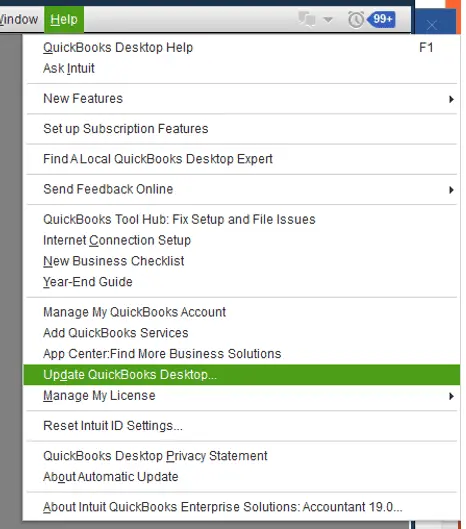
You can also enable automatic updates from the Options tab in the Update QuickBooks Desktop window.
After an update is installed, check the release number in the Product Information window to confirm that it changed.
If QuickBooks does not download the update, Intuit provides a separate manual update option.
Our QuickBooks Desktop update guide explains both methods and the checks to make when an update fails.
In a multi-user environment, coordinate updates with the person managing the server and workstations to avoid version or access problems.
If QuickBooks still does not work correctly after an update, identifying the exact symptom is more useful than immediately reinstalling the software.
Common QuickBooks Desktop 2024 Problems
QuickBooks Desktop 2024 can encounter installation, activation, company-file access, and network problems.
These issues do not all have the same cause.
| Problem | What to check first |
| QuickBooks Desktop 2024 will not install | Confirm system compatibility and that the installer matches your product |
| License or activation error | Check the license number, product number, and subscription status |
| QuickBooks 2024 update fails | Check the installed release and review Intuit’s manual update option |
| QuickBooks opens but the company file does not | Check the error message, company-file location, and file permissions |
| Multi-user mode stops working | Review server hosting, network access, and Database Server Manager |
| QuickBooks runs slowly | Check system resources, company-file size, and installed maintenance release |
For example, if QuickBooks opens normally but one company file cannot be accessed, the problem may involve file permissions or the company file itself rather than the application.
If QuickBooks works on the server but other computers cannot access it, the issue may involve network configuration.
Our QuickBooks Desktop multi-user mode guide explains common hosting and connection problems.
Avoid reinstalling QuickBooks or changing company-file settings without first identifying the likely cause. When a problem affects company data, preserve a recent backup before attempting repairs.
These checks can also help determine whether the current Desktop environment is still suitable for the business.
Should You Continue Using QuickBooks Desktop 2024?
QuickBooks Desktop 2024 remains a practical option for businesses with eligible subscriptions, compatible computers, and accounting requirements that the software already meets.
There is no need to replace it solely because of the former May 2027 discontinuation deadline.
For example, a contractor using Premier Plus for job-costing reports may prefer to keep the current product if its features meet the company’s needs.
A wholesaler that needs advanced inventory controls may find Enterprise more suitable.
Businesses seeking browser-based accounting and cloud collaboration can compare QuickBooks Online with their current Desktop workflows.
Before changing products, review the accounting functions that matter most: inventory costing, payroll services, industry-specific reports, integrations, user access, and historical financial records.
Desktop and Online do not have identical features. A product change should therefore be based on actual requirements rather than an assumption that one platform replaces the other without differences.
For existing Desktop 2024 users, maintaining an eligible subscription, a supported operating system, and current software updates is the immediate priority.
Conclusion
QuickBooks Desktop 2024 remains supported under Intuit’s continuous-update policy, with no announced May 2027 discontinuation deadline.
Existing eligible subscribers can continue using and renewing their products, while new U.S. customers must consider the editions still available for purchase.
If you already use version 24.0, check the installed release number, keep the software updated, and confirm that your computer meets the published requirements.
Businesses considering a new Desktop subscription should review Enterprise’s features and current terms before purchasing.
Frequently Asked Questions
Is QuickBooks Desktop 2024 the last Desktop version?
QuickBooks Desktop Plus 2024 and Enterprise 24.0 were Intuit’s final annual Desktop platform releases. The company now delivers new features and security improvements through continuous updates instead of launching a new version every year.
Can I renew QuickBooks Desktop 2024 after 2027?
Under Intuit’s current policy, eligible existing subscribers can continue renewing QuickBooks Desktop 2024. Intuit has removed the May 2027 sunset deadline for version 24.0. Future renewals remain subject to subscription terms and product availability.
Can I use QuickBooks Desktop 2024 without an internet connection?
Many core accounting tasks can work locally without a constant internet connection. However, registration, software updates, payroll, bank feeds, payments, and other connected services require internet access. Subscription requirements still apply.
What happens if my QuickBooks Desktop 2024 subscription expires?
Intuit provides eligible Desktop Plus users with view-only access to company data for up to 12 months after their subscription ends. During this period, users can view or export data but cannot make edits with the inactive subscription. Restoring full access generally requires an eligible active subscription.
Is QuickBooks Desktop Enterprise 24.0 the same as QuickBooks Desktop 2024?
Enterprise 24.0 belongs to the QuickBooks Desktop 2024 platform, but it is a separate edition with additional features. Enterprise includes advanced inventory, reporting, and user-management capabilities that are not available in every Pro Plus or Premier Plus subscription.
Why are some QuickBooks Desktop 2024 features missing?
Some features are available only in specific editions, such as Enterprise. Others require a later maintenance release or an eligible connected service. Check your product edition, installed release number, and subscription before trying to enable a feature.
Can I install QuickBooks Desktop 2024 on multiple computers?
Yes, if your license and subscription permit the required installations and users. A shared company file also needs the proper network configuration. Installing QuickBooks on multiple computers does not automatically provide additional user licenses.
Accounts Confidant is an independent accounting and bookkeeping service provider and is not affiliated with Intuit.