
There is exactly one page Intuit uses to distribute QuickBooks Desktop installers: the Downloads & Updates page. You pick a country, a product, and a version year, press Search, and the installer link appears. That part takes under a minute.
The part that stops people is what happens before the download. Since September 30, 2024, Intuit no longer sells QuickBooks Desktop Pro Plus, Premier Plus, or Mac Plus to new subscribers in the United States. The installer is still there, and it still downloads. It will then ask for a license and product number that a new US customer can no longer buy.
So the honest answer to “how do I download QuickBooks Desktop” splits in two. If you already have a subscription, this is a five-minute task. If you don’t, the download is not your problem, and this guide will show you what is.
Key Takeaways
- The only official installer source is Intuit’s Downloads & Updates page. Select Country → Product → Version, then Search and Download.
- Intuit stopped selling new US subscriptions of Pro Plus, Premier Plus, Mac Plus, and Desktop Enhanced Payroll after September 30, 2024. Existing subscribers keep renewing and keep downloading
- QuickBooks Desktop Enterprise is not affected and is still sold to new customers
- 2024 is the newest year you can download. There is no Desktop 2025 or 2026 release. The current maintenance releases are R21_50 for Windows and R13 for Mac Plus 2024
- You need your license and product number to install. Press F2 inside QuickBooks, or sign in to CAMPS, or use Intuit’s License Look Up Tool.
- QuickBooks Desktop 2023 lost all services after May 31, 2026. It still opens your file; payroll, bank feeds, payments, and security updates are gone.
Where to download QuickBooks Desktop
Go to Intuit’s Downloads & Updates page. Intuit’s own instructions are to select your country, your product, and your version, then select Search, then Download. The same page serves both the full installer and maintenance updates , choose the standard setup option, and use Get the latest updates when you only need to patch an existing installation rather than reinstall it.
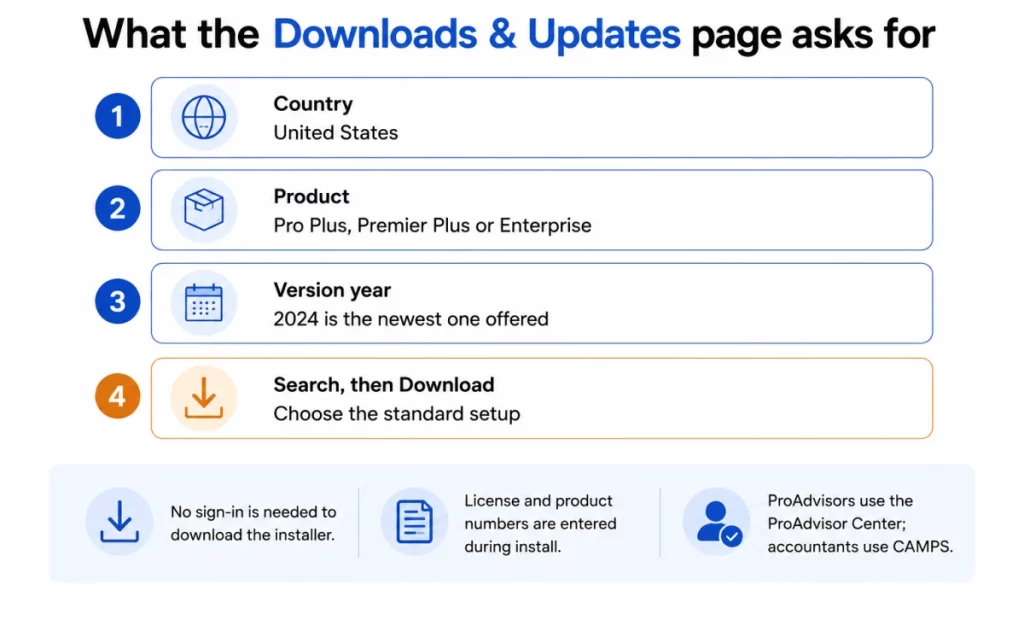
Two routes bypass that page entirely. ProAdvisors sign in to the QuickBooks ProAdvisor Center to download their software, and accountants sign in to CAMPS for theirs
Do not download QuickBooks Desktop from anywhere else
This matters more than it used to. Intuit’s position is unambiguous: after September 30, 2024 it stopped selling QuickBooks Desktop software online, and if you bought QuickBooks Desktop online from a vendor other than Intuit Inc., Intuit asks you to call 1-800-4INTUIT so it can take action against the fraudulent site
Read that carefully, because it describes the current search results better than it describes 2024. A product that can no longer be bought new, that thousands of businesses still want, generates exactly the conditions resellers exploit: pages offering “QuickBooks Desktop 2026 download,” “lifetime license” listings, and installer mirrors that are not Intuit’s. There is no 2026 version to download, and a license bought outside Intuit is one activation check away from being dead. If the domain is not downloads.quickbooks.com , camps.intuit.com , or qbo.intuit.com , close the tab.
Can you still get it? A 60-second eligibility check
Find yourself in one of these four rows before you download anything.
| Your situation | Can you download and activate? | What to do |
| Active Pro Plus / Premier Plus / Mac Plus subscription | Yes | Download 2024 from the Downloads & Updates page and activate with your existing license |
| Lapsed or suspended Desktop Plus subscription | Usually yes | Intuit allows renewal of a suspended Desktop Plus subscription, and states it provides a 30-day grace period to renew after it sends the final notice |
| Accountant or ProAdvisor | Yes | Download via the ProAdvisor Center or CAMPS. Desktop Accountant products remain available on request through Accountant Sales |
| New US customer, no prior subscription | No, except Enterprise | Enterprise is still sold to new customers. Otherwise the practical alternative is QuickBooks Online |
Intuit’s stop-sell covered four products specifically QuickBooks Desktop Pro Plus, Premier Plus, Mac Plus, and Desktop Enhanced Payroll — and applies to the US only. Existing subscribers were explicitly carved out: “This change doesn’t impact existing subscribers. Existing QuickBooks Desktop Plus and Desktop Payroll subscribers
can continue to renew their subscriptions after September 30, 2024″ (Intuit). Enterprise sits outside the whole announcement: new and existing Enterprise customers can still purchase and renew
One date, two versions of it. If you have seen July 31, 2024 quoted as the cutoff, that was the original announcement. Intuit extended the deadline to September 30, 2024 before it took effect. Both dates are still circulating in third-party articles, and Intuit’s own help-article URL still contains the string july-2024 . September 30, 2024 is the operative date.
The row most people miss is the third one. Intuit’s guidance to accountants states that ProAdvisor Program Premier Plus, ProAdvisor Program Enterprise, and standalone QuickBooks Desktop Accountant Edition remain purchasable after the stop-sell date, available for sale upon request through the Accountant Sales channel. If you work with a bookkeeper or CPA who still runs Desktop, that is why. It is also worth a phone call before you conclude the door is shut. For the multi-user side of that setup, see our guide to QuickBooks Desktop multi-user mode.
Outside the United States, none of this applies. Intuit is explicit that the stop-sell decision “applies to the U.S. only”. That is also why the download page opens with a country selector rather than assuming one. If you are in Canada, the UK, Australia, or another Intuit market, set Country to your own before you judge what is on offer, and check your local Intuit site for what is currently sold there — availability, versions, and end-of-service dates are set per region and the US answers on this page will not match
Which version you will actually get
That is the whole answer, and it surprises people who arrive searching for a 2025 or 2026 download. Intuit’s QuickBooks Desktop 2023 service discontinuation policy tells existing subscribers to “Upgrade to QuickBooks Desktop Plus 2024 or Enterprise 24.0,” and notes that existing Desktop Plus and Enterprise subscribers receive version 2024 at no extra cost as part of their annual plan. Intuit’s update article, as it read on 2026-07-06, lists the newest available build as QuickBooks 2024 R21_50 on Windows and QuickBooks Desktop for Mac Plus 2024 R13 (Intuit). Release numbers move; check yours against that page before assuming you are current.
So the version year stopped moving and the release number kept moving. That is the shape of the product now: no annual rebrand, ongoing maintenance releases against the 2024 build. Practically, it means two things for you.
You cannot “upgrade” your way out of an end-of-service date by buying a newer year. There isn’t one to buy. Upgrading from 2023 to 2024 is the last version jump available on Pro, Premier, and Mac.
Check your release, not just your year. Press F2 (or Ctrl+1) inside QuickBooks to open the Product Information window and read the release number at the end of the product name. If yours is behind R21_50, you are missing security and product updates that are free and already paid for. Go to Help → Update QuickBooks Desktop → Update Now → Get Updates, or download the update file from the same Downloads & Updates page.
How to redownload QuickBooks Desktop you already bought
Reinstalling on a new computer, or recovering from a failed drive, uses the same download path plus your existing license. Nothing needs to be repurchased.
- Get your license and product number before you start. The section below covers all five routes.
- Download the installer for your product and year from the Downloads & Updates page. Download the year you own, not the newest year, unless your subscription entitles you to 2024.
- Run the installer and enter your numbers when prompted, then follow the activation prompts.
- Sync your license data afterward with Help → Manage My License → Sync License Data Online, which is what makes a moved installation stop nagging about seats.
If you are moving between machines rather than rebuilding one, Intuit’s migrator tool copies your files and software settings together, which is safer than reinstalling and hand-copying a .qbw file. If the file misbehaves after the move, QuickBooks File Doctor inside the QuickBooks Tool Hub is the right first diagnostic
If your version is already discontinued
Discontinued products come with a specific limitation worth knowing before you try. New registration is not possible for a discontinued product, you cannot register one for the first time. Re-registration does work: a product that was registered before and is being reinstalled can be re-registered. Assisted support is gone, but Intuit will still supply the validation code you need. That distinction rescues a lot of situations. A 2021 install being restored onto a replacement PC is a reregistration and will go through. A never-registered 2021 disc found in a drawer will not.
Find your license and product number first
The installer will ask for both. There are five places to find them, and one of them works even when QuickBooks won’t open.
- Inside QuickBooks: press F2 to open the Product Information window and read the product name, product number, and license number. On Mac, go to Help → Product Information.

- CAMPS: as long as the product was registered, sign in to your account management portal and read the product and license number there. This is the route to use when the software will not launch.
- Purchase confirmation email: if you bought a digital copy from Intuit’s website, the original confirmation email carries your product info. Check spam.
- Original packaging: retail copies print the label next to the UPC code, under a scratch-off panel.
- License Look Up Tool: Intuit’s lookup tool returns your details if the software was registered.
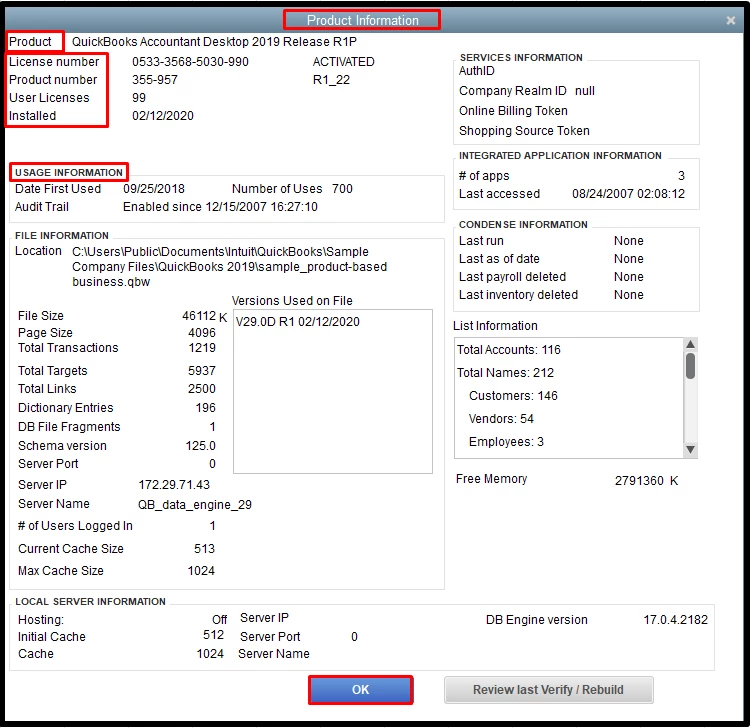
The same F2 window answers a question that comes up right after installation: User Licenses tells you how many simultaneous users your license permits, which is what actually limits your office, not the edition name on the box.
System requirements for QuickBooks Desktop 2024
Intuit’s headline requirement rules out more machines than people expect: QuickBooks Desktop 2024 requires a 64-bit Windows operating system, and 32-bit is not supported
Operating systems. Windows 11 64-bit installed natively; Windows Server 2022, 2019, and 2016 in Standard and Essentials editions. Database servers must also run one of those three Server versions natively. Windows 10 will still take the install, but Microsoft’s lifecycle page puts Windows 10 Home and Pro end of support at October 14, 2025, and Intuit recommends moving to a supported Windows version.
What is explicitly unsupported. Linux, Windows 10 S Mode, emulators, and virtual environments. Also ARM processors: QuickBooks needs an x86 processor from Intel or AMD, and Intuit does not support virtualization or emulation on ARM. That single line disqualifies a good number of newer thin clients and Windows-on-ARM laptops
Hardware. A 2.4 GHz processor minimum, 8 GB of RAM on a workstation with 16 GB recommended, 2.5 GB of disk space for the program plus room for your data files, and a display optimized for 1280 × 1024 or higher with support for up to two extended monitors. Microsoft .NET 4.8 Runtime (60 MB) ships with the installer. Intuit recommends keeping the company file on an SSD.
RAM is where multi-user offices get caught, because the requirement scales with concurrent users on the server:
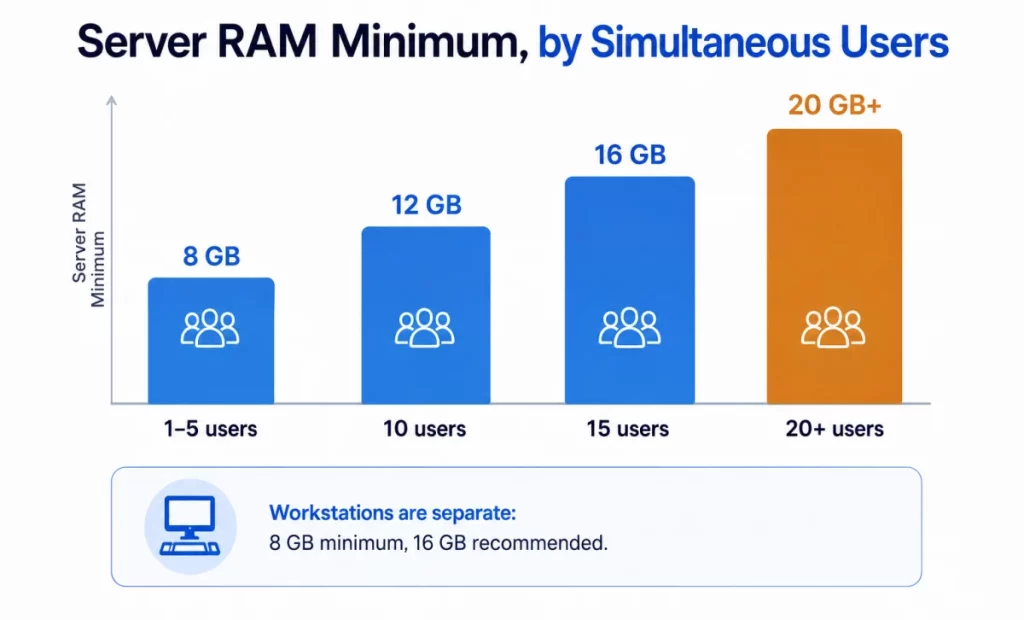
Connected services. Internet access and Google Chrome are required, and QuickBooks Desktop 2024 needs TLS 1.2 for connected services to work. Payroll and other online features want at least a 56 Kbps connection, with 1 Mbps recommended. If your payroll updates fail after an otherwise clean install, TLS and browser configuration are the first things to check, our walkthrough on QuickBooks payroll updates not working covers the sequence.
Downloading QuickBooks Desktop for Mac
Yes, QuickBooks Desktop runs on Mac, and yes, it is a real native application rather than a browser wrapper. The product is QuickBooks Desktop for Mac Plus 2024, the current maintenance release is R13, and it downloads from the same Downloads & Updates page with United States and the Mac product selected. Intuit’s stated minimums are modest compared with the Windows build: macOS 12 (Monterey) or later, an Intel or Apple CPU, 2 GB of RAM minimum with 4 GB recommended, and 250 MB of available storage. Multiuser setups want an Intel Core 2 Duo or higher on the server side. Reports export to Apple Numbers 12 or later or Excel 2016 or later, and PDF email works through Apple Mail or Outlook 2016 and later.
The file-conversion rules are the part to read twice before you commit, because several of the paths run one way only:
- Conversion to QuickBooks Online is one-way.
- Conversion from QuickBooks Desktop for Windows 2021 and 2023 is one-way.
- Conversion to and from QuickBooks for Windows 2024 works in both directions.
If your bookkeeper is on Windows and you are on Mac, that last line is the one that keeps a shared workflow viable, but only if both sides are on 2024.
Mac Plus 2024 is also one of only two products with a downloadable trial, covered below.
Pro vs Premier vs Enterprise
The three editions were always separated by scale rather than by core bookkeeping. What changed is that only one of them is still purchasable by a new US customer, which reframes the comparison from “which should I buy” to “which one am I entitled to run.”
Concurrent users is the cleanest way to see the gap:
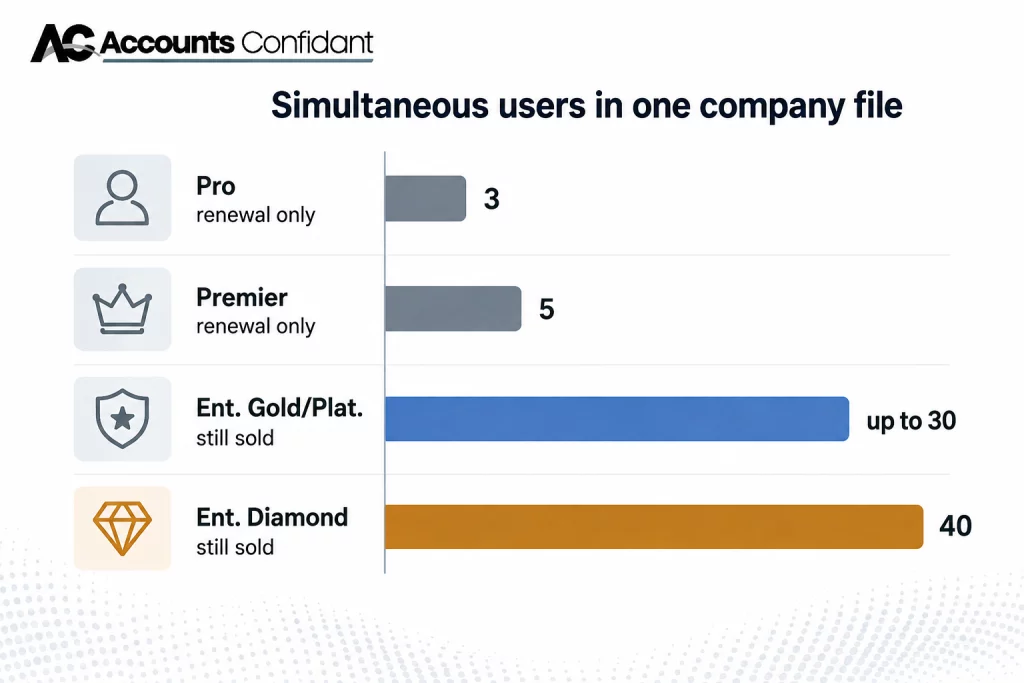
Pro is the general small-business ledger: invoicing, bills, banking, reporting, three users. Premier adds industry specific editions, Intuit’s own product list names six, General Business, Contractor, Manufacturing & Wholesale, Nonprofit, Professional Services, and Retail, and lifts the ceiling to five. Enterprise is a different weight class. Intuit describes it as delivering more than 200 customizable reports, user roles assembled from up to 115 unique work activities, multi-company and intercompany transaction handling, advanced inventory and pricing on the higher tiers, and optional cloud hosting.
Enterprise is sold in three tiers, Gold, Platinum, and Diamond, as an annual subscription (Intuit). Gold bundles Enhanced Payroll; Platinum adds Advanced Inventory, Advanced Pricing, and bill and PO approval workflows; Diamond adds Assisted Payroll and QuickBooks Time Elite and raises the seat ceiling to 40.
On price, Intuit publishes Enterprise as “starting at” figures that vary by tier, seat count, promotion, and payroll add-ons, and it renders them dynamically on the Enterprise pricing page rather than publishing a fixed rate card. Any specific dollar figure quoted in a third-party article, including this one, would be a snapshot with a short shelf life. Get a current number from Intuit’s pricing page, or from Enterprise sales, the number Intuit publishes there. For Pro or Premier, the only figure that applies is the one on your own renewal notice, because renewal is the only way left to hold those products.
What “download QuickBooks Online for desktop” really means
There is no such download. QuickBooks Online is a browser application; Intuit does not distribute a QuickBooks Online desktop installer, and the Downloads & Updates page carries Desktop products only. Search phrases like “download QuickBooks Online for desktop” or “QuickBooks Online desktop download” almost always mean one of three things:
- You want a desktop shortcut to QBO. Chrome and Edge both create one: open QuickBooks Online, then use the browser’s install-as-app or create-shortcut option. It behaves like an app window and it is still the web product.
- You want your QBO data available offline in a desktop program. That is not a supported configuration. QuickBooks Online has no offline mode.
- You actually want QuickBooks Desktop. Then the eligibility check earlier in this guide is your answer, not a download link.
The reverse direction is the one Intuit supports and documents heavily: moving a Desktop company file into QuickBooks Online. It is a one-way conversion, so plan it as a migration rather than an experiment, our guide to migrating from QuickBooks Desktop to Online walks through the sequence and what does not carry over. Worth knowing before you decide: Intuit’s own trial page exists partly for this purpose, noting that if you need QuickBooks Desktop in order to move your data to QuickBooks Online, you can download a 30-day trial
The support clock you are downloading into
Intuit retires QuickBooks Desktop versions on a rolling schedule, and the pattern is consistent enough to plan against. Checking the same Intuit policy page at three points in time shows it plainly: QuickBooks Desktop 2021 was discontinued after May 31, 2024; 2022 after May 31, 2025; 2023 after May 31, 2026.
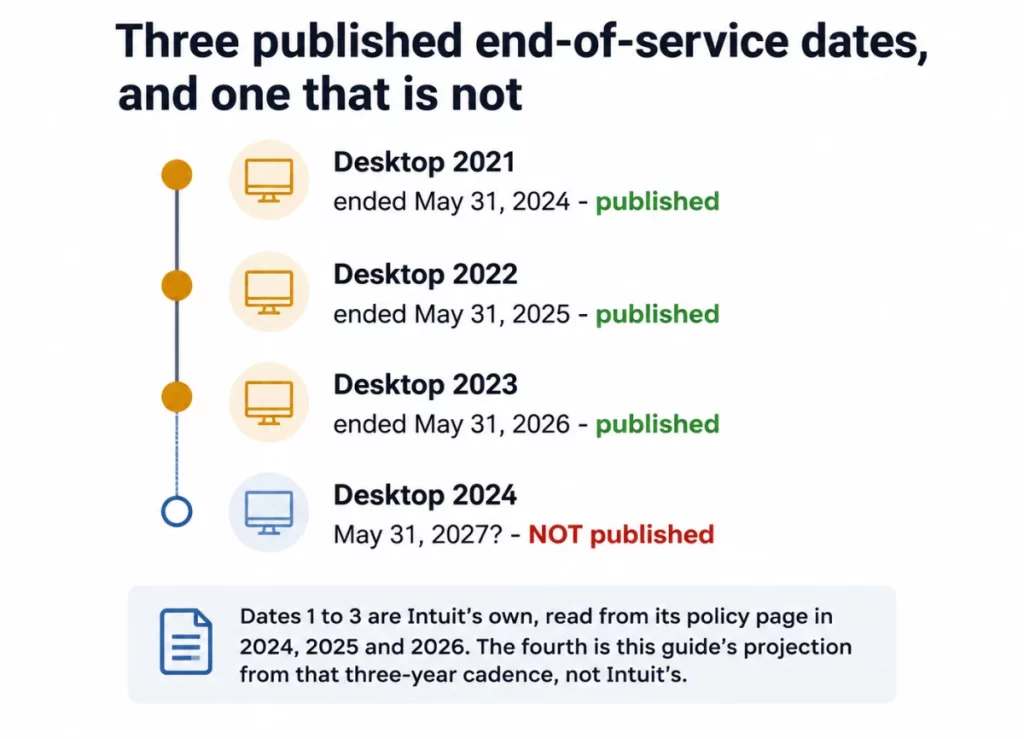
Treat the 2027 marker as a planning assumption, not a fact. Third-party articles currently quote both May 31, 2027 and September 30, 2027 for QuickBooks Desktop 2024, and Intuit has published neither. What Intuit has published is the consequence, and it is the same every year: after the cutoff you lose live technical support, QuickBooks Desktop Payroll, Desktop Payments, and online bank feeds, and you stop receiving critical security updates
What does not happen is a lockout. Discontinued QuickBooks Desktop keeps opening your company file, keeps entering transactions, and keeps running reports. If you are downloading 2023 today to get a business back on its feet, that still works, it just works without payroll, feeds, or patches. If your subscription itself has stopped rather than your version, that is a different failure with a different fix; see what to do when your QuickBooks subscription has lapsed.
Where to go next
If the download and install went cleanly, the next things that typically break are network-related rather than installer-related. Multi-user setups depend on a background service that has its own failure modes, QBDBMgrN not running on this computer covers the most common one, and company file errors in the 6000 series covers the rest.
If the eligibility check told you Desktop is closed to you, the decision is a real one rather than a formality. Compare your options with our overview of the best accounting software before defaulting to QuickBooks Online, and read the migration guide before you convert anything, because that conversion runs one way.
Frequently Asked Questions
Where can I download QuickBooks Desktop?
From Intuit’s Downloads & Updates page. Select your country, product, and version, then select Search and Download. ProAdvisor’s download from the QuickBooks ProAdvisor Center and accountants from CAMPS instead. No other site is an authorized source; Intuit asks customers who bought Desktop online from a non-Intuit vendor to call 1-800-4INTUIT
Is QuickBooks Desktop still available for new customers?
Only Enterprise. Intuit stopped selling new US subscriptions of QuickBooks Desktop Pro Plus, Premier Plus, Mac Plus, and Desktop Enhanced Payroll after September 30, 2024, and this applies to the US only. QuickBooks Desktop Enterprise was excluded and is still sold to new customers.
How do I redownload QuickBooks Desktop that I already purchased?
Download the installer for the year you own from the Downloads & Updates page, then enter your existing license and product number during installation. Nothing needs to be repurchased. If your version is already discontinued you can still re-register it, because re-registration is permitted for products that were registered before, only first-time registration of a discontinued product is blocked
What’s the difference between QuickBooks Desktop Pro, Premier, and Enterprise?
Scale, mainly. Pro allows 3 simultaneous users and Premier allows 5, while Enterprise allows up to 30 on Gold and Platinum or 40 on Diamond. Premier adds six industry-specific editions; Enterprise adds more than 200 customizable reports, user roles built from up to 115 unique work activities, multi-company handling, advanced inventory and pricing, and optional cloud hosting. Pro and Premier are renewal-only for existing US subscribers; Enterprise is the only edition still sold new.
Can I still buy QuickBooks Desktop or only QuickBooks Online now?
You can still buy QuickBooks Desktop Enterprise. Pro Plus, Premier Plus, and Mac Plus cannot be bought new in the US, though existing subscribers can keep renewing them indefinitely, Intuit has said this is a stop-sell for new purchases, not a discontinuation of the product line. Accountants can also still obtain Desktop Accountant products on request through Intuit’s Accountant Sales channel
What are the system requirements for QuickBooks Desktop 2024?
A 64-bit version of Windows 11, or Windows Server 2022, 2019, or 2016 (Standard or Essentials), installed natively. A 2.4 GHz processor, 8 GB of RAM on a workstation (16 GB recommended), 2.5 GB of disk space plus room for data, a 1280 × 1024 display, internet access, Google Chrome, and TLS 1.2. Server RAM scales with users: 8 GB for 1–5, 12 GB for 10, 16 GB for 15, and 20 GB or more beyond 20. Linux, Windows 10 S Mode, emulators, virtual environments, and ARM processors are not supported
How much does QuickBooks Desktop cost?
Intuit prices Enterprise as an annual subscription across three tiers, Gold, Platinum, and Diamond. with the rate depending on seat count, tier, promotions, and payroll add-ons, and it renders those figures dynamically rather than publishing a fixed rate card. Get a current quote from the Enterprise pricing page or Enterprise sales. For Pro Plus and Premier Plus there is no new-customer price at all in the US; the only number that applies is the renewal amount on your own invoice.
Is there a free trial for QuickBooks Desktop?
Yes, for two products. Intuit publishes a 30-day trial of QuickBooks Desktop Enterprise 24.0 and one of QuickBooks Desktop for Mac Plus 2024, and no codes are needed to open them. Intuit’s own warning is worth repeating: “Don’t try to register the trial. If you try to register, it could lock you out of QuickBooks”. There is no Pro or Premier trial.
Does QuickBooks Desktop work on Mac?
Yes. QuickBooks Desktop for Mac Plus 2024 is a native Mac application requiring macOS 12 (Monterey) or later, an Intel or Apple CPU, 2 GB of RAM minimum, and 250 MB of storage. It downloads from the same Downloads & Updates page. Note the conversion limits: files move one way from Windows 2021 and 2023, but convert in both directions with Windows 2024.
How do I find my QuickBooks Desktop license and product number?
Press F2 inside QuickBooks to open the Product Information window, or on Mac go to Help → Product Information. If the software will not open, sign in to CAMPS and read the numbers there, check your original Intuit purchase confirmation email, look under the scratch-off label next to the UPC code on retail packaging, or use Intuit’s License Look Up Tool if the product was registered.