
IRS Form 2848 allows you to authorize an eligible representative to handle specific tax matters on your behalf. Officially known as the Power of Attorney and Declaration of Representative, the form lets your representative communicate with the IRS within the authority you grant.
Filling out the form correctly helps avoid processing delays and ensures your representative has the authority needed to handle the specified tax matters.
In this blog, you’ll learn who can represent you, how to fill out and submit Form 2848, how it differs from Form 8821, and how to avoid common mistakes that could delay processing or lead to rejection.
What Is IRS Form 2848?
IRS Form 2848, Power of Attorney and Declaration of Representative, lets you authorize an eligible individual to represent you before the IRS for specific tax matters and periods. Your representative can communicate with the IRS and access your confidential tax information within the authority you grant.
You can use Form 2848 when you need representation for:
- An IRS audit or examination
- A tax appeal
- A collection matter
- A tax dispute
- A response to an IRS notice
You don’t need Form 2848 simply because you work with a tax professional. You need it when you want to authorize that person to represent you before the IRS.
Keep in mind: Authorizing a representative does not transfer your tax liability to them. You remain responsible for your tax obligations.
Who Can Be a Representative on Form 2848?
Eligible representatives may include:
- Attorneys
- Certified public accountants (CPAs)
- Enrolled agents (EAs)
- Enrolled actuaries
- Enrolled retirement plan agents
- Certain family members who meet IRS requirements
- Qualifying students and law graduates in approved tax clinic programs
- Other individuals who meet specific IRS requirements
Note: Being a family member or tax return preparer does not automatically grant someone the right to represent you in every IRS matter. Eligibility depends on the individual’s qualifications and the type of tax issue involved.
Once you’ve confirmed that your representative qualifies, the next step is to complete Form 2848 correctly.
Form 2848 Instructions: How to Fill Out the Form
Following the Form 2848 instructions helps you avoid errors and processing delays.
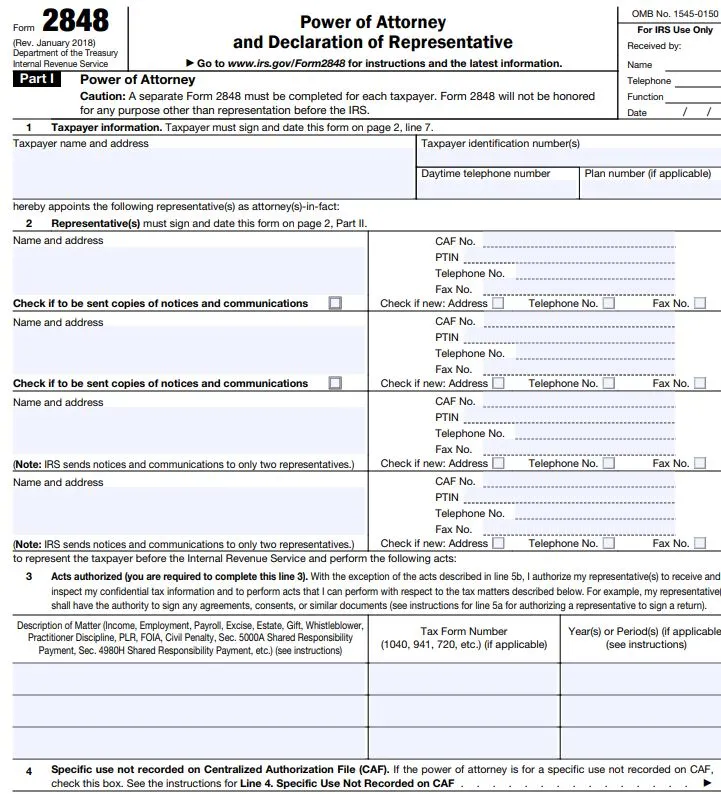
1. Enter the taxpayer’s information
- Provide the taxpayer’s name, address, phone number, and applicable taxpayer identification number, such as an SSN or EIN.
- If the taxpayer is a business or other entity, the person signing must have the proper authority and include their title or capacity.
- Make sure the details match IRS records to avoid processing issues.
2. Designate your representative
- Enter each representative’s name, address, CAF number, and other required professional identification details, including a PTIN when applicable.
- Use the representative’s existing CAF number. If they don’t have one, follow the current Form 2848 instructions.
- You can name multiple representatives, but generally, only two can receive copies of IRS notices and communications.
3. Enter the tax matters and periods
- Identify the tax matter, tax form number, and specific tax years or periods covered by the authorization.
- Avoid vague entries such as “All Years” or “All Future Periods.” Instead, list the relevant years, such as 2022 through 2024.
- For matters that don’t involve a specific tax year or period, follow the current IRS instructions.
4. Understand additional authorized acts
- Check which additional actions you want your representative to perform.
- Clearly identify any extra authority you’re granting and the representative it applies to.
- Grant only the authority needed for your situation.
5. Complete the Representative’s Declaration
- The representative must complete the applicable declaration section.
- Provide the required details about their eligibility to practice before the IRS, including professional credentials, jurisdiction, or enrollment information, as applicable.
- Check that all required identification numbers and credentials are included.
6. Sign and date the form correctly
- The taxpayer or authorized signer must sign and date the form, and the representative must complete and sign the applicable declaration.
- For online submissions, the IRS accepts electronic or handwritten signatures. Faxed or mailed forms require handwritten signatures.
- Before submitting, check that all required signatures and dates are present to avoid rejection.
Keep these instructions in mind and you’ll be ready to fill out the form.
Form 2848 vs. 8821: What’s the Difference?
One of the most important distinctions for taxpayers is Form 2848 vs. 8821.
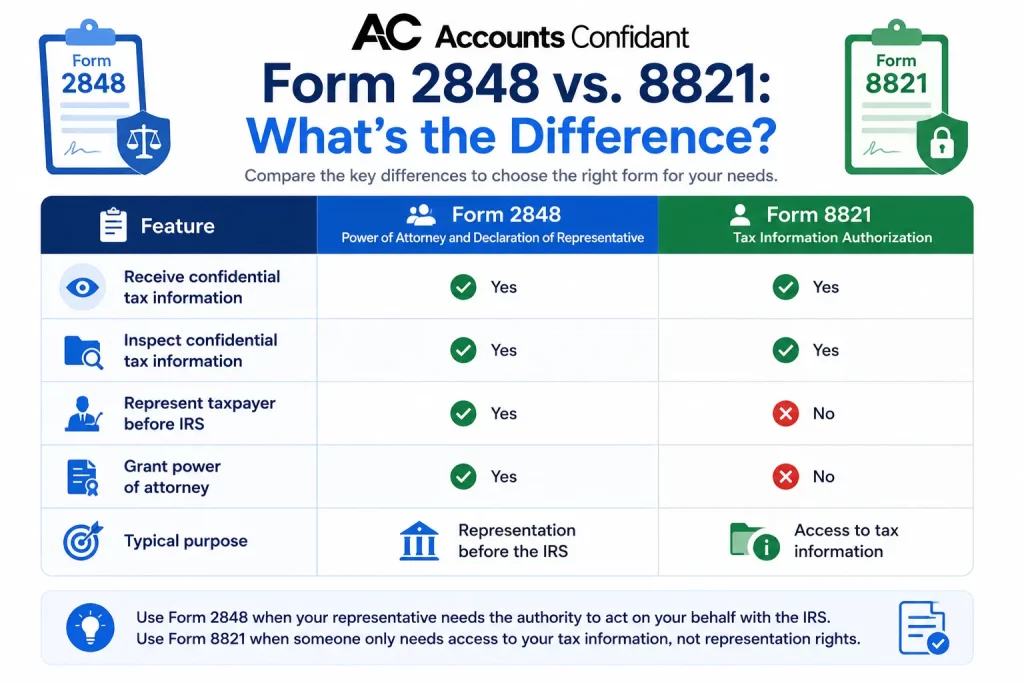
One of the most important distinctions for taxpayers is Form 2848 vs. 8821.
| Feature | Form 2848 | Form 8821 |
| Full name | Power of Attorney and Declaration of Representative | Tax Information Authorization |
| Receive confidential tax information | Yes | Yes |
| Inspect confidential tax information | Yes | Yes |
| Represent taxpayer before IRS | Yes | No |
| Grant power of attorney | Yes | No |
| Typical purpose | Representation before the IRS | Access to tax information |
Choosing the correct form matters because signing Form 8821 does not give someone the same representation authority as Form 2848.
How Can You Submit Form 2848?
The IRS currently provides three main options for submitting Forms 2848 and 8821:
- Tax Pro Account
- Online form submission
- Fax or mail
The right option depends on the taxpayer, tax matter, and circumstances.
If your Form 2848 rejection notice arrives, check the specific reason given and correct the problem before resubmitting.
Why Was My Form 2848 Rejected?
If your Form 2848 rejected notice arrives, check the specific reason given and correct the problem before resubmitting.
The IRS identifies several common reasons for rejection, including:
- Missing taxpayer signature or signature date
- Missing representative signature or signature date
- Nonspecific tax periods
- Missing representative designation
- Missing jurisdiction information
- Missing applicable bar, certification, registration, or enrollment number
- Missing title when a business taxpayer signs
- Checking the prior-authorization retention/revocation box without attaching the required copy of the prior power of attorney
For example, entering “All Years” instead of specifying the applicable years can cause a rejection. Similarly, if the representative’s professional information is incomplete, the IRS may be unable to process the authorization.
Review the form against the current IRS instructions rather than simply resubmitting the same document.
Also avoid submitting duplicates. The IRS currently advises taxpayers and representatives not to submit the same authorization online if it has already been faxed or mailed.
Common Mistakes to Avoid When Filing Form 2848
A few simple checks can help prevent unnecessary delays.
1. Using vague tax periods
Do not enter “All Years” or “All future periods.” Specify the applicable tax years or periods.
2. Missing signatures
Check that all required parties have signed and dated the form according to the submission method.
3. Entering incorrect representative information
Review the representative’s name, CAF number, PTIN when applicable, professional designation, jurisdiction, and identification number.
4. Choosing the wrong authorization form
If you need someone to represent you before the IRS, Form 2848 is generally the relevant authorization. If someone only needs to inspect or receive confidential tax information without representation authority, Form 8821 may be appropriate.
5. Using an outdated fax number
IRS fax numbers can change. Always check the latest Form 2848 instructions before faxing.
6. Submitting duplicate forms
If you have already faxed or mailed a Form 2848, do not submit the same form online.
Still facing issues? Accounts Confidant can provide you with the necessary guidance for IRS Form 2842!
Conclusion
Before submitting Form 2848, review the details and follow the latest IRS instructions to avoid delays. If your form is rejected, check the reason, correct the error, and resubmit it through the appropriate channel. A careful review can help ensure your authorization is processed without unnecessary complications.
Need A CPA?
With our free 30-day trial, you will get a personal team of CPA’s to track your finances, keep your books updated and make your tax complaint with minimum benefits!

Frequently Asked Questions About IRS Form 2848
What is IRS Form 2848 and do I need it?
IRS Form 2848 is the Power of Attorney and Declaration of Representative. It allows a taxpayer to authorize an eligible individual to represent them before the IRS and receive and inspect confidential tax information within the authorized scope. You generally need it when you want an eligible representative to act on your behalf in an IRS matter.
How do I fill out Form 2848 for my accountant?
Enter the taxpayer’s information, designate your accountant as the representative, provide the required representative information, specify the tax matter, tax form, and years or periods covered, complete applicable authorization sections, and provide the required signatures and dates. Review the current IRS instructions before submitting the form.
What’s the difference between Form 2848 and Form 8821?
Form 2848 authorizes an eligible individual to represent you before the IRS. Form 8821 authorizes someone to inspect or receive confidential tax information but does not grant power of attorney or representation authority.
Why was my Form 2848 rejected?
Common reasons include missing taxpayer or representative signatures, missing signature dates, nonspecific tax periods, missing representative designation or jurisdiction information, missing applicable professional identification numbers, and problems with retaining a prior power of attorney.
Can I file Form 2848 online instead of mailing it?
Yes. The IRS provides an online submission service for Forms 2848 and 8821. Qualifying individual taxpayer authorization requests can also be submitted through Tax Pro Account, which provides all-digital processing and real-time processing. Forms submitted through the standard online upload service can cover individual or business taxpayers and any tax matter or period.
How do I fill out Form 2848 to help my elderly parent with the IRS?
First, determine whether you qualify to represent your parent under IRS rules. If you qualify, complete the taxpayer and representative information, identify the specific tax matter and applicable periods, complete the required declaration, and obtain the required signatures. Being a family member alone does not automatically provide unlimited IRS representation authority.
What should I write for “years or periods” on Form 2848?
Enter the specific tax years or periods covered by the authorization. For example, you may identify individual years or a defined range when appropriate. Avoid vague descriptions such as “All Years” or “All future periods,” which the IRS identifies as common reasons for rejection.