

A “subscription payment failed” message in QuickBooks Online accounting software means Intuit could not collect your subscription fee. Your card may have expired, your billing details may be incorrect, or your bank may have declined the charge.
To resolve the problem, check your subscription status and payment history. If the charge failed, open Settings > Subscriptions and billing and update your payment method.
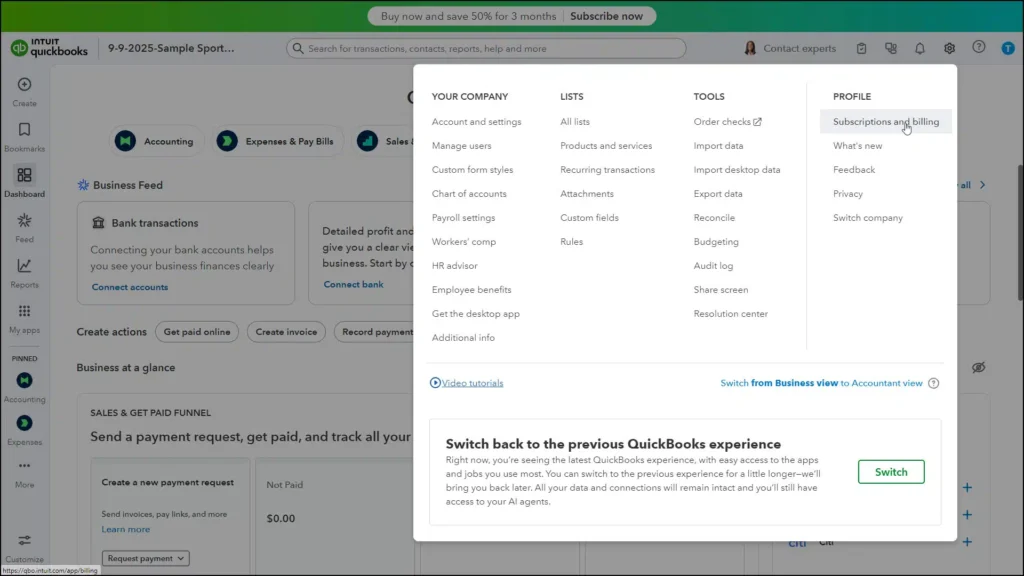
Before responding to a payment failure email, sign in through the official Intuit website to confirm that the notification is genuine.
This guide from Accounts Confidant covers US QuickBooks Online subscriptions billed directly by Intuit.
Accounts Confidant is an independent accounting and bookkeeping service provider and is not affiliated with Intuit.
Why Is Your QuickBooks Subscription Payment Failing?
A subscription charge can fail when your payment provider rejects the transaction. Problems with the billing form can also prevent you from updating your payment details.
Possible causes include:
- An expired, canceled, or replaced credit card.
- Incorrect card details or billing address.
- Insufficient funds or available credit.
- Bank restrictions on recurring payments.
- An unsupported payment method, such as a prepaid credit card.
- Temporary processing problems at your bank.
- Missing information in the subscription billing form.
A failed subscription payment is different from a declined customer invoice payment or vendor bill payment. It concerns the fee you pay to use the accounting software, rather than a transaction recorded in your books.
If your accounting subscription is active but your payroll service shows an inactive status, learn how to reactivate an inactive QuickBooks Payroll subscription.
Check Your Payment Status Before Trying Again
Review your billing history to find out whether the payment failed, is pending, or has already been completed.
Sign in through a computer browser, open Settings > Subscriptions and billing, and select View payment history. Compare the relevant invoice with your bank or credit card transactions.
| Payment or account status | What to do |
| Payment declined | Correct your billing details or contact your card issuer. |
| Charge appears as pending | Ask your bank whether it is a temporary authorization. |
| Payment completed but subscription inactive | Confirm the activation status before paying again. |
| Billing information cannot be edited | Check your administrator permissions and billing provider. |
| Subscription suspended | Confirm your payment status before resubscribing. |
| Subscription active but payment failure email received | Check whether the notification is genuine. |
If you manage multiple companies, confirm that you are viewing the subscription for the affected company. Each company has its own subscription.
You must also have Primary Admin or Company Admin access to update billing information. If you cannot access the correct company, follow our guide to resolving QuickBooks Online login problems.
How to Fix a Failed QuickBooks Subscription Payment
Once you confirm that the charge was unsuccessful, choose the solution that matches your billing problem. You do not need to complete every step.
1. Update Your QuickBooks Online Billing Information
Replace an expired or invalid payment method through your subscription settings.
- Sign in as the Primary Admin or Company Admin.
- Open Settings > Subscriptions and billing.
- Find Payment method and select Edit.
- Update your existing payment details or add a new payment method.
- Review the information and select Save.
According to Intuit’s subscription payment troubleshooting guide, account activation may take up to 24 hours after a billing update.
2. Verify Your Card Details and Billing Address
A valid credit card can still be declined if its billing address does not match the card issuer’s records.
Check your card number, expiration date, street address, city, state, and ZIP code.
For example, if you recently moved your office but your card is still registered to your previous address, enter the address currently held by your card issuer.
Intuit recommends completing all required billing fields, including the ZIP code’s four-digit extension. Certain symbols, such as @ or #, can also cause problems when entered in the billing address.
Your card’s billing address does not need to match the physical business address in your company settings.
3. Ask Your Bank to Authorize the Subscription Payment
Your card may work for everyday purchases but fail when used for automatic subscription renewals.
Contact your bank or card issuer with the date, merchant name, and amount of the attempted charge. Ask whether the transaction was declined because of a payment restriction, insufficient available credit, or another authorization problem.
Also confirm whether future recurring charges from Intuit are permitted.
For PayPal payments, check with PayPal or the financial institution connected to your account.
If your bank reports a temporary processing issue, wait a few hours before trying again.
4. Try Another Accepted Payment Method
When your current card continues to be rejected, another payment method may resolve the issue.
According to Intuit’s US billing documentation, accepted payment methods include:
- Visa
- Mastercard
- American Express
- Discover
- PayPal
- Direct debit or Automated Clearing House (ACH) payments
You can also try an eligible digital or virtual card. However, prepaid credit cards are not accepted under Intuit’s documented address verification requirements.
Payment options may vary depending on how your subscription is billed. Choose from the methods available in your account.
5. Update Your Billing Details in a Private Browser
A browser problem may prevent the billing page from loading or saving your payment details.
To test this in Google Chrome, open an Incognito window using Ctrl + Shift + N on Windows or Command + Shift + N on Mac.
Sign in to your company and try saving the billing information again.
If the form works in Incognito mode, stored browser data or an extension may be involved. Our guide to troubleshooting QuickBooks Online in Chrome explains how to investigate these problems.
Private browsing may resolve a billing form issue, but it cannot remove a bank-imposed payment restriction.
6. Retry the Payment and Confirm Processing
Intuit’s declined credit card guidance explains that a declined card is not automatically charged again without an update to the subscription information.
Once the reason for the decline is resolved, resubmit your existing card details or update your payment method.
Check your payment history afterward.
A pending card transaction does not always represent a completed subscription payment. It may be a temporary authorization used to verify your card.
For example, if your bank displays a completed $99 subscription charge and another pending Intuit transaction, the pending amount may be an authorization hold rather than a second payment.
These holds are typically removed within five days, according to Intuit’s subscription charges documentation.
If your bank confirms a completed payment but your subscription remains inactive beyond the activation period, contact Intuit before attempting another charge.
How to Fix QuickBooks Subscription Payment Error 81624
Error 81624 indicates that your bank has declined or blocked the subscription payment. It may also appear as error code -81624.
In addition to checking your card details and obtaining bank approval, verify that your contact number follows the required area-code format.
Error 81624 concerns payment authorization. It does not indicate a damaged company file or software installation.
If the problem continues after your bank confirms that the transaction is permitted, contact Intuit for an account-specific investigation.
Refer to Intuit’s official error 81624 troubleshooting instructions for additional guidance.
What Happens If Your QuickBooks Subscription Payment Remains Unpaid?
According to Intuit’s account access and data availability policy, users have 14 days to correct their billing information after a credit card decline. Full access remains available during this period.
After 14 days, an unresolved credit card payment failure results in account suspension. You must resubscribe to restore access.
To resubscribe, sign in through a computer browser, open Settings > Subscriptions and billing, and select Resubscribe. Follow the available billing instructions.
Intuit allows payment details to be updated during resubscription. However, some payment arrangements may require you to use the previous payment type before switching to another.
Under Intuit’s resubscription policy, billing occurs overnight rather than immediately.
After resubscribing, review the next charge date. Contact Intuit if it displays a date in the past.
For other subscription expiration or licensing problems, see our guide to restoring an expired QuickBooks subscription.
Is the QuickBooks Subscription Payment Failed Email a Scam?
A subscription payment failure email can be legitimate, but scammers may send fake renewal notices to collect passwords, verification codes, or credit card information.
Before responding to an unexpected payment warning:
- Open the official Intuit website separately.
- Sign in to your account.
- Review your subscription status and payment history.
- Check whether the account displays a billing warning.
Avoid clicking links or opening attachments in suspicious emails. Be cautious of unfamiliar website addresses, urgent payment demands, and requests for sensitive information.
An email containing your correct business name or subscription details can still be fraudulent.
Forward suspicious messages to security@intuit.com, then delete them.
If you have already entered your password on a suspicious website, change it immediately, review your account activity, and enable multi-factor authentication. Contact your card issuer if you shared payment information.
Read Intuit’s phishing prevention and reporting guidance for further security instructions.
What to Do If Intuit Still Cannot Process Your Payment
Contact Intuit directly if your billing information is correct and your bank confirms that there are no payment restrictions.
An account-specific investigation may be necessary when:
- Multiple valid payment methods are rejected.
- Your bank cannot find the attempted charge.
- A completed payment has not restored your subscription.
- Your billing history contains unexplained duplicate charges.
- You cannot resubscribe after a payment failure.
To reach Intuit, sign in to your account and open Help (?). Use the available contact options or follow Intuit’s official customer support instructions.
Have your subscription plan, attempted payment date, amount, and exact error message available.
Never send your full card number, security code, password, or verification codes through unsecured messages.
Intuit is responsible for investigating its subscription charges, resolving billing adjustments, and restoring access to suspended accounts.
Conclusion
If your subscription payment has been completed but your account remains inactive after the activation period, contact Intuit with your payment confirmation. Avoid making another payment until the existing charge has been investigated.
Frequently Asked Questions
Why does my Subscription Payment Failed Error in QuickBooks every month?
Your bank may restrict recurring subscription charges, or your payment method may have insufficient available credit on the renewal date. Ask your issuer whether future Intuit charges are permitted. If the problem continues, contact Intuit or try another accepted payment method.
Why does QuickBooks decline my credit card when I have enough money?
Available funds are only one factor in payment approval. Incorrect billing details, fraud prevention rules, and transaction restrictions can also cause a decline. Your card issuer can help identify the reason.
Why can’t I change my payment method if my accountant manages the subscription?
Your accountant or accounting firm may control the subscription billing. Contact them to update the payment information. A Primary Admin can also follow Intuit’s billing transfer instructions to take responsibility for future payments.
Can I pay my QuickBooks subscription with an international credit card?
Intuit’s documented US subscription billing process requires a US card billing address, excluding US territories. If your card is registered in another country, check the payment requirements for your regional subscription.
How do I fix a failed subscription payment through Apple or Google Play?
If your subscription is billed through the Apple App Store or Google Play Store, update your payment method through the respective provider. The direct Intuit billing instructions do not apply to these subscriptions unless you have transferred billing to Intuit.
Will a failed QuickBooks subscription payment delete my accounting data?
A declined payment does not immediately delete your accounting records. However, continued nonpayment can result in account suspension.
Intuit has a separate cancellation policy that provides one year of read-only access following cancellation of a paid QuickBooks Online subscription.
Can QuickBooks Tool Hub fix a subscription payment failure?
No. The QuickBooks Tool Hub utility addresses Desktop software problems. An Online subscription payment failure requires billing corrections, payment authorization, or assistance from the billing provider.
Why did my QuickBooks subscription payment increase before the renewal failed?
A promotional discount may have ended, your subscription plan may have changed, or sales tax may have increased the total charge. Review the latest invoice and confirm that your payment method has enough available funds or credit.
Trademark notice: Intuit and QuickBooks are registered trademarks of Intuit Inc. Accounts Confidant is an independent accounting and bookkeeping service provider and is not affiliated with, sponsored by, endorsed by, or approved by Intuit Inc. This educational article has not been approved by Intuit.
