If you receive a W2 Form, it shows the wages your employer reported to the IRS and the federal, Social Security, Medicare, state, and local taxes withheld from your pay. If you are an employer, preparing W-2s correctly is an important year-end payroll requirement.
The 2026 Form W-2 also has several important changes. The IRS added new Box 12 codes for qualified tips, qualified overtime compensation, and employer contributions to Trump Accounts. Box 14 was also divided into Box 14a and Box 14b, with Box 14b used for Treasury Tipped Occupation Codes.
This guide explains what Form W-2 is, who must file it, the 2026 filing requirements, how to read the major boxes, W-2 vs. 1099, electronic filing, penalties, missing W-2s, and how to correct an incorrect form.
Important date clarification: A “2026 W-2 deadline” can mean either the deadline that occurred in 2026 for 2025 wages, or the deadline for 2026 wages, which occurs in 2027. This article explains both.
What Is Form W-2?
Form W-2, Wage and Tax Statement, reports an employee’s wages and the taxes withheld from those wages during a calendar year. Employers provide copies to employees and file the required information with the Social Security Administration (SSA).
A W-2 may show:
- Wages and salary
- Reported tips
- Federal income tax withheld
- Social Security wages
- Social Security tax withheld
- Medicare wages and tips
- Medicare tax withheld
- Retirement contributions
- Health benefit information
- Dependent care benefits
- State income tax information
- Local income tax information
- Other required compensation information
Employees generally use the information from their W-2 when preparing their federal and state income tax returns.
For employers, the W-2 is part of the year-end wage reporting process.
Who Must File Form W-2?
Employers generally must file a Form W-2 for each employee who meets the IRS reporting rules. This includes situations where the employer withheld federal income, Social Security, or Medicare tax, and certain situations where wages reach the applicable reporting threshold.
For wages paid during 2026, the IRS says an employer must generally prepare Form W-2 when:
- Federal income tax was withheld, regardless of the wage amount.
- Social Security or Medicare tax was withheld.
- Federal income tax would generally have been withheld under the applicable rules.
- The employee received $2,000 or more in wages when no federal income, Social Security, or Medicare tax was withheld.
The $2,000 reporting threshold is a 2026 change. It increased from $600 for wages paid after 2025 and is scheduled to be adjusted for inflation after 2026.
Do all employees get a W-2?
Not necessarily.
Most regular employees receive a W-2, but special rules apply to certain workers and payments. The key issue is whether the person is an employee and whether the payment is subject to the W-2 reporting rules.
A worker who is properly classified as an independent contractor generally receives a 1099-NEC, not a W-2.
When Is the W-2 Deadline for 2026?
For W-2s covering wages paid in 2025, the deadline in 2026 was February 2, 2026, because January 31, 2026 fell on a Saturday. For wages paid during 2026, the W-2 deadline is February 1, 2027.
This distinction matters because “W-2 deadline 2026” can refer to two different filing years.
W-2 deadline calendar
| Wages reported | Employee deadline | SSA filing deadline |
| 2025 wages | February 2, 2026 | February 2, 2026 |
| 2026 wages | February 1, 2027 | February 1, 2027 |
For 2026 wages, the IRS instructions currently state that employers must furnish employee copies and file with the SSA by February 1, 2027.
What Are the W-2 Copies?
The different W-2 copies are used by different people or agencies, so an employee does not need every copy that an employer prepares.
Common W-2 copies include:
| Copy | Main purpose |
| Copy A | Filed with the SSA |
| Copy B | Employee uses for federal income tax return when required |
| Copy C | Employee’s records |
| Copy 1 | State, city, or local tax department when required |
| Copy 2 | Employee uses for state or local tax return when required |
| Copy D | Employer records |
The IRS instructions also require employers to keep certain W-2 and W-3 records for at least four years.
How to Read Form W-2 Box by Box
The most important W-2 boxes for employees are Boxes 1 through 6, while Boxes 12 through 20 provide additional retirement, benefit, state, and local tax information.
You do not need to understand every box to file your tax return, but knowing the major boxes helps you identify errors.
What Does Box 1 on Form W-2 Mean?
Box 1 shows your taxable wages, tips, and other compensation for federal income tax purposes. It is not always the same as your gross salary or your Social Security wages.
Box 1 can include:
- Salary
- Wages
- Bonuses
- Taxable tips
- Certain taxable benefits
- Certain noncash compensation
- Other taxable compensation
Some pre-tax benefits and retirement contributions can reduce the amount shown in Box 1.
Example
Suppose your annual salary is $70,000, but you make certain pre-tax contributions through your employer’s benefit plans.
Your Box 1 amount may be lower than $70,000.
That does not automatically mean your employer underreported your salary. Box 1 follows federal taxable-wage rules.
What Does Box 2 on Form W-2 Mean?
Box 2 shows the federal income tax your employer withheld from your pay during the year.
This amount is not your total federal tax liability.
Instead, it represents federal income tax that was already withheld and generally gets credited against your federal income tax when you file your return.
For example:
- Box 1 = $70,000
- Box 2 = $8,000
The $8,000 is the federal income tax already withheld from your pay.
Your actual tax liability is determined when you file your federal tax return.
What Does Box 3 on Form W-2 Mean?
Box 3 reports wages subject to Social Security tax. The amount can differ from Box 1 because Social Security has its own wage rules and annual wage base.
For 2026, the Social Security wage base is $184,500.
The total of Box 3 and Box 7 generally cannot exceed that wage base.
What Does Box 4 on Form W-2 Mean?
Box 4 shows the Social Security tax withheld from your wages, including Social Security tax related to reported tips.
For 2026, the maximum Social Security tax withholding is $11,439, based on the $184,500 wage base multiplied by 6.2%.
If you worked for multiple employers during the year, you could have more Social Security tax withheld than the annual maximum because each employer generally calculates withholding separately.
The excess may be claimed as a credit on your federal tax return when applicable.
What Does Box 5 on Form W-2 Mean?
Box 5 shows wages and tips subject to Medicare tax. Unlike Social Security wages, Medicare wages do not have the same annual wage-base limit.
Because Medicare has no Social Security-style wage cap, Box 5 can be higher than Box 3 for higher-income employees.
For example:
- Box 3: $184,500
- Box 5: $210,000
That difference can be normal.
What Does Box 6 on Form W-2 Mean?
Box 6 shows the Medicare tax withheld from your wages, including applicable Additional Medicare Tax.
The standard employee Medicare tax rate is 1.45%. Employers must also withhold an additional 0.9% Additional Medicare Tax from an employee’s wages above $200,000.
The additional 0.9% tax applies to the employee; there is no matching employer portion for Additional Medicare Tax.
What Do Boxes 7 and 8 Mean?
Box 7 reports Social Security tips that the employee reported to the employer, while Box 8 reports allocated tips when applicable.
Box 7 — Social Security tips
This box contains tips reported by the employee to the employer.
The tips are also included in the appropriate wage calculations.
Box 8 — Allocated tips
Allocated tips are amounts an employer assigns to certain employees under the applicable tip-reporting rules.
Box 8 is not the same as Box 7 and should not simply be added to Box 1 as if it were regular reported wages.
What Are Boxes 10 and 11?
Box 10 generally reports dependent care benefits, while Box 11 is used for certain nonqualified plan distributions.
Box 10 — Dependent care benefits
This box reports certain employer-provided dependent care benefits.
These benefits can include amounts provided through a dependent care assistance program.
Box 11 — Nonqualified plans
Box 11 is used to report certain distributions from nonqualified plans.
If you see an amount in this box, review the related instructions or information supplied by your employer because the tax treatment can depend on the type of plan.
What Are the Box 12 Codes on a W-2?
Box 12 uses letter codes to identify specific benefits, contributions, taxes, or other payroll amounts.
Some common Box 12 codes include:
| Code | What it generally reports |
| D | 401(k) elective deferrals |
| E | 403(b) elective deferrals |
| F | SEP contributions |
| G | 457(b) contributions |
| H | Certain 501(c)(18) contributions |
| J | Nontaxable sick pay |
| L | Certain employee business expense reimbursements |
| P | Certain excludable moving expense reimbursements |
| T | Adoption benefits |
| W | HSA contributions |
| AA | Designated Roth 401(k) contributions |
| BB | Designated Roth 403(b) contributions |
| DD | Cost of employer-sponsored health coverage |
| EE | Designated Roth governmental 457(b) contributions |
| TA | Employer contributions to certain Trump Accounts |
| TP | Cash tips reported to the employer |
| TT | Qualified overtime compensation |
The 2026 W-2 instructions specifically add TA, TP, and TT.
What Are the New 2026 W-2 Box 12 Codes?
The 2026 Form W-2 adds three important Box 12 codes: TA, TP, and TT.
These changes come from Public Law 119-21 and affect employers with applicable employee compensation or contributions.
Code TP — Cash tips
Code TP reports the total amount of cash tips reported to the employer.
This is separate from simply looking at the employee’s regular wages.
The IRS says the amount reported with Code TP represents the total cash tips reported to the employer.
Code TT — Qualified overtime compensation
Code TT reports the total amount of qualified overtime compensation.
For purposes of this reporting rule, qualified overtime is the portion of qualifying overtime compensation above the employee’s regular rate. The IRS gives the example that only the “half” portion of time-and-a-half compensation is reported using Code TT.
The IRS also states that employers must report qualified overtime compensation beginning in 2026.
Code TA — Trump Account contributions
Code TA reports qualifying employer contributions made to a Trump Account for an employee or the employee’s dependent under a section 128 Trump Account contribution program.
Employees should not assume that the amount shown in Code TA is ordinary taxable wages simply because it appears on the W-2. The code identifies a specific type of employer contribution.
What Changed in Box 14 for 2026?
The 2026 W-2 changed Box 14 by splitting it into Box 14a and Box 14b.
The IRS states that:
- Box 14a — Other continues to report information previously reported in Box 14.
- Box 14b — Treasury Tipped Occupation Code(s) is used for the new tipped occupation reporting requirement.
What is Box 14a?
Box 14a can contain other information such as:
- State disability insurance taxes
- Union dues
- Certain health insurance amounts
- Educational assistance
- Other employer-provided information
The employer should label each item reported in Box 14a.
What is Box 14b?
Box 14b reports Treasury Tipped Occupation Code(s) when applicable.
When cash tips are reported using Code TP, the employer must also complete Box 14b with the applicable Treasury Tipped Occupation Code(s). The IRS allows up to two occupation codes in that box.
What Is the 2026 W-2 Wage Reporting Threshold?
For wages paid after 2025, the general W-2 reporting threshold increased from $600 to $2,000 when no federal income, Social Security, or Medicare tax was withheld.
The change applies to wages paid during 2026 and was made under Public Law 119-21. The IRS says the threshold will be adjusted for inflation after 2026.
This does not mean employers can stop preparing W-2s for employees earning less than $2,000 in every situation.
For example, if federal income tax, Social Security tax, or Medicare tax was withheld, the employer may still have a W-2 reporting obligation regardless of the wage amount.
W-2 vs. 1099: What’s the Difference?
A W-2 generally reports employee wages, while Form 1099-NEC generally reports qualifying nonemployee compensation.
| Form W-2 | Form 1099-NEC |
| Generally used for employees | Generally used for independent contractors |
| Reports employee wages | Reports nonemployee compensation |
| Employer handles applicable payroll withholding | Contractor generally handles their own income and self-employment taxes |
| Reports Social Security and Medicare wages | Does not function as an employee wage statement |
| Used for payroll reporting | Used for information reporting |
The key issue is worker classification
An employer cannot choose between W-2 and 1099 simply because one form is easier.
Worker classification depends on the actual working relationship, including factors involving behavioral control, financial control, and the relationship between the parties.
For difficult classification situations, employers can review the IRS rules or consider Form SS-8, which allows the IRS to determine a worker’s federal employment tax status.
How Does Form W-2 Differ From Form 1099?
The biggest difference is the relationship between the payer and the worker.
W-2 employee
An employee generally:
- Works as part of the employer’s business.
- Has taxes withheld through payroll.
- Receives a W-2.
- Has Social Security and Medicare taxes handled through payroll.
1099 contractor
An independent contractor generally:
- Operates independently.
- Controls more aspects of how the work is performed.
- Receives qualifying nonemployee compensation.
- Generally handles their own income and self-employment tax obligations.
Simply receiving a 1099 does not legally make someone an independent contractor.
Do Employers Have to File W-2s Electronically?
Yes, employers generally must e-file their information returns when they have 10 or more information returns in total.
The 10-return threshold applies by adding together applicable information returns, including W-2s and various 1099 forms. The rule has applied since 2024.
For example, suppose a business has:
- 7 W-2s
- 4 1099-NECs
That is 11 information returns.
The employer generally must e-file the applicable information returns unless an IRS waiver or exemption applies.
How can employers e-file W-2s?
The SSA provides Business Services Online (BSO) for electronic wage reporting.
Employers can:
- Create W-2s online.
- Submit W-2s electronically.
- Create W-2c corrections.
- Upload wage files.
- Check wage-reporting status.
The SSA also offers W-2 Online for eligible filing situations.
What Is Form W-3?
Form W-3 is the Transmittal of Wage and Tax Statements used to transmit Copy A of paper Forms W-2 to the SSA.
Employers required to file W-2s generally also need Form W-3 when filing paper Copy A forms.
If you e-file through SSA systems, the process is different and the W-3 information can be generated electronically.
The SSA’s BSO system can generate Form W-3 based on the W-2 information submitted through the system.
How to Fill Out Form W-2
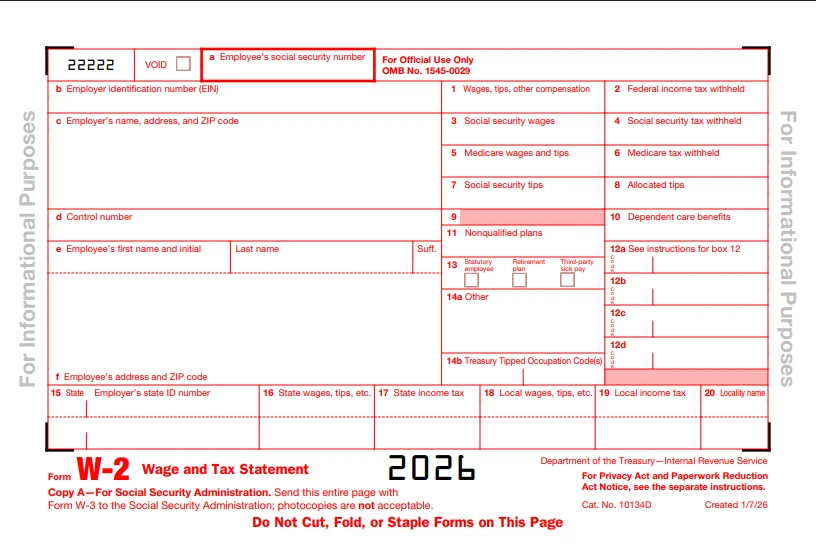
Start with accurate employee and employer information, then reconcile the wage and withholding amounts with your payroll records before filing.
Step 1: Enter the employee’s SSN
Box a contains the employee’s Social Security number.
The IRS specifically warns employers not to use an ITIN instead of an SSN for employee identification or W-2 reporting.
Step 2: Enter the employer EIN
Box b contains the employer’s EIN.
The EIN should match the EIN used on the employer’s applicable federal employment tax returns.
Step 3: Enter employer information
Box c contains:
- Employer name
- Address
- ZIP code
Step 4: Enter employee information
Boxes e and f contain the employee’s name and address.
Use the employee’s name as shown on the Social Security card.
Step 5: Enter wage and tax amounts
Complete the applicable wage and withholding boxes, including:
- Box 1
- Box 2
- Box 3
- Box 4
- Box 5
- Box 6
- Box 7
- Other applicable boxes
Step 6: Complete Box 12 and Box 14
Add the applicable codes and amounts.
For 2026, check whether TA, TP, or TT applies.
If Code TP is used, review the Box 14b TTOC requirement.
Step 7: Review state and local information
Complete Boxes 15 through 20 when applicable.
Step 8: Reconcile before filing
Compare the W-2 totals against:
- Payroll records
- Form 941 records
- Payroll tax deposits
- Employee wage records
- State payroll records
This final reconciliation can catch many W-2 errors before the form reaches the SSA.
What Happens If a W-2 Is Wrong?
If an employer discovers an error on a W-2 that was already filed with the SSA, the employer generally uses Form W-2c to correct it.
Common errors include:
- Incorrect SSN
- Incorrect employee name
- Wrong wage amount
- Wrong Social Security wages
- Wrong Medicare wages
- Incorrect withholding
- Wrong Box 12 information
- Incorrect tax year
- Incorrect EIN
The IRS says employers should file Form W-2c and W-3c as soon as possible after discovering an error and provide the corrected W-2 information to the employee as soon as possible.
What Is Form W-2c?
Form W-2c is the Corrected Wage and Tax Statement used to correct errors on a previously filed Form W-2.
For example, suppose an employer accidentally reports:
- Correct wages: $55,000
- W-2 filed: $65,000
The employer should not simply issue another W-2 showing $55,000.
Instead, the employer should follow the IRS correction process using Form W-2c, and a corresponding Form W-3c may be required.
What if the error is found before filing?
If a W-2 has not yet been filed with the SSA and an error is discovered, the correction process can be different.
The IRS instructions allow an employer to mark an incorrect W-2 as VOID when preparing a replacement form before filing.
Do not use the VOID procedure to replace a W-2 that has already been properly filed with the SSA. In that situation, review the W-2c correction rules.
What If the W-2 Has the Wrong Name or SSN?
A wrong employee name or SSN should be corrected promptly because the SSA uses this information to match wage records to the employee.
If only the employee’s name or SSN needs correction, the IRS provides specific W-2c instructions.
An employer should not simply change the information on an old W-2 and hand it back to the employee if the original was already filed with the SSA.
What If I Don’t Receive My W-2?
If you do not receive your W-2, contact your employer first and ask for a replacement or electronic copy.
If the employer does not provide the W-2, the IRS recommends additional steps.
You should generally:
- Contact your employer.
- Ask the employer to confirm your mailing address.
- Request another copy.
- If necessary, contact the IRS for assistance.
- If you still cannot obtain the form, consider using Form 4852.
Form 4852 is the Substitute for Form W-2 and can be used when an employer or payer does not provide a W-2 or has issued an incorrect W-2.
What Is Form 4852?
Form 4852 allows a taxpayer to substitute for a missing or incorrect Form W-2 when the employer or payer has not provided a correct form.
The taxpayer generally uses available records, such as:
- Final pay stub
- Payroll records
- Year-to-date earnings
- Federal tax withholding information
to estimate the amounts that would otherwise appear on the W-2.
The IRS specifically identifies Form 4852 as a substitute for Form W-2, W-2c, and certain Form 1099-R situations.
This should not be the first step. Try to obtain the actual W-2 from the employer before using a substitute form.
How Can I Get a Copy of an Old W-2?
Start with your former employer because the employer is generally the fastest source for a replacement W-2.
You may also be able to obtain wage information through IRS records or tax-return records, depending on what you need.
For example, if you only need to confirm income that was reported on a previous tax return, your tax return or IRS transcript may provide useful information.
However, if you need the actual W-2 document, contact the employer first.
What Are the Penalties for Late W-2 Filing?
Employers can face a separate penalty for failing to file a correct W-2 on time and for failing to furnish a correct employee statement on time.
For information returns due in 2026, the IRS lists these penalty amounts:
| Timing | Penalty per return or statement |
| Up to 30 days late | $60 |
| 31 days late through August 1 | $130 |
| After August 1 or not filed | $340 |
| Intentional disregard | $680 |
The IRS notes that maximum annual penalties can vary based on the size of the business.
Example
A business has 50 W-2s that were not filed correctly and the applicable penalty reaches $340 per return.
50 × $340 = $17,000
There can also be a separate penalty for failing to furnish correct employee statements.
This is why employers should correct W-2 problems as soon as they discover them.
What Are the Most Common W-2 Mistakes?
Most W-2 problems come from incorrect employee information, payroll reconciliation errors, wrong Box 12 reporting, missed deadlines, and incorrect worker classification.
1. Incorrect SSN
A single incorrect digit can cause a wage-reporting mismatch.
2. Incorrect employee name
The name should match the employee’s Social Security records.
3. Box 1 does not match payroll records
The employer should reconcile taxable wages before filing.
4. Confusing Box 3 with Box 5
Social Security wages and Medicare wages follow different rules.
5. Missing Box 12 codes
For 2026, employers need to review the new TA, TP, and TT requirements.
6. Missing Box 14b information
If applicable cash tips are reported with Code TP, Box 14b must also be completed with the required Treasury Tipped Occupation Code(s).
7. Using an ITIN instead of an SSN
The IRS specifically states that an ITIN should not be used in Box a as an employee SSN.
8. Filing fewer than 10 returns by paper when e-filing is required
The 10-return rule counts W-2s together with other covered information returns.
9. Issuing a 1099 when the worker is actually an employee
Worker classification should be based on the actual relationship, not simply the payment method.
10. Waiting too long to correct an error
The IRS instructs employers to file W-2c corrections as soon as possible after discovering errors.
2026 W-2 Compliance Checklist for Employers
A year-end W-2 checklist can help employers catch payroll and reporting problems before filing with the SSA.
Employee information
- Confirm employee legal names.
- Verify SSNs.
- Check employee addresses.
- Confirm state and local information.
Payroll information
- Reconcile gross wages.
- Verify federal taxable wages.
- Verify Social Security wages.
- Verify Medicare wages.
- Verify federal withholding.
- Verify Social Security withholding.
- Verify Medicare withholding.
- Check reported tips.
2026-specific items
- Check whether Code TP applies.
- Check whether Code TT applies.
- Check whether Code TA applies.
- Review Box 14a.
- Review Box 14b when applicable.
- Confirm TTOC reporting for applicable tipped employees.
Filing
- Determine whether e-filing is required.
- Check the SSA deadline.
- Furnish employee copies on time.
- Reconcile W-2 totals with payroll tax returns.
- Keep required records.
- Correct errors promptly.
W-2 Case Study: A Small Business Finds Three Payroll Errors
Consider a business with 35 employees preparing its 2026 W-2s.
During the final payroll review, the payroll administrator finds three issues.
Error 1: Wrong SSN
One employee’s SSN contains a transposed digit.
Because the W-2 has not yet been filed with the SSA, the payroll team corrects the form before submission.
Error 2: Qualified overtime
Another employee received qualifying overtime compensation during 2026.
The payroll team checks the 2026 reporting rules and determines that the applicable amount must be reported using Box 12 Code TT.
Error 3: Reported cash tips
A restaurant employee reported cash tips during the year.
The employer determines that the 2026 W-2 must include the applicable cash-tip amount using Code TP and must also complete Box 14b with the required Treasury Tipped Occupation Code(s).
What this example shows
A W-2 review should not stop at Boxes 1 and 2.
For 2026, employers need to review the new reporting requirements, especially for tipped employees and employees receiving qualifying overtime or applicable Trump Account contributions.
W-2 Filing Process: A Simple Step-by-Step Guide
The safest approach is to build the W-2 from reconciled payroll data rather than manually copying numbers from individual paychecks.
Step 1: Close the payroll year
Make sure all 2026 payroll transactions are recorded.
Step 2: Reconcile payroll
Compare payroll records with applicable employment tax filings.
Step 3: Verify employee information
Check names, SSNs, addresses, and state information.
Step 4: Review taxable wages
Confirm Box 1 and the applicable Social Security and Medicare wages.
Step 5: Review benefits and deductions
Check retirement plans, health benefits, dependent care, HSA contributions, and other applicable amounts.
Step 6: Review Box 12
Check traditional codes and the new 2026 codes:
- TA
- TP
- TT
Step 7: Review Box 14
Use Box 14a for applicable “Other” information and Box 14b for Treasury Tipped Occupation Codes when required.
Step 8: Determine filing method
If the employer has at least 10 applicable information returns, e-filing is generally required unless an IRS waiver or exemption applies.
Step 9: File with SSA
Submit the W-2 information by the applicable deadline.
Step 10: Furnish employee copies
Give employees their copies by the required date.
Can Employees Receive Their W-2 Electronically?
Yes. Employers can furnish W-2 statements electronically when the applicable IRS consent and electronic-delivery requirements are met.
Electronic delivery can make it easier for employees to access their forms, especially when they move or work remotely.
However, simply emailing a PDF without following the applicable electronic furnishing rules is not enough.
Employers should follow the IRS requirements for electronic W-2 statements. The 2026 instructions specifically discuss electronic statements and corrected electronic W-2s.
Does a W-2 Show Your Gross Salary?
Not necessarily. Box 1 shows federal taxable wages, not simply your stated annual salary or total gross pay.
For example, an employee might have:
- Annual salary: $80,000
- Pre-tax retirement contribution: $5,000
- Other pre-tax deductions
The W-2 Box 1 amount can therefore be different from the employee’s gross salary.
Other boxes can also show different amounts because Social Security and Medicare have their own wage rules.
Why Is Box 3 Different From Box 1?
Box 3 and Box 1 can differ because they are based on different tax rules.
Box 1 generally represents federal taxable wages.
Box 3 represents wages subject to Social Security tax.
Certain retirement contributions and other payroll adjustments can cause the amounts to differ. The Social Security wage base can also limit Box 3.
For 2026, the Social Security wage base is $184,500.
Why Is Box 5 Higher Than Box 3?
Box 5 can be higher than Box 3 because Medicare wages do not have the same annual wage limit as Social Security wages.
For example, a high-income employee might have:
- Box 3: $184,500
- Box 5: $240,000
That can be correct because Medicare tax continues to apply beyond the Social Security wage base.
What Should You Do If Your W-2 Is Incorrect?
Do not change the W-2 yourself. Ask the employer to review the error and issue a corrected W-2 when necessary.
The correct process depends on the type of error and whether the original W-2 has already been filed with the SSA.
If the employer has not filed it
Ask the employer to correct the original form before submission.
If the employer already filed it
The employer may need to file Form W-2c and provide the corrected information to you.
If you cannot get a corrected W-2
Keep your payroll records and contact the IRS if necessary. If the issue cannot be resolved, Form 4852 may be available as a substitute.
W-2 Form 2026 PDF: Where Can You Get It?
The official 2026 Form W-2 and instructions are available through the IRS website.
The IRS currently lists the 2026 Form W-2 and the 2026 General Instructions for Forms W-2 and W-3 among its current forms and instructions.
For employers, it is better to use the current IRS/SSA specifications or approved payroll software rather than downloading an old W-2 template from an unrelated website.
The 2026 version contains changes that older templates may not support, including the new Box 12 codes and revised Box 14 structure.
Final W-2 Checklist
For employees, the most important step is to compare the W-2 with your final pay records. For employers, the priority is to reconcile payroll, verify employee information, apply the 2026 reporting changes, and file on time.
If you are an employee:
- Check your name.
- Check your SSN.
- Compare Box 1 with your records.
- Review Box 2.
- Check Social Security and Medicare amounts.
- Review Box 12 codes.
- Review state and local information.
- Contact your employer if something looks wrong.
- Request a corrected W-2 when necessary.
If you are an employer:
- Reconcile payroll.
- Verify employee SSNs.
- Confirm taxable wages.
- Review withholding.
- Check Box 12 codes.
- Review Box 14a and 14b.
- Check the 10-return e-filing rule.
- File with the SSA on time.
- Furnish employee copies on time.
- Correct errors promptly with W-2c when required.
The biggest 2026 changes to keep in mind are the $2,000 wage-reporting threshold, the new Box 12 codes TA, TP, and TT, and the new Box 14a/14b structure.
Frequently Asked Questions
What is IRS Form W-2?
Form W-2 is the Wage and Tax Statement that reports an employee’s wages and applicable taxes withheld during the year.
When is the W-2 deadline for 2026?
For 2025 wages, the 2026 deadline was February 2, 2026. For 2026 wages, the current deadline is February 1, 2027.
What is Box 1 on a W-2?
Box 1 reports federal taxable wages, tips, and other compensation.
What is Box 2 on a W-2?
Box 2 reports federal income tax withheld from your wages.
What are the new 2026 Box 12 codes?
The new 2026 codes are TA, TP, and TT for qualifying Trump Account employer contributions, reported cash tips, and qualified overtime compensation.
What is Box 14b on the 2026 W-2?
Box 14b is used to report Treasury Tipped Occupation Code(s) when applicable.
Do employers have to file W-2s electronically?
Generally, employers with 10 or more total applicable information returns must e-file unless an IRS waiver or exemption applies.
What if I lose my W-2?
Contact your employer and request another copy. If you cannot obtain it, Form 4852 may be used in qualifying circumstances.
What is Form W-2c?
Form W-2c is used to correct an incorrect W-2 that was previously filed with the SSA.
What happens if an employer files a W-2 late?
The IRS can assess penalties based on how late the information return is filed or furnished. For returns due in 2026, the listed penalty levels range from $60 to $680 per return or statement, depending on the circumstances.
Is a W-2 the same as a 1099?
No, A W-2 generally reports employee wages, while a 1099-NEC generally reports qualifying nonemployee compensation.