If you can’t sign in to your Intuit account because you forgot your password, lost your phone, or no longer have access to your registered email, you can recover your account through Intuit’s official recovery process.
There are two main ways to recover an Intuit account:
- Using your email or phone number: Receive a verification code and follow the prompts to regain access.
- Using the Intuit Account Recovery Request form: Submit proof of identity when you cannot access your registered verification methods.
These methods apply to Intuit accounts used with products such as QuickBooks Online, QuickBooks Payroll, QuickBooks Workforce, and TurboTax. The exact steps may vary depending on the product and your account’s security settings.
Official recovery links:
How Do You Recover an Intuit Account?
The correct recovery method depends on why you cannot access your account.
| Your situation | What you should do |
| Forgot your Intuit password | Reset it using your registered email or phone number. |
| Forgot your Intuit user ID | Try recovering it with the email or phone number linked to your account. |
| Lost access to your registered phone number | Use another available verification method or submit an account recovery request. |
| Cannot access your registered email or phone | Complete the official identity-based recovery form. |
| Intuit verification code is not working | Request a new code and use the most recent one. |
| Account recovery request was denied | Review the reason for rejection and correct the information or documents. |
| Previous QuickBooks primary admin is unavailable | Use Intuit’s separate primary-admin access request process. |
Start with the standard verification process if your registered email or phone number still works. You generally won’t need to submit identification documents unless Intuit cannot verify your identity through the available methods.
How to Recover an Intuit Account Using Email or Phone
You can recover your Intuit account using a verification code sent to the email address or phone number linked to your account.
This is the simplest option if you’ve forgotten your password or user ID but still have access to at least one registered contact method.
Follow these steps:
- Open the official Intuit sign-in page.
- Select I forgot my user ID or Password, if that option appears.

- Enter the email address or phone number associated with your Intuit account.
- Select Continue.
- Choose an available verification method, such as email or text message.
- Check your email inbox or text messages for the verification code.
- Enter the code on the Intuit verification screen.
- Follow the instructions to reset your password or complete sign-in.
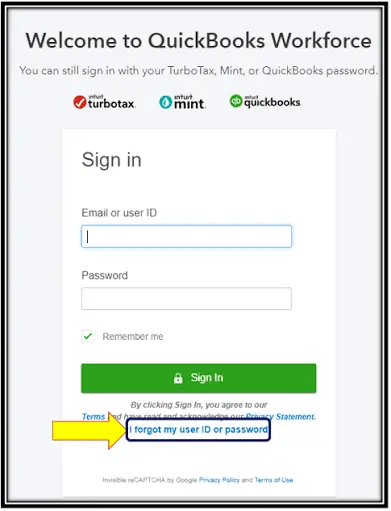
Depending on the sign-in screen, you may first need to enter your user ID, select Enter password, and then choose Forgot password?
Keep the verification page open while checking your email. Opening your inbox in another tab can prevent you from having to restart the process.
If Intuit asks for another verification method you cannot access, use the account recovery request process described below.
How to Recover an Intuit Account Without Your Phone Number or Email
If you no longer have access to the email address or phone number registered with Intuit, you can request account recovery by verifying your identity.
This may happen when you change your phone number, lose your mobile device, leave a company, or can no longer access an old email account.
Intuit provides an identity-based recovery form for these situations.
Step 1: Open the Intuit Account Recovery Request Form
Visit the official recovery page and make sure the website address belongs to intuit.com before entering personal information.
Step 2: Enter Your Account Information
Complete the required fields in the form.
Use the details associated with the Intuit account you want to recover. Depending on what the form requests, you may need your account’s email address, user ID, or other identifying information.
For example, if you originally registered using an old business email address, enter that account information where requested rather than replacing it with an unrelated email address.
Incorrect or mismatched information can prevent Intuit from locating or verifying the account.
Step 3: Upload Your Identification Document
Intuit may ask you to upload a photo of an accepted identification document to confirm that you own the account.
For U.S. QuickBooks users, Intuit’s account recovery guidance lists the following documents:
| Identification document | Requirement |
| Driver’s license | Must be valid and readable. |
| State-issued identification card | Details must be clearly visible. |
| Passport | Must be valid and show the required identity information. |
| Notarized document | Listed as an option in Intuit’s U.S. QuickBooks recovery guidance; follow the form’s specific requirements. |
The documents accepted can differ between Intuit products and regional recovery procedures. Use the requirements shown on your recovery form.
When taking a photo of your identification:
- Place the document on a plain, dark background.
- Remove protective covers that create glare.
- Make sure the entire document is visible.
- Check that the text and photograph are clear.
- Avoid uploading expired documents.
Do not send identification documents to third-party support websites or email addresses claiming to perform Intuit account recovery.
Step 4: Submit Your Account Recovery Request
Review the information you entered, confirm that your document is readable, and submit the form.
Intuit will review the request to determine whether it can verify your identity and account ownership.
Submitting the form does not guarantee approval. Follow any further instructions Intuit provides regarding your request.
How Long Does Intuit Account Recovery Take?
Intuit’s U.S. QuickBooks recovery guide lists request-processing hours as Monday through Friday, 8 AM to 5 PM Pacific Time.
These are processing hours, not a guaranteed turnaround time. Requests that require additional verification may take longer.
Other Intuit products and regions may have different review schedules. For example, Intuit’s TurboTax recovery resources publish different processing hours.
If you have already submitted a request, check the contact email address you provided, including your spam folder, for further instructions or updates. Follow the instructions in any genuine response from Intuit rather than submitting repeated requests without checking the original result.
How to Fix Intuit Account Verification Code Problems
If Intuit sends a verification code but you cannot receive or use it, the problem may involve message delivery, an outdated contact method, or an invalid code.
Try the solution that matches your situation.
| Verification problem | What to do |
| Code not received by email | Check spam, junk, and any other email inbox associated with your account. |
| Code not received by text | Check whether your phone is blocking messages from Intuit’s documented short codes, 88811 or 97962. |
| Verification code is invalid | Request a fresh code and enter the most recently received one. |
| Multiple codes received | Ignore earlier codes because only the latest code works. |
| Verification page closed | Start the verification process again. |
| Code is sent to an old phone number | Select another available verification method or use the identity-based recovery process. |
Intuit recommends allowing do_not_reply@intuit.com in your email settings if its verification messages are being blocked.
If the code has not arrived after a few minutes, use the I didn’t get an email, or I didn’t get a text message option, where available.
What if Intuit keeps asking for a code after you enter the correct password?
Intuit uses multi-factor authentication to protect accounts. It may require an additional verification code even when your password is correct, particularly if you are signing in from an unfamiliar device or browser.
If you have lost the device or verification method Intuit requires, resetting your password alone may not solve the problem. Use another verification option if Intuit offers one, or submit the official recovery request.
What to Do if Your Intuit Account Recovery Request Is Denied
An Intuit account recovery request can be denied when Intuit cannot verify the submitted identity documents or match the information to the account.
Intuit’s official TurboTax recovery guidance identifies several common reasons for rejected requests.
| Reason for rejection | What you should check |
| Expired identification | Use a current, accepted identification document. |
| Unclear identification photo | Upload a sharp image that shows the entire document. |
| Unsupported identification | Review the accepted document types for your recovery process. |
| Account not found | Confirm your original Intuit user ID and registered email address. |
| Address mismatch | Check the address associated with the account. |
| Account ownership not verified | Review the identity information and follow Intuit’s instructions for further help. |
For example, suppose you created an Intuit account using a previous email address but entered a different email address in your recovery request.
Intuit may be unable to match the details to the correct account. Confirming the original account information before resubmitting may help resolve the mismatch.
Read the rejection notice carefully. If Intuit asks for a new document or corrected information, address that specific issue before submitting another request.
If the request continues to be rejected, use the support options available through the official Intuit account recovery help page.
How to Recover Access to QuickBooks Online, Payroll, and Workforce
An Intuit account is used to sign in to several Intuit products, but recovering your account credentials is different from obtaining permission to access a particular company or payroll account.
The distinction matters when the problem involves company ownership, administrator permissions, or employee records.
QuickBooks Online Account Recovery
If you cannot access QuickBooks Online because your Intuit credentials or verification methods are unavailable, use the recovery instructions above.
After recovering the account, sign in using the Intuit credentials associated with your QuickBooks company.
If you can sign in but QuickBooks Online still displays a browser error, keeps logging you out, or fails to load, the problem may not require another account recovery request.
Our QuickBooks Online login guide covers normal sign-in procedures and browser-related login problems in more detail.
QuickBooks Payroll Account Recovery
QuickBooks Payroll users can also encounter Intuit sign-in or identity verification problems.
If you cannot access your payroll account because your Intuit password or verification method is unavailable, recover the Intuit account first.
However, if you can already sign in and payroll cannot download updates, calculate taxes, or process payments, investigate the payroll-specific problem instead.
Our guide to QuickBooks Payroll errors covers common payroll update and processing issues separately.
QuickBooks Workforce Account Recovery
QuickBooks Workforce allows employees to access payroll information made available through their employer, including pay stubs and W-2 forms.
If your Workforce account requests a code sent to a phone number you no longer use, try another verification method offered on the sign-in screen.
If you cannot complete verification, use Intuit’s official account recovery form to request access.
Once you regain access, you can update your phone number through Workforce account settings.
Recovering your Intuit credentials does not guarantee that every historical payroll document will be available. Access to specific employee records may depend on the information provided through the employer’s payroll account.
You can review Intuit’s Workforce multi-factor authentication instructions for product-specific information.
What if the Previous QuickBooks Primary Administrator Is Unavailable?
If the former owner, accountant, or primary administrator is no longer available, you may need a different process.
Resetting your own Intuit password will not automatically make you the primary administrator of a company.
Intuit provides a separate process for requesting primary-admin or primary-contact access. It may require personal identification and documents that show business ownership or permission to manage the account.
Follow Intuit’s primary administrator access request guide rather than attempting to recover another person’s private credentials.
How to Update Your Intuit Account Information After Recovery
Once you regain access, check whether your registered email address and phone number are still correct.
Outdated recovery information can leave you locked out again if Intuit asks for verification in the future.
To update your account details:
- Open Intuit Account Manager.
- Sign in using your recovered credentials.
- Select Sign in & security.
- Choose the information you want to update, such as your email address, phone number, user ID, or password.
- Follow the on-screen verification steps and save the changes.
Intuit states that changes to shared account credentials can apply across its products, including QuickBooks, TurboTax, and QuickBooks Workforce.
Consider setting up an additional supported verification method, such as an authenticator app or passkey, where available.
Also, review any unexpected changes to your account. If you suspect another person gained access, change your password and contact Intuit through its official support channels.
Never share your password or one-time verification codes with someone claiming they can recover your account for you.
Conclusion
If you still have access to the email address or phone number registered with Intuit, begin with the standard verification process. If those methods are unavailable, use the official Intuit Account Recovery Request form and submit the required proof of identity.
After recovering your account, update your security information so you have a working verification method the next time you sign in.
Frequently Asked Questions (FAQs)
What is Intuit Account Recovery?
Intuit Account Recovery is the process of regaining access to an Intuit account when you cannot sign in because of a forgotten password, missing verification method, or account lockout.
Users can verify their identity through a registered email or phone number. If those methods are unavailable, Intuit provides an identity-based account recovery request form.
What is the official Intuit Account Recovery Request website?
The official Intuit Account Recovery Request website is account-recovery.app.intuit.com/hri-ui/accountrecovery.
Use this form when you cannot verify your identity through the phone number or email address registered with your account.
Can I recover my Intuit account without my old phone number?
Yes, if Intuit offers verification through your registered email address, you can use that method instead.
If Intuit requires your old phone number and no other usable option is available, submit an identity-based recovery request.
How do I recover my Intuit account if I forgot my email address and user ID?
Start at the official Intuit sign-in page and try the phone number associated with your account.
If Intuit can identify the account and verify your identity, follow the recovery prompts. Otherwise, use the account recovery form or official support options to determine the next step.
Can I recover an Intuit account without access to both my email and phone number?
Yes, Intuit provides an account recovery form for users who cannot receive verification codes through their registered contact methods.
You must provide the requested information and acceptable proof of identity. Recovery depends on Intuit successfully verifying account ownership.
Can Intuit customer support change my registered email address for me?
Intuit states that its support specialists cannot directly change your account information on your behalf.
If you can sign in, update the email through Intuit Account Manager. If you cannot sign in, complete the account recovery process first.
How long does Intuit take to approve an account recovery request?
Intuit does not provide a guaranteed approval time in its U.S. QuickBooks recovery guide. That guide lists processing hours as Monday through Friday, 8 AM to 5 PM Pacific Time.
The time required may depend on the request and whether Intuit needs additional identity verification.
Why does Intuit keep sending verification codes to my old phone number?
Your old phone number may still be registered as a verification method, or it may be associated with your two-step verification settings.
If another method is offered, try it. Otherwise, recover your account through Intuit’s identity verification process and update your phone number after regaining access.
Why is my Intuit verification code not working?
Intuit only accepts the most recently generated verification code. If you requested several codes, older ones may no longer work.
Request a new code, keep the verification screen open, and enter the latest code you receive.
Is an Intuit account the same as a QuickBooks Online account?
Your Intuit account provides the sign-in identity used to access QuickBooks Online and other Intuit services.
However, access to a particular QuickBooks company depends on the permissions and subscriptions associated with that account. Recovering your Intuit credentials does not automatically grant access to every QuickBooks company.
Does resetting my Intuit password delete my QuickBooks data?
No, resetting an Intuit account password changes your sign-in credentials. It does not itself delete your QuickBooks company data, transactions, or reports.
You still need the appropriate company permissions to access the records after signing in.
Can I recover my QuickBooks Workforce account after leaving my employer?
You can use Intuit Account Recovery to try to regain access to your personal Workforce sign-in.
However, whether old pay stubs or W-2 forms remain available is a separate question. If the records are unavailable after recovery, you may need to contact your former employer or payroll administrator.
What if I recover my Intuit account but cannot access my QuickBooks company?
Check whether you signed in with the Intuit account that has access to the company.
If another administrator manages the company, you may need that person’s help with permissions. If the previous primary administrator is unavailable, follow Intuit’s formal primary-admin access request process.
Is Intuit Account Recovery the same as recovering a QuickBooks company file?
No, Intuit Account Recovery restores access to your sign-in identity.
QuickBooks company file recovery concerns missing, damaged, or inaccessible accounting data. Resetting your Intuit credentials will not repair a damaged QuickBooks Desktop company file.
Can I use Intuit Account Recovery for TurboTax?
Yes, TurboTax uses Intuit account credentials, and Intuit provides account recovery options for TurboTax users.
The general verification process is similar, but accepted documents and processing schedules can vary. You can use the official TurboTax account recovery page for product-specific instructions.
What if my Intuit account has been deactivated rather than locked?
Account deactivation and sign-in lockout are different problems.
If Intuit has deactivated your account, follow its official account reactivation instructions. A standard password reset may not restore a deactivated account.
Should I create a new Intuit account if I cannot recover my old account?
Creating another account is not a substitute for recovering your existing one.
A new sign-in will not automatically restore the subscriptions, company permissions, or historical product access linked to your original Intuit account. Try the official recovery process before creating another account for the same purpose.
What should I do if I receive an Intuit account recovery email that I did not request?
Avoid clicking links or sharing verification codes from an unexpected message.
Open Intuit’s official website directly and review your account security information. If you suspect phishing or unauthorized account activity, report the message through Intuit’s official security channels.
Intuit provides further guidance in its phishing and suspicious activity help article.