Starting a new job often comes with a stack of forms, and IRS Form W-4 is one of the most important. It tells your employer how much federal income tax to withhold from each paycheck.
If you are unsure what to enter on a W-4, you are not alone. The form changed in 2020, and the 2026 W-4 also includes updates related to new deductions and exemption from withholding.
The good news is that most employees do not need to complete every section.
This guide explains what Form W-4 is, how to fill it out, how dependents and multiple jobs affect withholding, when to update it, what “exempt” means, and how the W-4 affects your paycheck.
What Is IRS Form W-4?
IRS Form W-4, Employee’s Withholding Certificate, tells your employer how much federal income tax to withhold from your wages. Your employer uses the information on the form along with IRS withholding rules and tables to calculate the federal income tax taken from each paycheck.
You generally complete Form W-4 when you:
- Start a new job
- Want to change your federal tax withholding
- Get married or divorced
- Have a child or other dependent
- Start or stop another job
- Have a significant change in income
- Become eligible for certain deductions or tax credits
- Want additional federal tax withheld
The W-4 does not determine your final tax bill or refund. It helps determine how much federal income tax is paid through your paychecks during the year.
If too little is withheld, you may owe tax when you file. If too much is withheld, you may receive a larger refund, although you had less money available in your paychecks during the year.
What Does the 2026 W-4 Look Like?
The 2026 Form W-4 has five steps, but most employees only need to complete Steps 1 and 5, plus Steps 2–4 if they apply to their situation.
The five steps are:
- Step 1: Personal information and filing status
- Step 2: Multiple jobs or spouse works
- Step 3: Dependents and other credits
- Step 4: Other adjustments
- Step 5: Sign the form
The 2026 form also has a specific “Exempt from withholding” checkbox below Step 4(c). This replaces the older practice of writing “Exempt” below Step 4(c).
What Changed on the 2026 W-4 Form?
The 2026 W-4 was updated to account for new federal tax deductions and includes a new checkbox for employees who qualify to claim exemption from federal income tax withholding.
The 2026 form reflects tax-law changes involving deductions such as:
- Qualified tips
- Qualified overtime compensation
- Certain passenger vehicle loan interest
- Additional deductions for eligible seniors
The 2026 W-4 also provides a dedicated checkbox for claiming exemption from federal income tax withholding.
Are W-4 Allowances Still Used?
No, The current W-4 does not use the old “allowances” system.
If you completed a W-4 years ago, you may remember questions about claiming zero, one, two, or more allowances.
The redesigned Form W-4 uses information about:
- Filing status
- Multiple jobs
- Dependents
- Other income
- Deductions
- Additional withholding
So when someone asks, “How many allowances should I claim on my W-4?” the answer for the current form is that you do not claim allowances on the 2026 W-4.
How to Fill Out a W-4 Form Step by Step
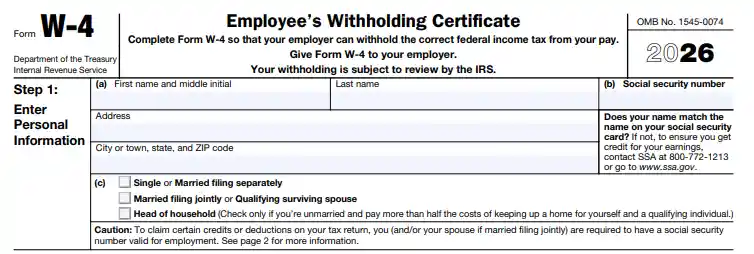
To fill out Form W-4, complete Step 1, then complete Steps 2–4 only if they apply to you, and sign Step 5.
Here is what each section means.
Step 1: Enter Your Personal Information
Step 1 asks for your name, Social Security number, address, and expected federal tax filing status.
You will select one of these filing statuses:
- Single or Married filing separately
- Married filing jointly or qualifying surviving spouse
- Head of household
Your filing status affects the standard deduction and tax rates used to calculate withholding.
Make sure your name matches your Social Security records.
What If My Filing Status Is Complicated?
The W-4 uses your anticipated filing status for federal income tax purposes.
If you are unsure whether you will file as single, married filing jointly, married filing separately, or head of household, check your expected tax-return status or use the IRS withholding estimator.
Step 2: Multiple Jobs or Spouse Works
Complete Step 2 if you have more than one job at the same time or you are married filing jointly and your spouse also works.
The 2026 W-4 provides three approaches.
Option 2(a): Use the IRS Withholding Estimator
This is generally the most accurate option when your situation involves multiple jobs or other income.
The IRS recommends using its Tax Withholding Estimator when you need help determining the right withholding amount.
Option 2(b): Use the Multiple Jobs Worksheet
You can use the worksheet included with the W-4 to calculate an additional withholding amount.
You then enter the result in Step 4(c).
Option 2(c): Use the Two-Jobs Checkbox
If you and your spouse have only two jobs total, you may be able to use the checkbox in Step 2(c).
The checkbox should generally be selected on the W-4 for both jobs.
The IRS notes that this option works best when the two jobs have similar pay. If one job pays substantially more, the estimator or worksheet may be more accurate.
Important Rule for Multiple Jobs
If you have multiple jobs, complete Steps 3 through 4(b) on only one W-4.
The IRS says withholding is generally most accurate when those steps are completed on the W-4 for the highest-paying job.
Step 3: Claim Dependents
Step 3 is used to account for qualifying children, other dependents, and certain other tax credits that may reduce your federal tax liability.
For 2026, the form provides:
- $2,200 for each qualifying child under age 17, subject to the applicable eligibility rules
- $500 for each other dependent, subject to the applicable eligibility rules
The 2026 form applies these amounts when total income is $200,000 or less, or $400,000 or less for married filing jointly.
You can also include certain other credits in Step 3.
Example of Step 3
Suppose you are eligible to claim:
- One qualifying child: $2,200
- One other dependent: $500
Your Step 3 amount could be:
$2,200 + $500 = $2,700
This amount affects your withholding calculation. It does not mean your paycheck will increase by $2,700.
Step 4: Other Adjustments
Step 4 lets you account for other income, deductions, or an additional amount of federal income tax you want withheld from each paycheck.
It has three parts.
Step 4(a): Other Income
Use Step 4(a) for expected income that is not from jobs, such as certain:
- Interest
- Dividends
- Retirement income
- Other taxable income
If you want federal tax withheld from this income through your paycheck instead of making separate estimated payments, Step 4(a) may help.
Step 4(b): Deductions
Step 4(b) is used when you expect to claim deductions beyond the basic standard deduction and want your withholding adjusted for them.
The 2026 instructions include deductions such as certain:
- Itemized deductions
- Qualified tips
- Qualified overtime compensation
- Passenger vehicle loan interest
- Student loan interest
- IRA deductions
- Eligible senior deductions
Use the W-4 Deductions Worksheet when applicable rather than guessing an amount.
Step 4(c): Extra Withholding
Step 4(c) is where you enter an additional amount of federal income tax you want withheld from each paycheck.
For example, if you want an extra $75 withheld from every paycheck, you can enter $75 in Step 4(c).
This reduces your take-home pay but can reduce the amount you owe when you file your tax return.
Step 5: Sign Your W-4
Step 5 is your signature and date, and the W-4 is not valid without the employee’s signature.
After completing the applicable steps:
- Review your information.
- Check your entries.
- Sign the form.
- Date it.
- Give it to your employer.
You generally do not send Form W-4 directly to the IRS.
How Does Form W-4 Affect Your Paycheck?
Your W-4 affects how much federal income tax your employer withholds from each paycheck, which changes your take-home pay.
For example, suppose your gross paycheck is $2,500.
Your employer may withhold amounts for:
- Federal income tax
- Social Security tax
- Medicare tax
- State or local taxes, where applicable
- Other payroll deductions
Your W-4 primarily affects the federal income tax withholding portion.
It does not determine your Social Security and Medicare withholding. The IRS notes that Form W-4 does not address regular Social Security and Medicare taxes.
More Withholding vs. Less Withholding
If your W-4 results in more federal tax being withheld:
Smaller paycheck → potentially smaller tax bill or larger refund
If your W-4 results in less federal tax being withheld:
Larger paycheck → potentially larger tax bill when you file
The goal is not necessarily to maximize your refund. The goal is generally to have withholding reasonably close to your actual federal tax liability.
What Is the IRS Tax Withholding Estimator?
The IRS Tax Withholding Estimator is a free online tool that helps employees estimate how much federal income tax should be withheld and can help prepare a new W-4.
It can be especially useful if you:
- Have multiple jobs
- Are married and both spouses work
- Have self-employment income
- Receive investment income
- Have significant deductions
- Have tax credits
- Started a job partway through the year
- Want to correct withholding after a major life change
The estimator uses information about your income, withholding, deductions, credits, and filing situation.
You will generally get more useful results if you have recent pay stubs available.
The IRS updated the estimator in 2026 to account for changes to deductions and credits under current federal tax law.
When Should You Update Your W-4?
Update your W-4 when your personal or financial situation changes in a way that could change your federal tax liability or withholding.
Common reasons include:
- Marriage
- Divorce
- Birth or adoption of a child
- Starting a second job
- Your spouse starting or stopping work
- A major income change
- Losing eligibility for a tax credit
- A major change in deductions
- Starting or stopping self-employment income
- A significant change in other taxable income
The IRS also recommends checking withholding early in the year and after major life changes.
Can I Change My W-4 at Any Time?
Yes, you can generally submit a new W-4 to your employer when you need to change your withholding.
Your employer must generally put a valid new W-4 into effect no later than the start of the first payroll period ending 30 or more days after you submit it.
Your employer may process it sooner.
What Is W-4 Form Exempt Withholding?
You can claim exemption from federal income tax withholding on the 2026 W-4 only if you meet both IRS conditions: you had no federal income tax liability in 2025 and you expect no federal income tax liability in 2026.
If you qualify, check the “Exempt from withholding” box on the 2026 W-4.
You then complete:
- Step 1(a)
- Step 1(b)
- Step 5
You do not complete the other W-4 steps.
If you claim exemption, your employer will not withhold federal income tax from your wages. You must submit a new W-4 for 2027 if you want to continue claiming exemption.
Is Claiming Exempt the Same as Having No Taxable Income?
No, the exemption has specific IRS requirements. Simply expecting a small tax bill or wanting a larger paycheck does not automatically make you eligible.
If you claim exempt when you do not qualify, you could end up owing tax and potentially a penalty when you file.
What Happens If I Don’t Fill Out a W-4?
If you do not give your employer a Form W-4, the employer generally uses the default withholding treatment for Single or Married filing separately with no entries in Steps 2–4 of the 2026 form.
That may result in a different amount of withholding than you would have had if you properly completed the form.
For this reason, new employees should complete the W-4 rather than simply leave it blank.
What Is the Difference Between Form W-4 and Form W-9?
Form W-4 is generally completed by employees, while Form W-9 is generally used by independent contractors and other payees to provide taxpayer identification information to the business paying them.
| Form W-4 | Form W-9 |
| Used by employees | Commonly used by independent contractors |
| Gives an employer withholding information | Provides taxpayer identification information |
| Helps determine federal income tax withholding | Helps the payer correctly report payments |
| Employee generally receives a W-2 | Contractor may receive Form 1099-NEC |
| Given to the employer | Given to the business or payer |
The form you need depends first on whether you are an employee or an independent contractor. The IRS says businesses must correctly determine worker classification because the tax responsibilities are different.
What Are Common W-4 Mistakes?
Common W-4 mistakes include using the old allowances concept, entering dependent amounts incorrectly, overlooking a second job, repeating Step 3 on multiple W-4s, and claiming exempt without meeting the requirements.
Watch for these problems:
1. Using Old Allowance Rules
The current W-4 does not ask you to claim allowances.
2. Ignoring a Second Job
If you and your spouse both work or you have multiple jobs, your withholding may need adjustment through Step 2.
3. Entering Dependents on Every W-4
When multiple jobs are involved, Steps 3 through 4(b) should generally be completed on only one W-4.
4. Guessing Step 4 Amounts
Large or unsupported amounts can cause withholding to be too low or too high.
5. Claiming Exempt Without Qualifying
You must meet both IRS conditions to claim exemption.
6. Forgetting to Update the Form
A W-4 from an earlier situation may no longer produce appropriate withholding after marriage, divorce, a new child, another job, or a major income change.
Can I File Form W-4 Electronically?
You normally give Form W-4 to your employer, and your employer may provide an electronic system for completing it. You do not generally send the employee W-4 directly to the IRS.
IRS rules allow employers to use electronic systems for W-4 submissions if the systems meet applicable IRS requirements.
Your employer or payroll provider will tell you whether to use:
- A paper W-4
- An employee payroll portal
- Another approved electronic system
Does My Employer Need to File My W-4 With the IRS?
No, Employees generally give Form W-4 to their employer rather than filing it directly with the IRS.
The employer uses the information to calculate federal income tax withholding.
Employers must keep employee W-4 records and follow IRS withholding requirements. The W-4 itself is not normally sent with your annual tax return.
W-4 for New Employees
New employees should complete Form W-4 as part of the hiring process so the employer can calculate federal income tax withholding from their wages.
Before completing it, have these details available:
- Social Security number
- Address
- Filing status
- Information about other jobs
- Spouse’s employment information, if applicable
- Number of qualifying children or other dependents
- Expected other income
- Expected deductions
- Desired additional withholding
If you have a straightforward situation, the form may take only a few minutes.
If you have multiple jobs, self-employment income, investments, or significant deductions, the IRS withholding estimator can help.
W-4 for Payroll Administrators and HR Teams
Payroll teams should use the employee’s valid W-4 information according to current IRS withholding procedures and maintain the form as part of the employee’s payroll records.
Payroll administrators should pay particular attention to:
- The employee’s filing status
- Multiple-job selections
- Dependent and credit amounts
- Additional withholding
- Exemption claims
- New W-4 submissions
- Changes to withholding
- Applicable employer deadlines
Employers must also use the correct federal withholding tables and procedures for the applicable year. The IRS publishes these procedures in Publication 15-T.
A Simple W-4 Example
Consider an employee named Alex.
Alex:
- Has one job.
- Is single.
- Has no dependents.
- Has no significant other income.
- Does not expect special deductions.
- Does not want extra withholding.
Alex would generally:
- Complete Step 1.
- Select the appropriate filing status.
- Skip Step 2 because there is only one job.
- Skip Step 3 because there are no dependents or other credits to enter.
- Skip Step 4 if none of its adjustments apply.
- Sign Step 5.
Now suppose Alex starts a second job.
Alex should review Step 2 because multiple jobs can change the appropriate withholding amount.
If Alex later has a child or experiences another significant tax change, Alex should review the W-4 again.
This illustrates an important point: Form W-4 is not necessarily a one-time form. You can update it when your circumstances change.
W-4 vs. W-2: What Is the Difference?
Form W-4 tells your employer how to calculate federal income tax withholding, while Form W-2 reports the wages paid and taxes withheld during the year.
The forms serve different purposes.
- W-4: Used during employment to determine withholding.
- W-2: Provided after the year ends to report wages and withholding.
Your W-2 is used when preparing your annual federal tax return.
Do Self-Employed People Need Form W-4?
Generally, independent self-employed workers do not complete Form W-4 for their own business income because W-4 is an employee withholding form.
Self-employed individuals generally handle federal income taxes through estimated tax payments or other applicable methods.
If you have both a regular job and self-employment income, however, the IRS W-4 estimator can help you determine whether additional withholding from your employee wages may be appropriate. The 2026 W-4 specifically directs employees with self-employment income to use the estimator for the multiple-job calculation.
Final Takeaway
IRS Form W-4 is the form employees use to tell their employers how to calculate federal income tax withholding from their paychecks.
For most employees, the process is straightforward:
- Complete your personal information and filing status.
- Review Step 2 if you have multiple jobs or a working spouse.
- Account for dependents and credits in Step 3 when applicable.
- Review other income, deductions, or extra withholding in Step 4.
- Sign and submit the form to your employer.
You do not need to use the old “zero allowances” or “one allowance” approach. The current W-4 uses a different system.
If your tax situation is more complicated, the IRS Tax Withholding Estimator can help you determine whether your current withholding is likely to be too high or too low.
Frequently Asked Questions
What is IRS Form W-4?
Form W-4, Employee’s Withholding Certificate, tells your employer how much federal income tax to withhold from your paycheck.
How do I fill out a W-4 form step by step?
Complete Step 1, complete Steps 2–4 only when applicable, and sign Step 5. Use the IRS Tax Withholding Estimator if your situation involves multiple jobs, other income, deductions, or credits.
What is the difference between Form W-4 and Form W-9?
Employees generally complete W-4 forms. Independent contractors and certain other payees generally provide Form W-9 to the business paying them.
How many allowances should I claim on my W-4?
The current W-4 does not use allowances. Instead, it uses filing status, dependents, other income, deductions, and additional withholding.
What changed on the 2026 W-4 form?
The 2026 W-4 was updated for new federal deductions and added a specific checkbox for employees who qualify for exemption from federal income tax withholding.
When should I update my W-4?
Update it when a major personal or financial change could affect your federal tax liability or withholding, such as marriage, divorce, a new child, another job, or a major income change.
What happens if I don’t fill out a W-4?
Your employer generally uses the default withholding treatment for Single or Married filing separately with no entries in Steps 2–4 of the 2026 form.
Can I claim exempt from withholding on Form W-4?
Yes, but only if you had no federal income tax liability for 2025 and expect no federal income tax liability for 2026.
How do I fill out Step 2 if I have multiple jobs?
You can use the IRS Tax Withholding Estimator, the Multiple Jobs Worksheet, or the Step 2(c) checkbox when the two-job conditions apply.
How do I claim dependents on Form W-4?
Use Step 3 to enter the applicable amount for qualifying children, other dependents, and certain other tax credits.
What is the IRS Tax Withholding Estimator?
It is an IRS online tool that helps estimate the federal income tax that should be withheld from your pay and can help you prepare a new W-4.
What are common W-4 mistakes?
Common mistakes include using old allowance rules, overlooking additional jobs, entering dependent information incorrectly, making unsupported Step 4 entries, and claiming exemption when you do not qualify.
How does Form W-4 affect my paycheck?
It affects how much federal income tax your employer withholds. More withholding generally means a smaller paycheck, while less withholding generally means a larger paycheck.
Can I change my W-4 at any time?
Generally, yes, you can submit a new W-4 to your employer when you want to change your withholding.
Does my employer need to file my W-4 with the IRS?
No, you generally give the W-4 to your employer. The employer uses the information to calculate your federal income tax withholding.