For business owners, accountants, and bookkeepers, a smooth QuickBooks Online login experience can make it easier to stay connected with important financial information throughout the day. You can access your account when you need to review business activity, update records, check reports, or complete routine accounting work without depending on a single computer.
However, users may sometimes experience difficulties while trying to access their QuickBooks Online accounts. Knowing how the QuickBooks Online login process works and what steps to take when access problems occur can help users resolve issues without unnecessary delays.
In this guide, we’ll explain how QuickBooks Online login works, how to access your account, and how to handle common problems that may prevent successful access.
Table of Contents
How to Log Into QuickBooks Online
You can access QuickBooks Online through a supported web browser without installing the desktop accounting application. To sign in to QuickBooks Online, follow these steps:
- Open the official QuickBooks Online sign-in page.
- Select the option to sign in.
- Enter the email address or user ID associated with your Intuit account.
- Enter your password.
- Complete any security verification requested by Intuit.
- Select Sign In to access your QuickBooks Online account.
If you regularly use QuickBooks Online, you can bookmark the official QBO login page to make future access easier.
Your QuickBooks Online credentials are connected to your Intuit account. Therefore, if you cannot remember your password or encounter an authentication problem, you may need to recover your Intuit account before accessing your company.
Is QuickBooks Online Login the Same as Your Intuit Account Login?
Yes. Your QuickBooks Online login uses your Intuit account credentials. This means the email address or user ID and password you use for QuickBooks Online are associated with your Intuit account.
If you use other Intuit products, your account credentials may also provide access to those services, depending on your account and permissions.
This is why changing or recovering your Intuit account password can affect your ability to log into QuickBooks Online.
QuickBooks Online Login Not Working? Try These Fixes
If your QuickBooks Online login is not working, the problem may be related to your credentials, browser, internet connection, security verification, or account status.
Try these troubleshooting steps:
Check Your Login Credentials
First, verify that you are entering the correct email address or user ID and password. Pay attention to capitalization, spelling, and accidental spaces.
If you recently changed your password, make sure you are using the new password rather than an older saved credential.
Reset Your Password
If you cannot remember your password, use Intuit’s account-recovery process to reset it.
After creating a new password, return to the QuickBooks Online sign-in page and try logging in again.
Clear Your Browser Cache and Cookies
Old cached information or cookies can sometimes interfere with authentication.
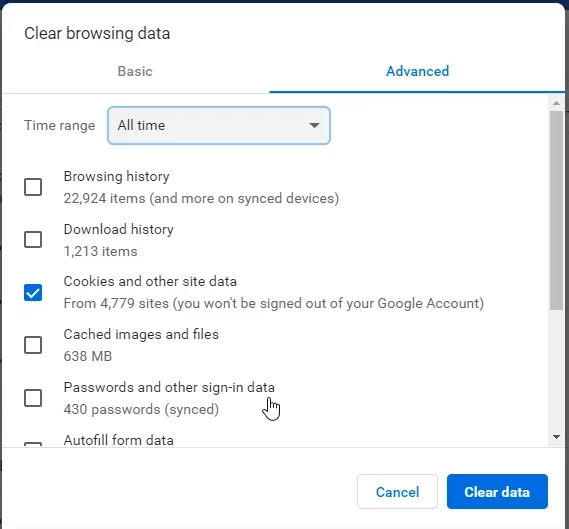
Try clearing your browser’s cache and cookies, then close and reopen the browser. You can also try signing in through a private or incognito window.
Try a Different Browser
If QuickBooks Online login works in another browser, the problem may be related to your original browser’s cache, cookies, extensions, or settings.
You can also temporarily disable browser extensions that could interfere with sign-in.
Check Your Internet Connection
A weak or unstable connection can prevent the login page from loading correctly or interrupt authentication.
Make sure your internet connection is working properly and reload the QuickBooks Online login page.
Try Another Device
If you cannot sign in to QuickBooks Online from your computer, try accessing your account from another supported device.
If login works elsewhere, the problem is likely specific to the original browser, device, or network.
Online Forgot Password: How to Reset It
If you have forgotten your QuickBooks Online password, you can use Intuit’s account recovery process.
Generally, you will need to provide the email address or phone number associated with your account. Intuit may then ask you to verify your identity before allowing you to reset your password.
After resetting your password:
- Return to the QuickBooks Online login page.
- Enter your registered email address or user ID.
- Enter the new password.
- Complete the requested security verification.
- Select Sign In.
If you still cannot access your account, check whether you are using the correct Intuit account credentials.
QuickBooks Online Login Account Locked
Repeated unsuccessful login attempts or security-related activity can prevent you from accessing your account.
If your QuickBooks Online login account is locked, avoid repeatedly entering different passwords because additional attempts may not resolve the issue.
Instead, use Intuit’s account-recovery options and follow the identity-verification instructions provided. If you cannot recover the account through the available options, contact Intuit Support for further assistance.
QuickBooks Online Login Verification Code Not Received
QuickBooks Online may require an additional verification step when you sign in. If you are not receiving the verification code, check the email address or phone number associated with your Intuit account.
You should also:
- Check your spam or junk folder.
- Wait a few minutes for the code to arrive.
- Make sure you have access to the selected verification method.
- Request another verification code if the option is available.
- Check whether your contact information is correct.
- Try signing in again after confirming your account details.
Do not share a verification code with anyone. It is intended to verify your identity during the sign-in process.
QuickBooks Online Login on a Different Browser or Device
You can access QuickBooks Online from another supported browser or device by using your Intuit account credentials.
If you are signing in from a new device, Intuit may request additional verification to confirm that it is really you.
If the QuickBooks Online login works on another device but not your usual computer, troubleshoot the original browser by clearing its cache and cookies, checking browser settings, or trying a private browsing window.
If the issue follows you across multiple browsers and devices, the problem may be related to your account rather than the device.
QuickBooks Online Accountant Login
Accountants and bookkeepers can access QuickBooks Online companies they have been invited to work on using their accountant credentials.
To complete a QuickBooks Online accountant login:
- Open the official QuickBooks sign-in page.
- Choose the appropriate QuickBooks Online Accountant option when available.
- Enter your Intuit account credentials.
- Complete any required verification.
- Access the client companies available to your account.
Your ability to access a client’s books depends on the invitation and permissions associated with your accountant account.
If you are a bookkeeper working with multiple clients, make sure you are signing in with the Intuit account associated with your QuickBooks Online Accountant profile.
QuickBooks Online Mobile App Login
QuickBooks Online can also be accessed through its mobile application. The QuickBooks Online mobile app login uses your Intuit account credentials.
If you cannot sign in through the mobile app, first confirm that your email address and password work through the web version of QuickBooks Online.
You can also check whether the app is updated and whether your mobile device has a stable internet connection.
If your credentials work through a browser but not the mobile application, updating or restarting the app may help resolve the problem.
QuickBooks Online Login Error: What Should You Do?
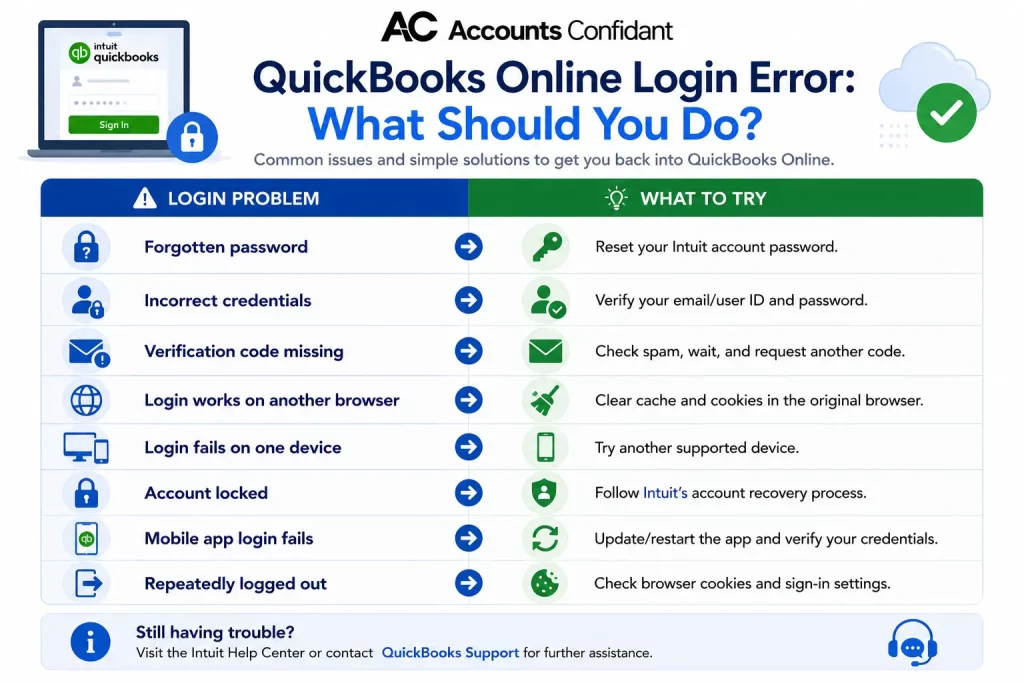
A QuickBooks Online login error can have several causes, so the appropriate fix depends on what happens when you attempt to sign in.
| Login problem | What to try |
| Forgotten password | Reset your Intuit account password |
| Incorrect credentials | Verify your email/user ID and password |
| Verification code missing | Check spam, wait, and request another code |
| Login works on another browser | Clear cache and cookies in the original browser |
| Login fails on one device | Try another supported device |
| Account locked | Follow Intuit’s account recovery process |
| Mobile app login fails | Update/restart the app and verify your credentials |
| Repeatedly logged out | Check browser cookies and sign-in settings |
If basic troubleshooting does not resolve the problem, use Intuit’s official account-recovery and support options rather than repeatedly attempting to sign in.
QuickBooks Online vs. QuickBooks Desktop Login
The login experience differs because QuickBooks Online and QuickBooks Desktop are different products.
QuickBooks Online is cloud-based, so users generally access their company through a web browser or mobile app using their Intuit account credentials.
QuickBooks Desktop is installed locally on a computer. Depending on the product and setup, users may authenticate their Intuit account separately from opening a locally stored company file.
The distinction is important when troubleshooting login problems. A problem accessing QuickBooks Online does not necessarily indicate a problem with QuickBooks Desktop, and the troubleshooting steps are different.
Does QuickBooks Online Support Two-Factor Authentication?
Yes, Intuit provides security verification options for its accounts, which can require users to verify their identity during sign-in.
Additional authentication helps protect your QuickBooks Online account against unauthorized access. Keep your registered email address and phone number up to date so you can complete verification when required.
If you are having trouble receiving a verification code, check your contact information and spam or junk folders before requesting another code.
Tips for a Smoother QuickBooks Online Sign-In
A few simple practices can reduce recurring login problems:
- Keep your Intuit account information current.
- Use a strong, unique password.
- Avoid sharing your login credentials.
- Keep your browser updated.
- Clear outdated browser data when sign-in problems occur.
- Keep the QuickBooks Online mobile app updated.
- Make sure you have access to your account’s verification method.
- Bookmark the official QuickBooks Online login page instead of relying on unfamiliar third-party login links.
These habits can make everyday account access easier while also helping protect your financial information.
Conclusion
A QuickBooks Online login problem does not always mean there is something wrong with your QuickBooks company. Forgotten credentials, verification requirements, browser data, account restrictions, and device-specific issues can all interfere with sign-in.
Start by confirming your Intuit credentials and checking your browser or device. If you have forgotten your password or your account is locked, use Intuit’s official recovery process. For accountant access, make sure you are using the correct QuickBooks Online Accountant account and have the required client permissions.
With the right troubleshooting steps, most common QuickBooks Online login, sign-in, password, and verification issues can be narrowed down without unnecessarily disrupting access to your accounting data.
Frequently Asked Questions
Why can’t I log in to QuickBooks Online?
Incorrect credentials, forgotten passwords, browser problems, account-security checks, verification issues, or account restrictions can prevent you from logging in.
How do I reset my QuickBooks Online password?
Use Intuit’s account-recovery process and follow the instructions to verify your identity and create a new password. Then return to the QuickBooks Online login page and sign in with your updated credentials.
Why does QuickBooks Online keep logging me out automatically?
Repeated sign-outs can be related to browser cookies, session settings, security checks, or browser problems. Try clearing your browser’s cache and cookies and signing in again. If the issue continues, try another supported browser.
How do I log in to QuickBooks Online as an accountant?
Use your Intuit credentials to access QuickBooks Online Accountant. After authentication, you can access the client companies for which your accountant account has the appropriate permissions.
Is QuickBooks Online login the same as my Intuit account login?
Yes, QuickBooks Online uses your Intuit account credentials. If you recover or change your Intuit account password, you should use the updated credentials when signing in to QuickBooks Online.
Where do I log in to QuickBooks Online?
You can access QuickBooks Online through the official QuickBooks sign-in page. Use your Intuit email address or user ID and password to authenticate your account.
How do I log in to QuickBooks Online if my account is locked?
Follow Intuit’s account-recovery instructions to verify your identity and regain access. If the available recovery options do not resolve the problem, contact Intuit Support.
What’s the difference between QuickBooks Online and QuickBooks Desktop login?
QuickBooks Online is accessed through the cloud using an Intuit account, while QuickBooks Desktop is installed locally. Their authentication and access processes can therefore differ.
How do I log in to QuickBooks Online as an accountant or bookkeeper for a client?
Sign in using your QuickBooks Online Accountant credentials and select the client company you have been invited to access. Your available client companies depend on your account permissions.
Does QuickBooks Online support two-factor authentication?
Yes. Intuit uses additional identity-verification methods to help protect accounts. Depending on the circumstances, you may be asked to provide a verification code when signing in.
Why am I not receiving the QuickBooks Online login verification code?
Check your spam or junk folder, verify that you have access to the email address or phone number associated with your account, and request another code if available. If you continue having problems, use Intuit’s account-recovery options.